55
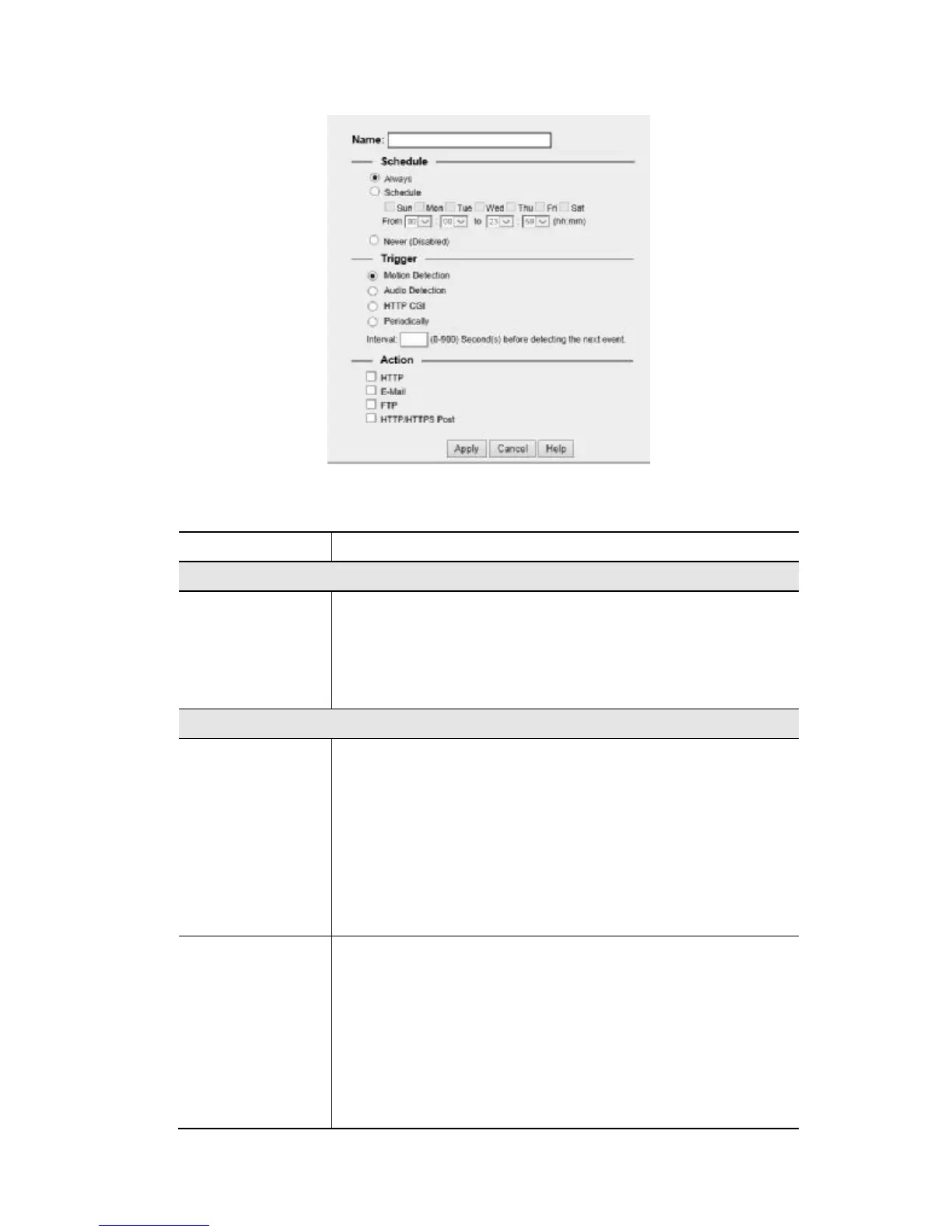
Add a new Schedule
Figure 31: Add schedule screen
Name
Enter the name of the schedule.
Schedule
Schedule
Choose the desired option:
• Always
• Schedule
• Never
Trigger Event
Trigger by
Motion Detection - Movement in a motion detection window
can be used to trigger events.
• Audio Detection - The sound detection can be used to trigger
events.
• HTTP Trigger- If checked, a HTTP CGI command will be
delivered to the HTTP server.
• Periodically - If checked, the events will be triggered at regular
intervals of time.
Interval - Select the desired interval from the list.
Actions
HTTP - If checked, a HTTP notification will be delivered to the
HTTP server.
• E-Mail - If checked, an E-Mail (with "Attachment") will be
delivered to the SMTP server. (SMTP Server must be
configured on the E-Mail page.)
• FTP - If checked, an FTP upload will be activated to the FTP
server. (FTP servers must be configured on the FTP page.)
• HTTP/HTTPS Post - If checked, a HTTP notification will be
delivered to the HTTP post server.


 To Next Page