- 41 -
Operation
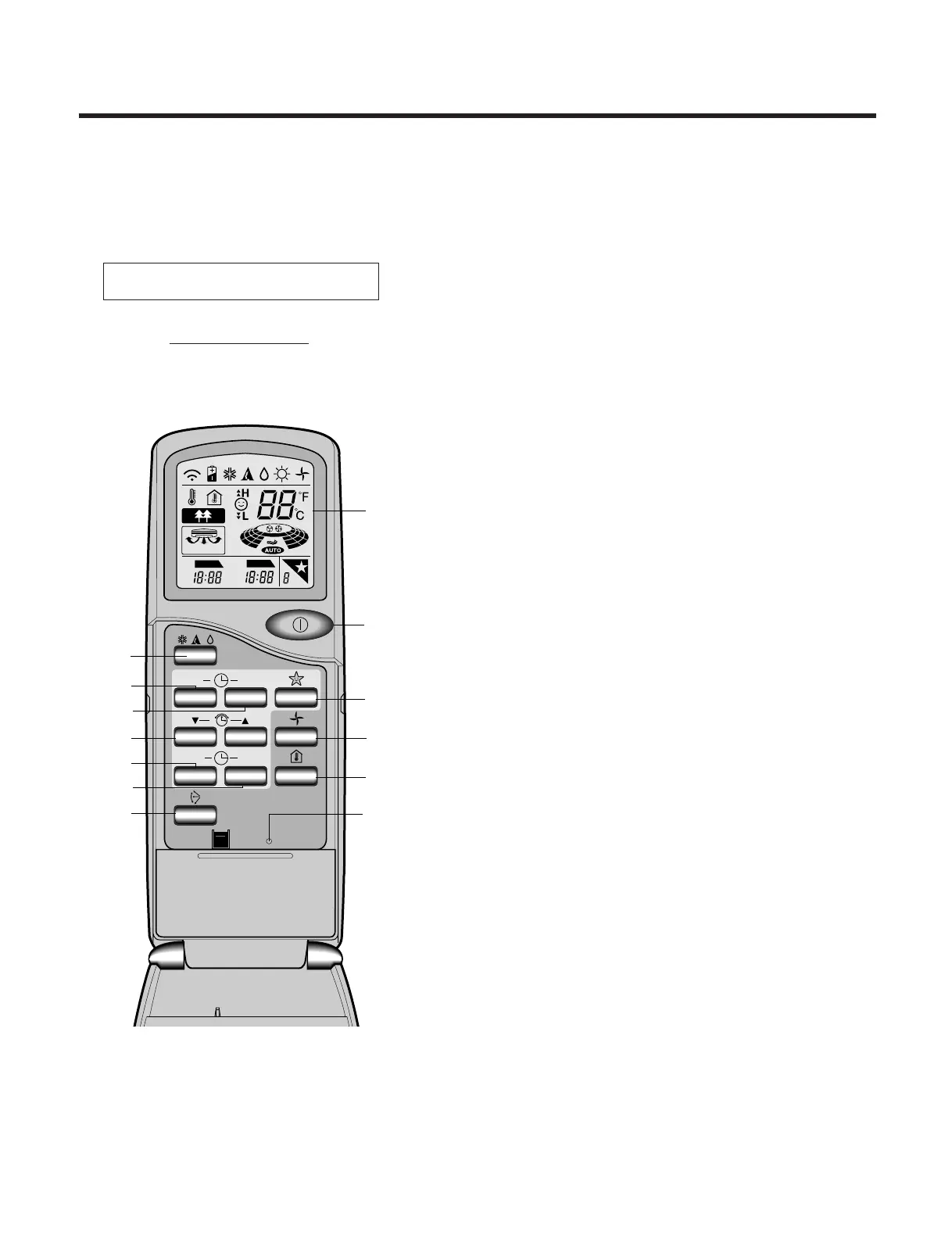
Name and Function-Remote Controller
1) Cooling Model
⁄AOperation display
Displays the operation conditions.
⁄BStart/Stop Button
•
Operation starts when this button is pressed, and stops when
the button is pressed again.
• The fan blows at low speed when start button is pressed
initially, after a while the fan speed will be reached at the
desired speed.
⁄COperation Mode Selection Button
Used to select the operation mode.
• Cooling Operation Mode.
• Auto Operation Mode.
• Soft Dry Operation Mode.
⁄DON Timer Button
Used to set the time of starting operation.
⁄EOFF Timer Button
Used to set the time of stopping operation.
⁄FTime Setting Button
Used to adjust the time.
⁄GTimer Set Button
Used to set the timer when the desired time is obtained.
⁄HTimer Cancel Button
Used to cancel the timer operation.
⁄ISleep Mode Auto Button
Used to set Sleep Mode Auto Operation.
⁄J
Air Circulation Button
Used to circulate room air without cooling.
⁄KRoom Temperature Checking Button
Used to check the room temperature.
⁄L
Airflow Direction Control Button
Used to set the desired vertical airflow direction.
⁄M
Reset Button



 To Next Page