16
5.3. Production level selection
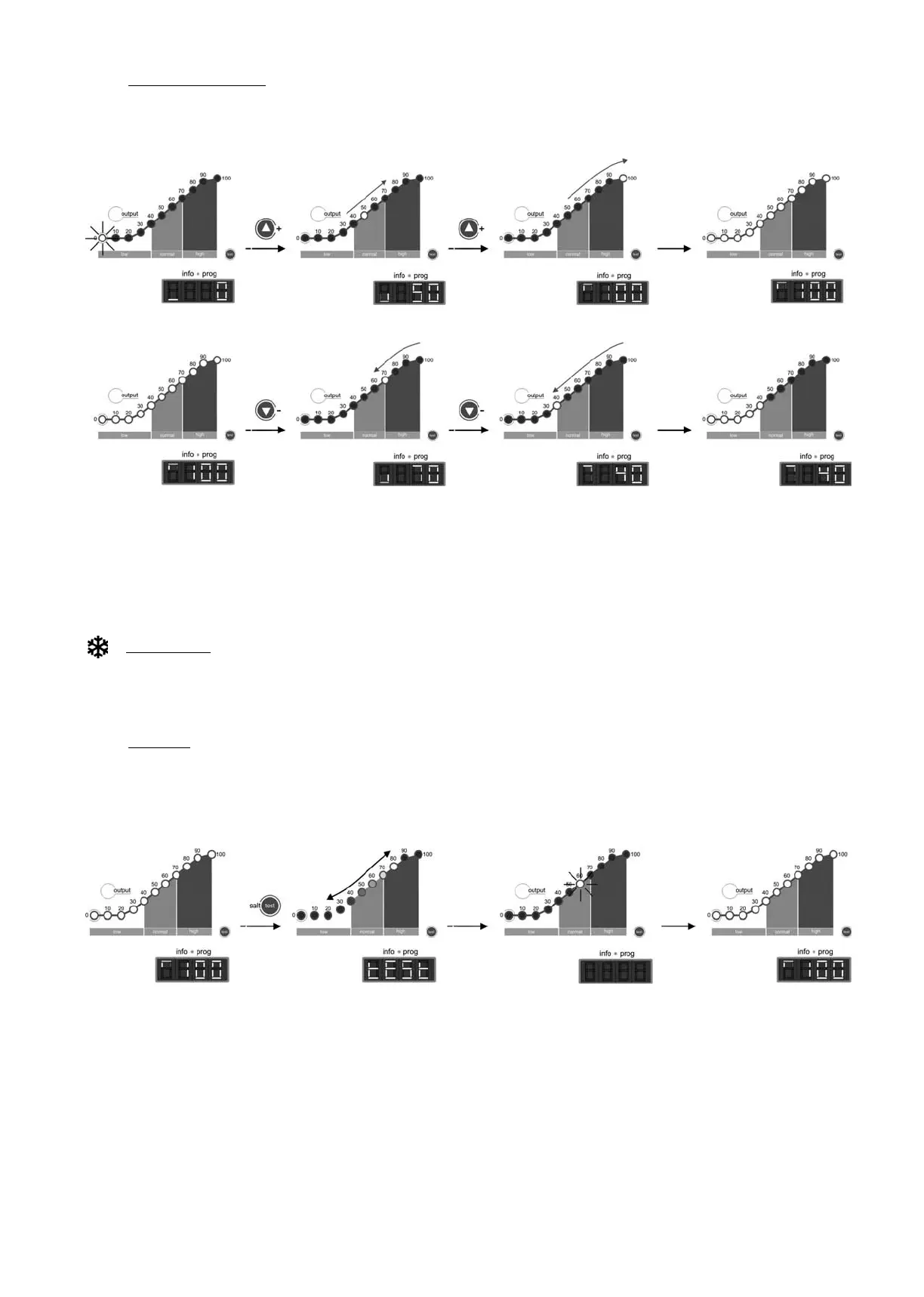
To select the desired production level, press the “” [1] / “” [14] keys until the production level light blinks. The system information screen
[11] will display the value of the production scale light [4]. The system will set its production to the desired level after a few seconds.
Fig. 24
In normal conditions, the production value [4] should be the same as the programmed value. However, if the salt level in the water is outside
the permitted range (“HIGH SALT” [7] or “LOW SALT” [6] alarms on), or there is a problem in the electrolysis cell (“ELECTRODES” [13] alarm
on), the production value [4] could be lower than the programmed and displayed value [11].
WINTER Mode:
during periods of low water temperature select a production level [1] in the 50-60% range.
5.4. Salinity test
The DOMOTIC Series systems have an integrated system to detect the salinity level of pool water. To run the test, press the “SALT TEST” [9]
key. During the test, the production light will range from 20%-80% of the salinity scale [5], alternately displaying “SALT” and “TEST” on the
system information screen [11]. Once the test is completed, the light will blink for a few seconds on the scale [5] on the detected salinity value
(see Fig. 25). The equipment will return to normal operating mode after a few seconds.
Fig. 25
The system might show lower than actual salt levels if the temperature falls beneath 20C (68 °F).



 To Next Page
 Loading...