25
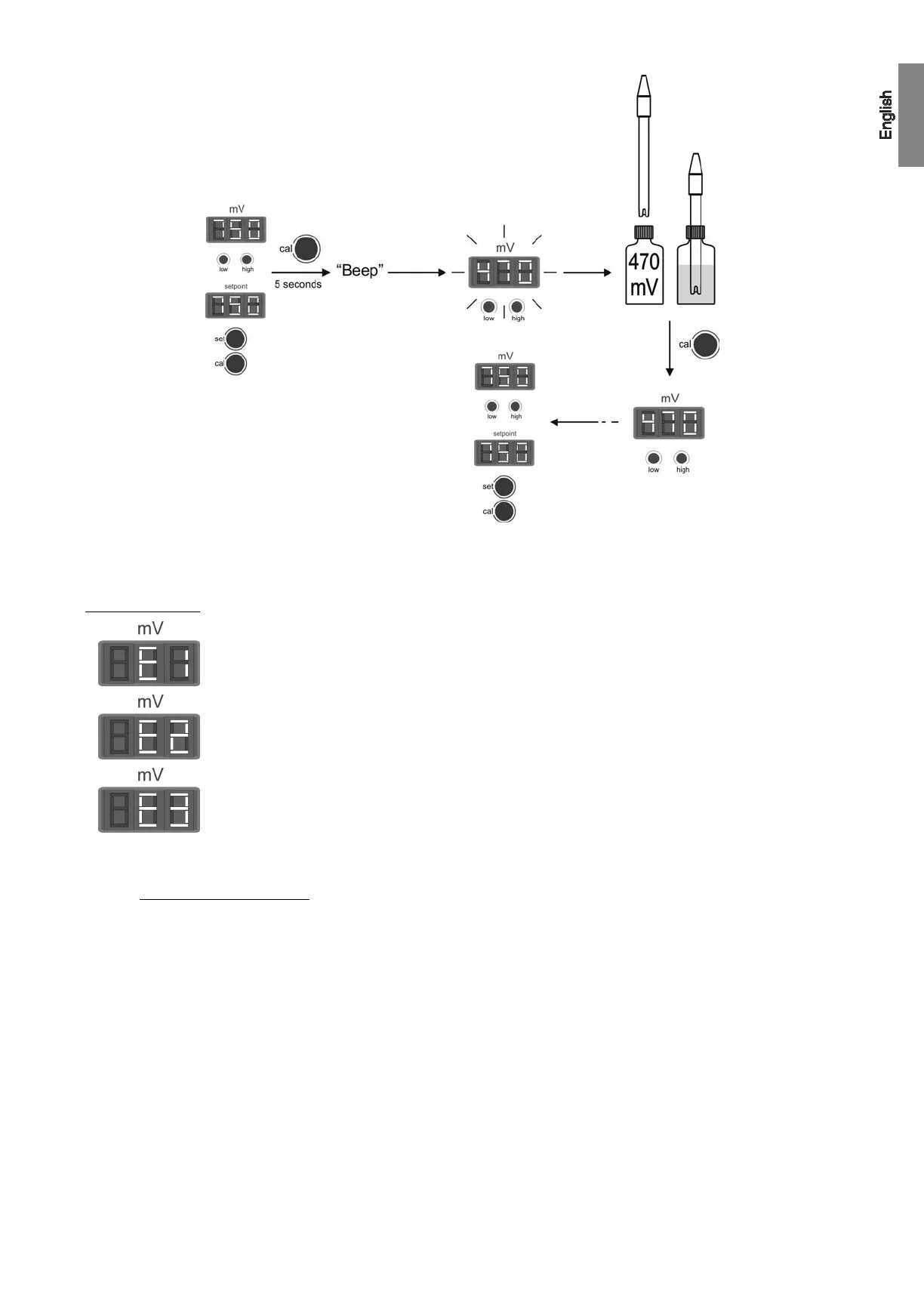
Fig. 37
ERROR MESSAGES:
If the calibration process is interrupted for whatever reason, the ORP controller will automatically leave the
calibration mode if the intervention of the user is not detected in a few seconds. In this case, “E1” indication in
display [21] will appear.
If the ORP value during the calibration process is very different from the expected one, (e.g., defective sensor,
etc.), display [21] will indicate “E2”, not allowing calibration.
If the ORP measure is unstable during the calibration process, code “E3” will appear in display [21]. In addition,
the sensor calibration will not be allowed.
6.4. pH / ORP sensors maintenance
1. Ensure that the sensor membrane remains moist all the time.
2. If the sensor in not going to be used for a long period, keep it submerged in a pH=4.0 conservation solution.
3. To clean the sensor, avoid the use of abrasive materials that can scratch the sensor surface.
4. The pH/ORP sensor is a consumable part and will need to be replaced over a period of time.



 To Next Page
 Loading...