@2020 iDFTECH
9
It is recommended that you read this chapter carefully and follow the steps in this section for the correct
installation of components and to prepare for the Poseidon-PRO before flight. Improper installation may cause
the Poseidon-PRO to malfunction and cause damage to the aircraft or injury.
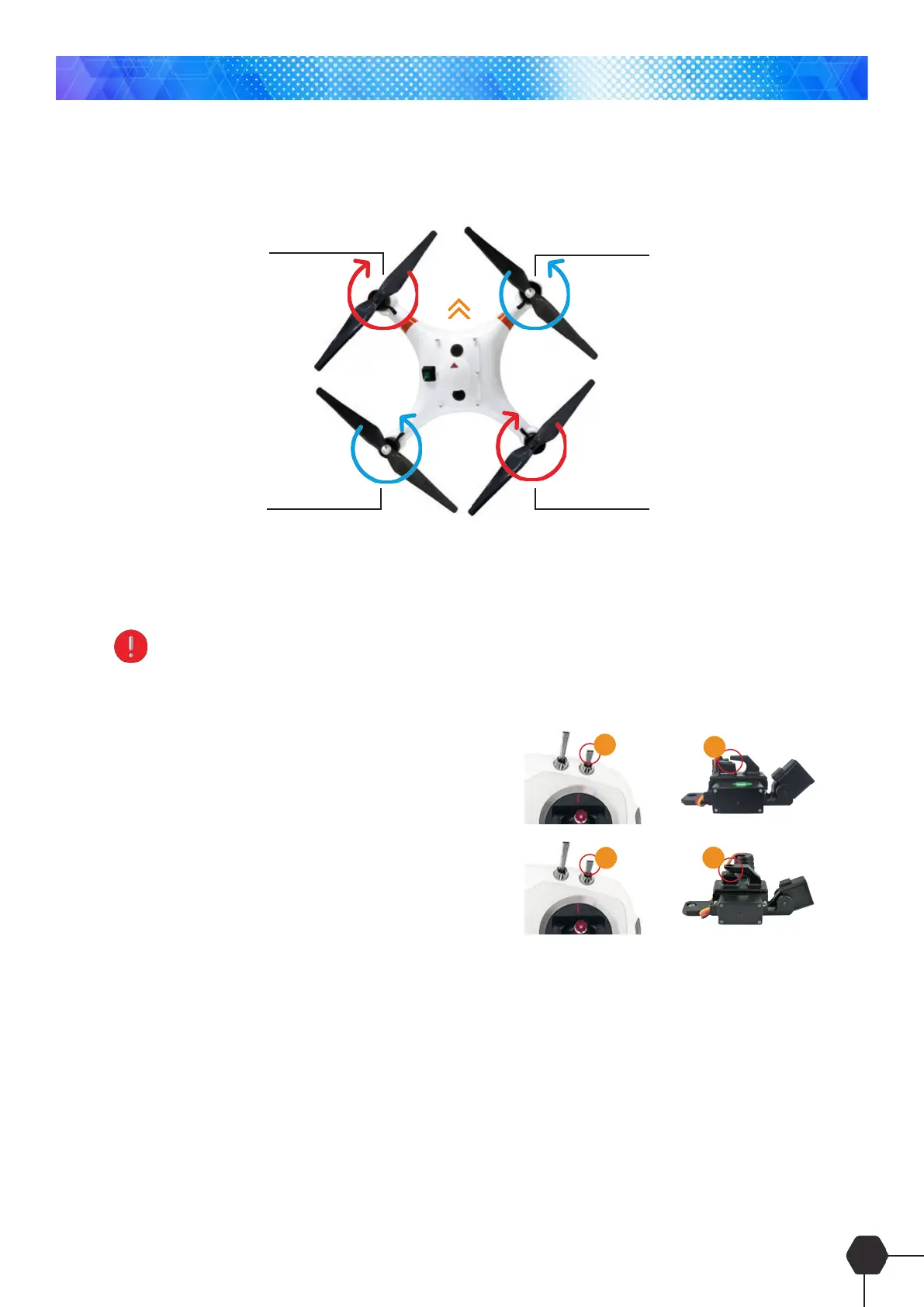
Clockwise rotation
Anticlockwise rotation Clockwise rotation
Anticlockwise rotation
FRONT
Please familiarize yourself and understand the various components on your aircraft, including the steering of the
quadcopter, the layout of the aircraft before and after, and the description of each interface.
Pay attention to distinguish the head and tail of the drone by the red mark on the arm of the quadcopter
Bait Clasp/Release Mechanism
1. Turn on the remote controller and ensure that the SWD
switch is in the top position
2. Turn on the power of the aircraft
3. Turn the SWD switch to the bottom - the dispenser will
open
4. Turn the SWD switch to the top - the dispenser will close
Battery Charger Procedure
1. Connect the charger to the main power and connect the battery to the charger.
2. Using the arrow button <> select the following parameters and press enter after each selection.
Charging Method B A L A N C E
Charging Current 5A setting for 4500mAh standard battery
10A setting for 10000mAh optional battery
Quadcopter
1
2
4
3



 To Next Page