
 Need help?
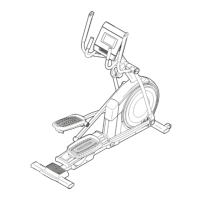
Do you have a question about the iFIT NTEL79823.2 and is the answer not in the manual?
Steps to attach the rear stabilizer to the frame using specified screws.
Steps to attach the front stabilizer to the frame using long screws.
Instructions for applying grease and attaching roller arms with screws and covers.
Guide on connecting the upright wire to the main wire for elliptical function.
Steps to attach the upright to the frame using screws and route wires.
Instructions for applying grease and attaching upper body legs with screws and washers.
Details on attaching pedal arms to roller arms using screws and retainers.
Critical instructions for properly grounding the elliptical and connecting the power cord.
Detailed instructions on mounting, pedaling, and dismounting the elliptical safely.
Instructions for powering on the console, including calibration steps.
Proper procedure for turning off the console to prevent premature wear of components.
How to adjust pedal resistance and ramp incline using console buttons or touch screen.
Guidance on starting the workout, interacting with trainers, and adjusting settings.
Instructions for logging into an iFIT account, switching users, and managing accounts.
Instructions for checking and installing console firmware updates for improved performance.
Steps to select a network, enter the password, and establish a wireless connection.
Steps to diagnose and resolve common problems encountered with the elliptical.
Specific guidance for troubleshooting incline system issues, including calibration.
Steps for resolving console issues like not turning on, freezing, or connectivity problems.
Instructions on adjusting the drive belt if pedals slip, ensuring proper tension.
Guide on adjusting the reed switch to ensure accurate feedback on the console.
 General
| Brand | iFIT |
|---|---|
| Model | NTEL79823.2 |
| Category | Fitness Equipment |
| Language | English |



 To Next Page