EasyManua.ls Logo

iFIT WEIDER 2980 X - User Manual

iFIT WEIDER 2980 X
28 pages
Print Icon
To Next Page IconTo Next Page
Loading...
Model No. WESY19318.2
Serial No.
Write the serial number in the space
above for reference.
Serial Number Decal (under seat)
USER’S MANUAL
weiderfitness.com
CAUTION
Read all precautions and
instructions in this manual before
using this equipment. Keep this
manual for future reference.
To register your product and
activate your warranty today,
go to my.weiderfitness.com.
REGISTER YOUR
PRODUCT
MEMBER CARE
For service at any time, go to
support.weiderfitness.com.
Or call 1-833-680-IFIT
(1-833-680-4348)
Mon.–Fri. 6 a.m.–6 p.m. MT
Sat. 8 a.m.–12 p.m. MT
Please do not contact the store.
Question and Answer IconNeed help?

Do you have a question about the iFIT WEIDER 2980 X and is the answer not in the manual?

Summary

Warning Decal Placement

Important Precautions

Assembly Instructions

Frame Assembly

Step-by-step guide to assemble the base, uprights, and stabilizer of the weight system.

Arm Assembly

Instructions for attaching the adjustable arms and leg lever components.

Adjustment and Usage

Changing Weight Settings

Guide on how to select and adjust the desired weight resistance.

Locking the Weight Stack

Procedure for securing the weight stack to prevent unauthorized use.

Weight Resistance Chart

Cable Diagram

Maintenance and Care

Exercise Guidelines

Overview

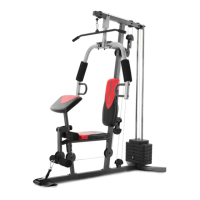
The Weider 2980 X is a versatile home weight system designed to develop major muscle groups, offering a range of exercises for shapely figures, muscle size and strength, or cardiovascular health. It is intended for home use only and should not be used in commercial, rental, or institutional settings.

Important Technical Specifications:

  • Model Number: WESY19318.2
  • Maximum User Weight: 300 lbs. (135 kg)
  • Dimensions:
    • Length: 5 ft. 3 in. (161 cm)
    • Width: 3 ft. 4 in. (102 cm)
    • Height: 6 ft. 4 in. (193 cm)
  • Weight Resistance: The system utilizes a weight stack with individual 12.5-lb. weights. The actual resistance at each exercise station may vary due to differences in individual weights and friction between cables, pulleys, and weight guides. A detailed weight resistance chart is provided in the manual, showing approximate resistance for high pulley, butterfly arm (per arm), press arm, leg lever, and low pulley stations. For example, selecting "Top" weight provides 11 lbs. for high pulley, 16 lbs. for butterfly arm, 27 lbs. for press arm, 27 lbs. for leg lever, and 26 lbs. for low pulley. Selecting "6" weights provides 101 lbs. for high pulley, 82 lbs. for butterfly arm, 173 lbs. for press arm, 214 lbs. for leg lever, and 187 lbs. for low pulley.

Usage Features:

  • Exercise Stations: The Weider 2980 X includes multiple exercise stations, such as a high pulley station, arm station (convertible between butterfly and press arms), leg lever, low pulley station, and a curl pad.
  • Adjustable Weight Setting: To change the weight setting, the Weight Pin (26) is inserted under the desired Weight (22). It is crucial to ensure the pin is fully inserted until the bent end touches the weight stack and then turned downward. The Top Weight (25) should never be used by itself.
  • Accessory Attachment: The Lat Bar (35) and Handle Strap (20) can be attached to the high or low pulley stations using Cable Clips (37). For some exercises, a Chain (19) can be used to adjust the length between the Lat Bar and the High Cable to achieve the correct starting position.
  • Leg Lever Usage: The Leg Lever (8) can be engaged or disengaged using the Leg Lever Pin (38) and Lock Plate (73). To use the leg lever, pull the pin out. To use the low pulley station, insert the pin fully into the leg lever and lock plate.
  • Convertible Arms: The arms (9, 10) can be converted between butterfly arms and press arms by adjusting the Arm Pins (40) into different holes in the Upright (3) and Pivot Frame (5).
  • Curl Pad Usage: The Curl Pad (14) can be attached to the Front Leg (7) by inserting the Curl Post (13) and securing it with the Curl Knob (61). When not in use, the Curl Pad should be removed and stored, and the Round Inner Cap (51) reinserted into the Front Leg (7).
  • Locking the Weight Stack: For safety and to prevent unauthorized use, the weight stack can be locked by inserting the Lock Pin (18) into a Weight Guide (21) and attaching the Lock (17) to the Lock Pin.
  • Exercise Guidelines: The manual provides comprehensive exercise guidelines, including four types of strength workouts (Muscle Building, Toning, Weight Loss, Cross Training) and advice on exercise form, warming up, cooling down, and staying motivated. It emphasizes moving through the full range of motion, performing repetitions smoothly, and proper breathing techniques.

Maintenance Features:

  • Regular Inspection: All parts should be inspected and properly tightened each time the weight system is used. Any worn parts must be replaced immediately with manufacturer-supplied parts.
  • Cleaning: The weight system can be cleaned with a damp cloth and a mild, non-abrasive detergent. Solvents should not be used.
  • Cable Tightening: Woven cables can stretch slightly during initial use. If slack is present, the cables need to be tightened. This involves inserting the weight pin into the middle of the weight stack and then adjusting the M6 Locknut (84) on the Low Cable (53) or loosening the M12 Nut (82) on the High Cable (55) to remove slack. It is crucial not to overtighten the cables, as this can lift the top weight off the stack.
  • Cable Routing: The manual includes a detailed cable diagram (Exploded Drawing B) to ensure proper routing of the Arm Cable (54), High Cable (55), and Low Cable (53). Incorrect cable installation can lead to damage when heavy weight is used. If cables frequently slip off pulleys, they may be twisted and should be removed and reinstalled.
  • Warranty and Support: The product comes with a limited warranty covering defects in workmanship and material for ninety (90) days. Users are encouraged to register their product online at my.weiderfitness.com to document ownership, activate the warranty, and ensure priority customer support. Member Care can be contacted for service or product registration. Extended service plans are also available for purchase to protect the fitness equipment.

iFIT WEIDER 2980 X Specifications

General IconGeneral
BrandiFIT
ModelWEIDER 2980 X
CategoryFitness Equipment
LanguageEnglish

Related product manuals