6
4. PANEL INSTRUCTION
4.1 Front Panel:
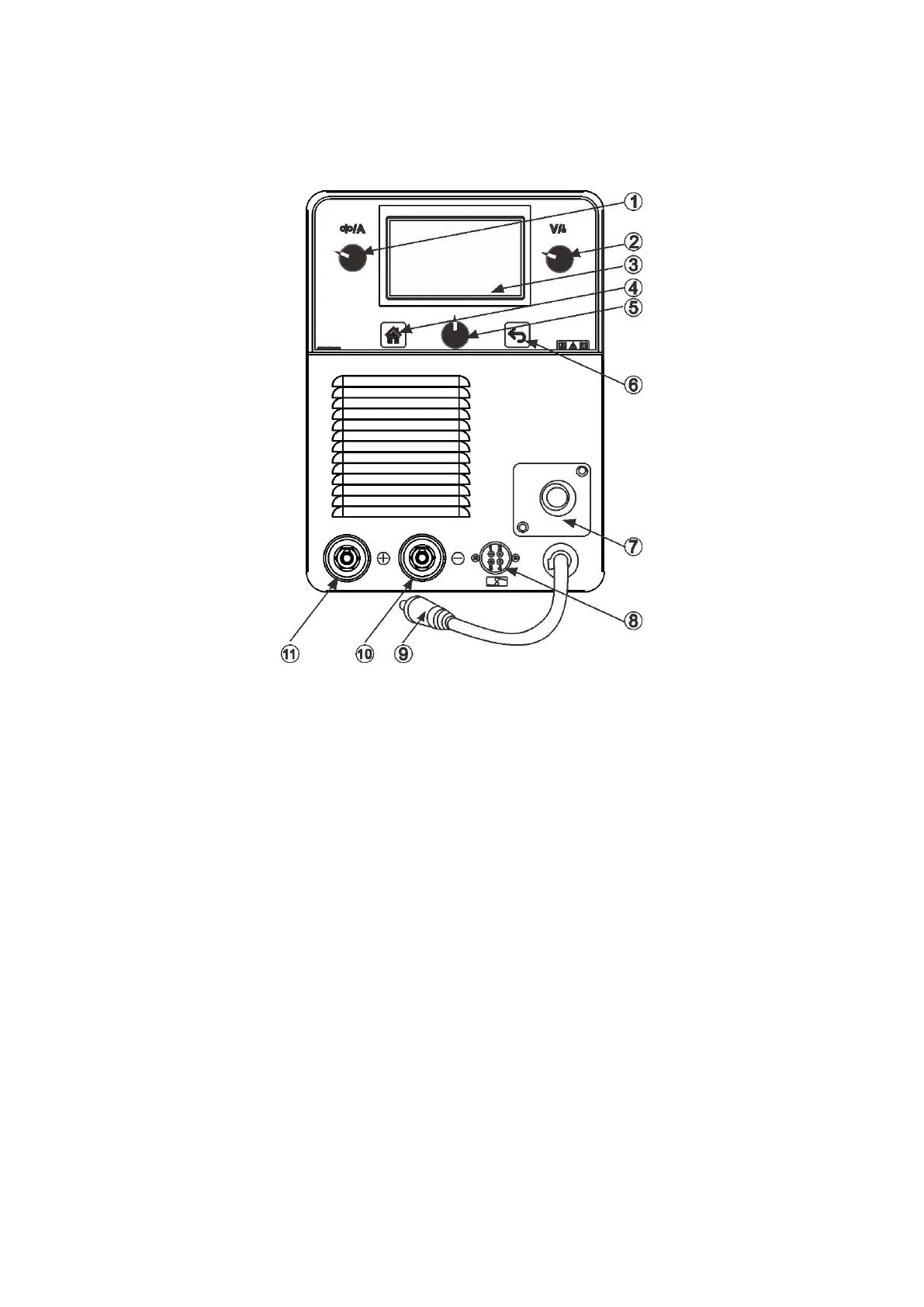
1. Adjusting knob: wire speed setting (MIG mode); welding current setting (MMA/TIG mode).
2. Adjusting knob: welding voltage setting (MIG mode); output on/off control (MMA/TIG
mode).
3. LCD: welding technics and parameters display.
4. Home button: return to the main menu, where the user can choose welding technics type
or display setting.
5. Central adjusting knob: rotate to select the parameter, or push to enter/confirm.
6. Return button: return to the last menu.
7. Welding torch connector: make sure the torch is tightly connected and locked before
welding.
8. Spool gun connector: to connect the optional spool gun. It’s usually used to weld
aluminum or aluminum alloy.
9. Welding cable:
a. Under Flux Cored welding mode: connect it to “-”;
b. Under MIG welding mode: connect it to “+”.
10. Output Connector “-”
11. Output Connector “+”



 To Next Page