26
The Sensor Setup Tab
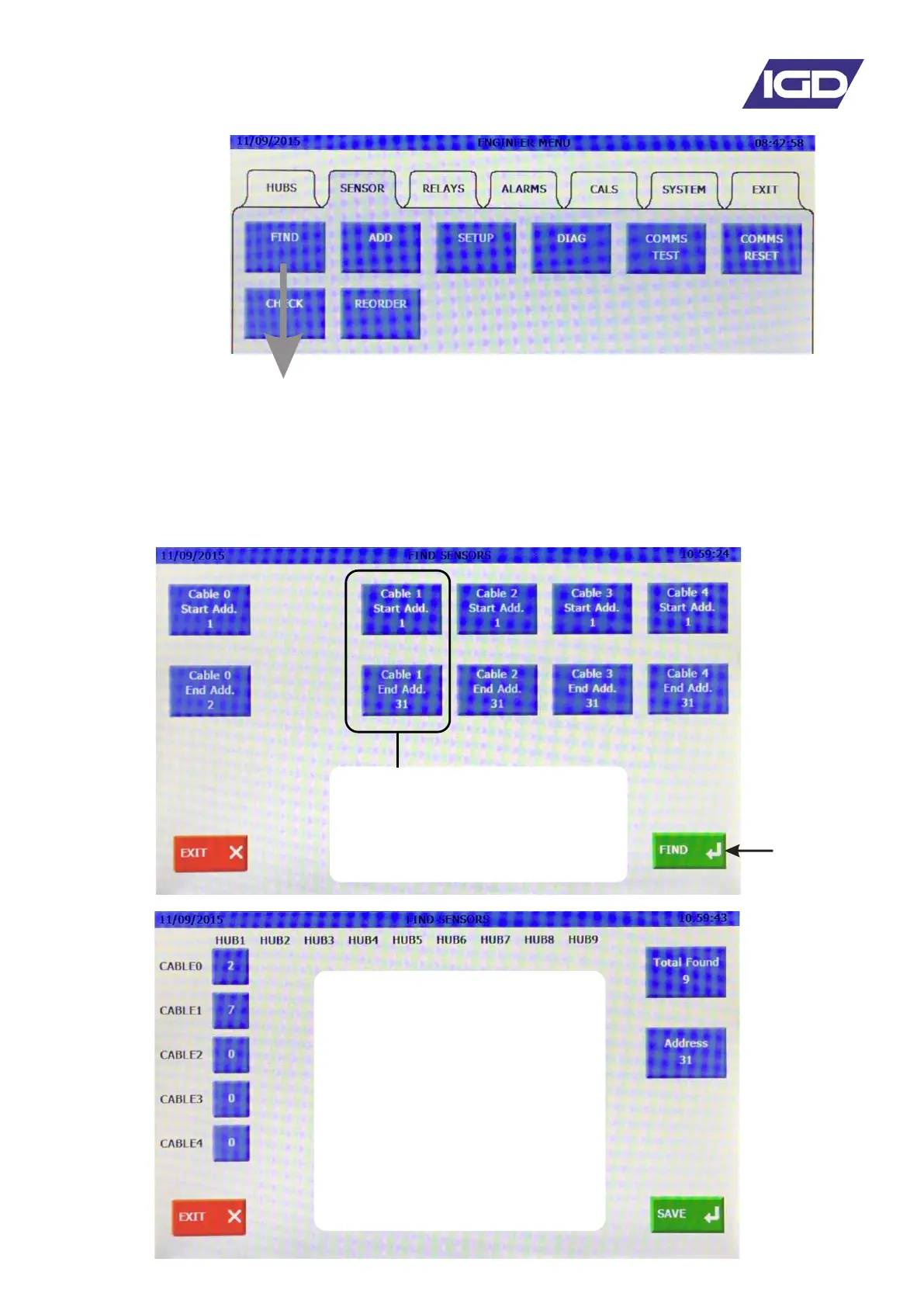
The Sensor FIND Function
The sensor FIND function is used during initial set up of the system to test that all connected detectors
communicate to the control panel. The function can also be used to automatically install onto the panel
all of the detectors which are 'found'. By doing this channels are automatically set up on the controller
for the Address, Cable, Range, Gas Type etc. This will speed channel set up but it should be noted
that performing a FIND and auto install will erase all the existing set up information including alarm
levels and alarm action types.
Select FIND to
start searching
for detectors.
Select the range of addresses to
search over for each cable run. By
default address 1 to 31.
The display will show how
many detectors were found, on
which cable highways
At this stage this may just be
useful diagnostic information in
which case select EXIT to exit
the sensor FIND or....
Select NEXT to continue and
automatically install sensors
onto the system


 To Next Page