42
Accessing TOC-750 Module PCB Setup Functions From the 750 Controller
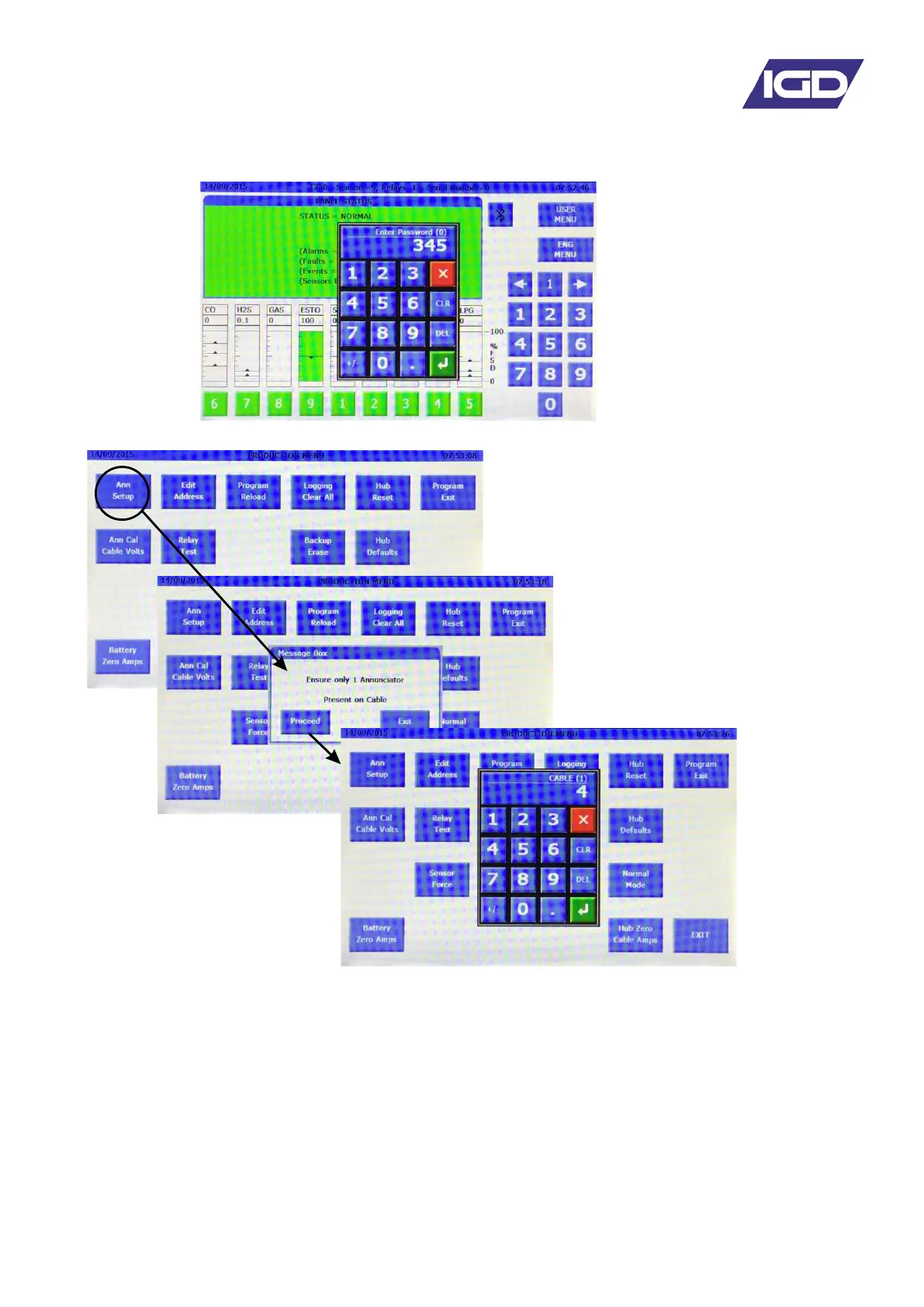
From the main screen select either the user or engineer menu and enter 345 as a password.
The Production Menu is now displayed. Select the T750 ANN Setup option
Pellistor Gas Detector Input
T102 input for Toxic/Infra-red/Oxygen or PID gas detectors
Setup for IO Port 1
Setup for IO Port 2
Relay setup
E-Stop
Keyswitch
It is advised when configuring systems to install and power the control panel first and then use one
port on the 750 to connect and check devices prior to installing them. In this manner all addresses
and module set up options can be checked before devices are installed into their final locations.
Follow the on screen prompts to
ensure there is only ONE
detector node PCB connected to
the selected port for setup. Running
the setup function with multiple
detector nodes will result in
unexpected changes to the detector
nodes setup.
The software now displays the
setup options for the ‘annunciator’
module as well as separate page
and options for:


 To Next Page