20
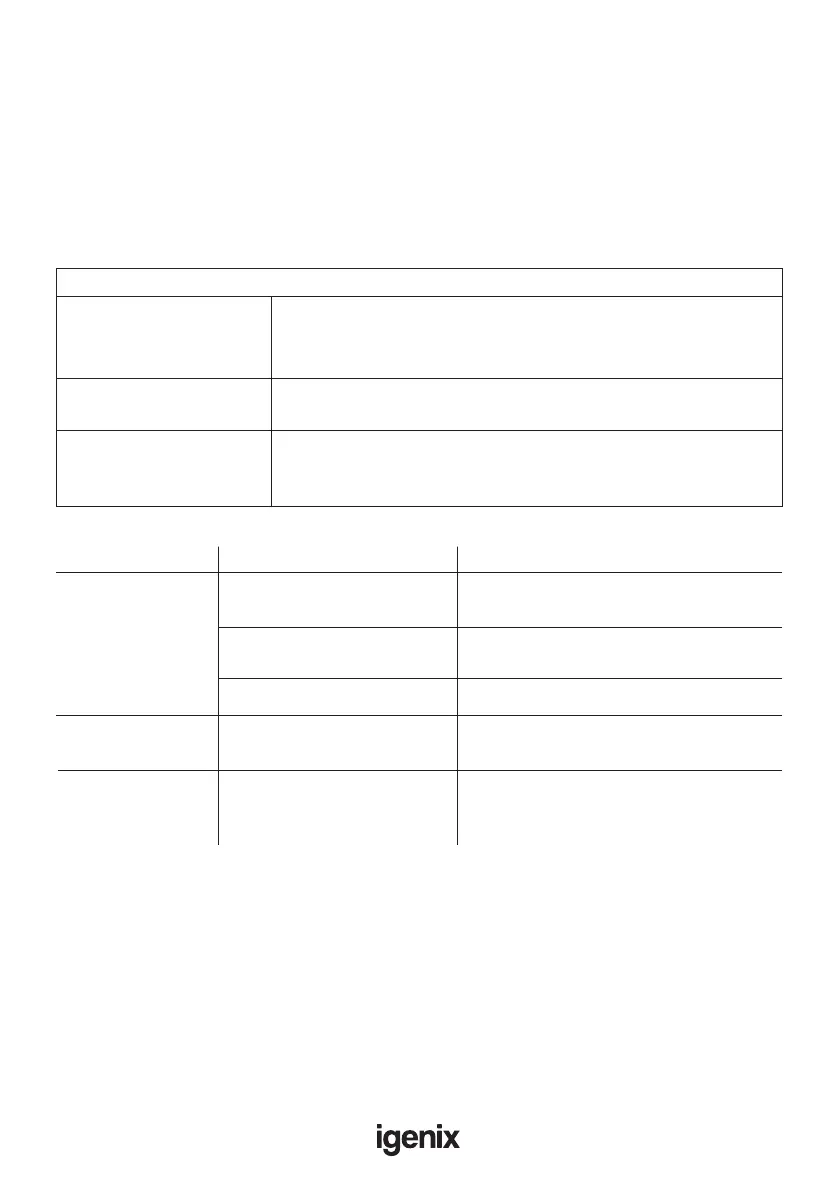
Fault Possible Cause Remedy
Microwave can
not be started.
1. Power cord not plugged in
properly.
Unplug. Then plug in again rmly
after 10 seconds.
(2) Fuse blown or circuit breaker
has tripped.
Consult a qualied electrician to replace fuse
or circuitbreaker.
(3) Trouble with outlet. Test outlet with other electrical appliances.
Microwave does
not heat.
Door not closed properly
Close door properly.
Glass turntable makes
noise when microwave
oven operates.
Dirty roller rest and oven
bottom.
Refer to “Maintenance of Microwave” to clean
dirty parts.
TROUBLE SHOOTING GUIDE
If you experience difculties with the appliance, please check the suggestions below
before contacting customer services on 01473 271272:
To test microwave is working before cooking food – DO NOT operate empty, instead
place one cup of water (approx.150ml) in a glass in the microwave and close the door
securely. Microwave lamp should go off if the door is closed properly. Let the microwave
work on full power for 1 min.
Normal
Microwave interferring
with TV reception.
Radio and TV reception may be interferred with when microwave is
operating. It is similar to the interference of small electrical appliances,
like mixers, vacuum cleaners and electric fans. This is normal.
Dim oven light. In low power microwave cooking oven light may become dim.
This is normal.
Steam accumulating on
door, hot air out of vents.
In cooking, steam may come out of the food. Most will get out of the
vents. But some may accumulate on a cool place, like the oven door.
This is normal.


 To Next Page