9
CLEANING AND MAINTENANCE
Always switch off the unit and unplug from the mains socket before cleaning or performing any
maintenance. When not in use for long periods it is also advisable to remove the plug from the power
socket.
Wipe the outside of the unit with a soft damp cloth. You may use a mild detergent if necessary. Dry with
a cloth. Do not use any harsh abrasives or solvents. Never immerse this appliance in water or any other
liquid.
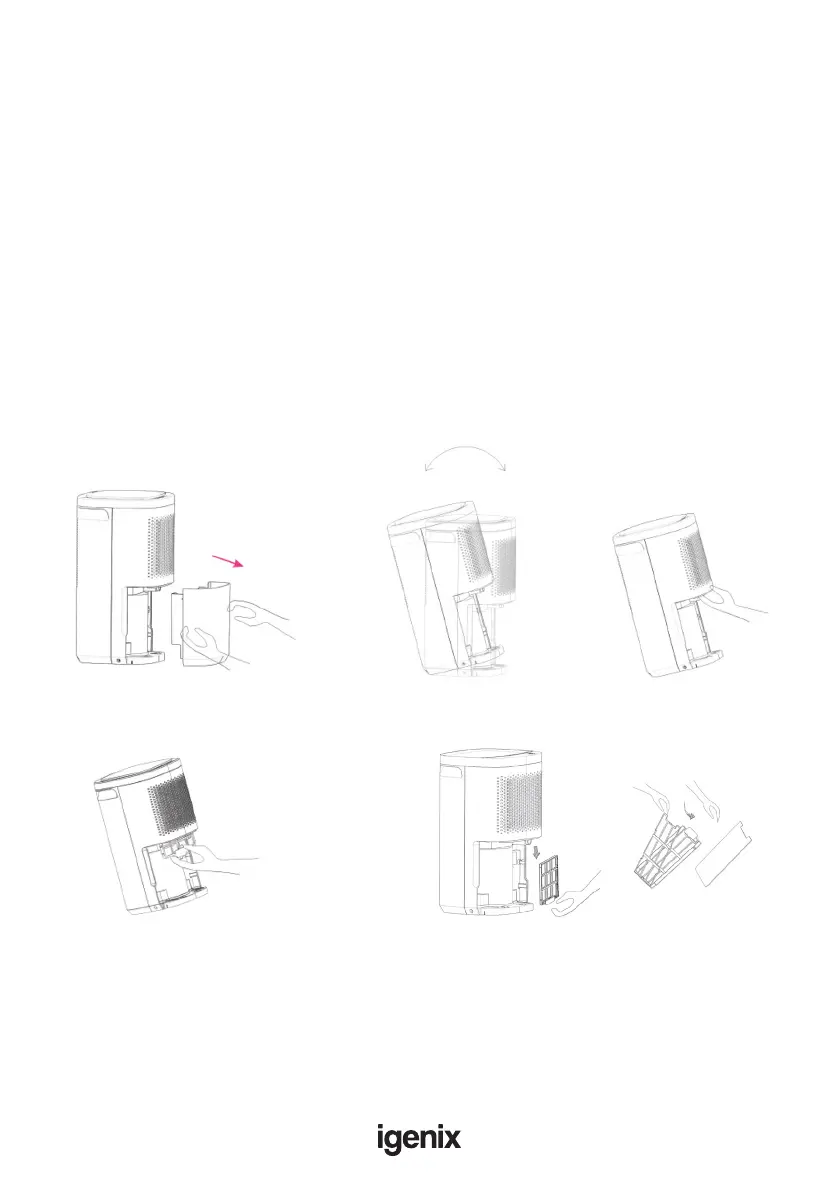
The air lter should also be cleaned regularly. To remove the lter remove the water tank and tip the
appliance towards the rear at a 15°C angle. The lter is located behind the front grill.
• Insert your hand behind the front grill and locate the black air lter
• Grasp the lter with your ngers and pull the lter towards you and downwards at the same time.
• The lter will unclip and drop slightly.
• Grip the bottom of the lter and pull down to completely remove from the appliance.
• Clean the lter and then replace it.
Note: Do not switch on the appliance for a minimum of 4 hours after the lter has been cleaned.
The water tank should be cleaned every few weeks to prevent growth of mould, mildew and bacteria.
Partially ll the tank with clean water and add a little mild detergent. Swich it around and then empty
the tank and rinse.
Note: After cleaning and drying the tank, it must be reinserted securely into dehumidier in order to
restart operation.
How to remove filter:
Remove water tank. Tilt unit at a 15° angle to
access lter.
Insert hand behind
front grill.
Grip lter with ngers and pull downwards.
Filter will drop and unclip.
Pull bottom of lter again with index nger
and thumb to completely remove from unit


 To Next Page