7 8
Add Device
Step 3
Hold 3~5
Seconds
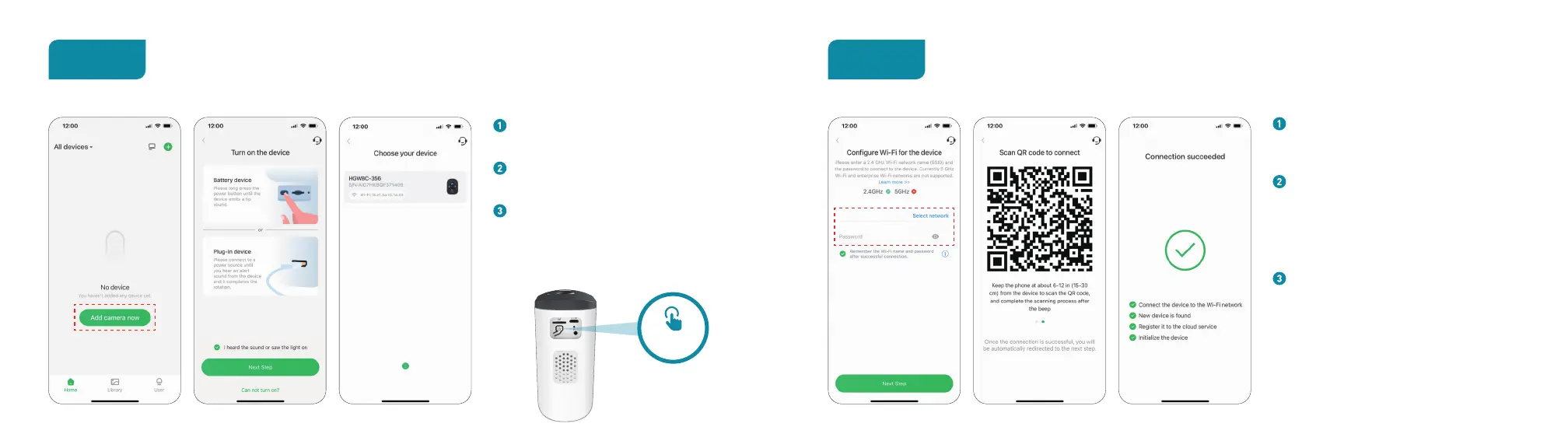
Login your account and tap“Add camera
now”.
Press the power button until you hear
scanning sound and see the light on.
Choose your camera and Connect to
2.4GHz Wi-Fi.
* If you can't hear 'Ding Dong Ding Dong', please
double-click the power button to enter the network
configuration mode again.
Connect to Network
Step 4
Enter the correct Wi-Fi password.
Note: The camera is not support
5GHz Wi-Fi.
This App will generate a QR code, place
the QR code 6~12 inches(15-30cm) in
front of the camera lens. After scan the
QR code,the camera prompt''Wi-Fi
connected''.
Name the camera after the Pairing is
successful.


 To Next Page