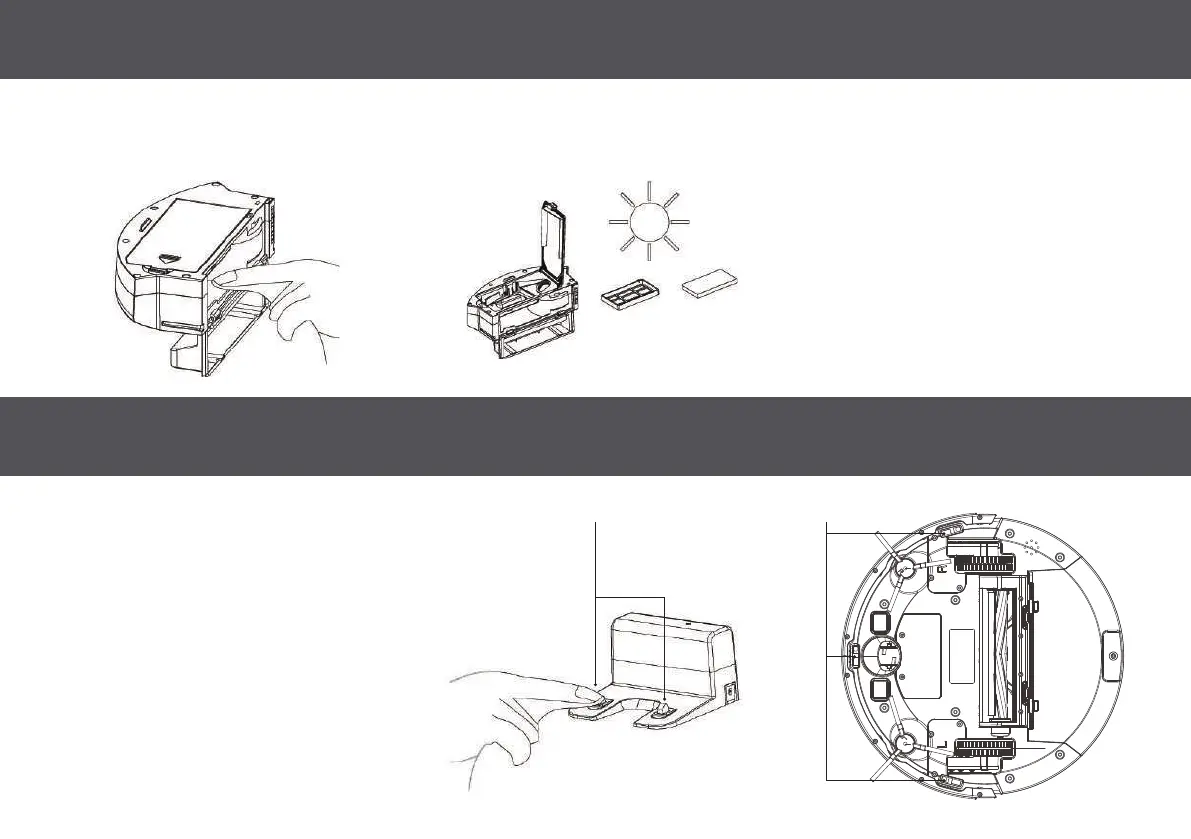
MAINTAINING THE DUSTBIN 13
CLEANING THE SENSORS & CHARGING PINS
NOTE: Please ensure the filter assembly
is completely dry before installing
Clean dust bin with a dry cloth. re-install both filters by nesting the HEPA filter into the primary filter and placing the entire assembly into the filter
compartment with the HEPA filter facing up. NOTE: push the metal arm toward the wall of the compartment in order for the filter assembly to fit.
NOTE: The interior of the charging port, the
sensor and the plate all contain sensitive
electronic components, please use a dry
cloth when cleaning. Do not use wet cloth.
Charging Base: Wipe the charging
contacts and charging port regularly to
prevent dust and dirt build up.
Cliff Detection Sensors: Wipe the three
cliff detection sensors on the bottom
of the Autovac.
Charging Contacts Cliff Detection Sensors


 To Next Page