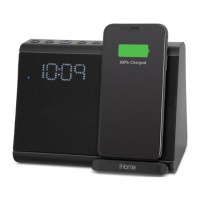
Instructions are given as “Alarm Button”; use Alarm 1 Button or Alarm 2 Button to set respective alarms. Note:
Each step must be completed while display is flashing or setting will time-out with any changes saved.
1. Press and hold the Alarm Button for 2 seconds until the display flashes. A beep sounds.
2. Press the – or + Buttons to adjust the alarm time to the desired time (hold for rapid setting). Make sure you set
the correct AM/PM alarm time. The PM indicator appears to the left of the display.
3. Press the Alarm Button to confirm the alarm time setting. The alarm schedule will flash: 7 (every day), 5
(weekdays) or 2 (weekend only). Press the – or + Buttons to select the desired alarm schedule.
4. Press the Alarm Button to confirm the alarm schedule. The wake-to source will flash.
5. Press the – or + Buttons to select the desired wake-to alarm source: Bluetooth or Tone.
Wake to Bluetooth: You will wake to the currently linked Bluetooth device. If no device is detected, the alarm
will default to the last tone selected.
Wake to Tone: Press the Alarm Button to confirm. Press the – or + Buttons to select the desired tone to wake
to (Tone 1 -Tone 4).
6. Press the Alarm Button to confirm wake-to source. The alarm volume will flash.
7. Press the – or + Buttons to adjust the alarm volume.
8. Press the Alarm Button to confirm the alarm settings and exit alarm setting mode. 2 beeps will confirm alarm
setting is complete. The alarm icon will remain on the display, to show the alarm is armed.
Previewing the Alarm and Turning the Alarm On/Off
1. Press and release the Alarm Button to view the current alarm time.
2. Press the Alarm Button to toggle the alarm ON and OFF, indicated by the related white alarm indicator.
3. When the alarm sounds, press the Power/Alarm Reset Button or the corresponding Alarm Button (1 or 2) to
disable the alarm and reset it to come on at the same time the next day.
Snooze/Display Dimmer
Snooze: When the alarm is sounding, press the Snooze/Dimmer Button to snooze for 9 minutes.
Dimmer: Press the Snooze/Dimmer Button (when alarm is NOT sounding) to adjust display brightness.
Programmable Snooze
To adjust the snooze duration:
1. Press and hold the Snooze/Dimmer Button.
2. Use the + or – Buttons to adjust the snooze duration from 1-29 minutes. Press the Snooze/Dimmer Button again
to confirm.
Display Auto-Dimmer
This unit is equipped with a sensor that will automatically adjust the brightness of the clock display based on ambient
light in your room. When the room is well lit, the display will adjust to Hi brightness for better visibility. In a dark room,
it will dim to a lower brightness.
You can adjust the “lower limit” of the Auto-dimmer to fit your personal preference of display brightness in a dark
room.
The 3 options are:
“Auto 2” – minimum brightness setting will be level 2
“Auto 1” – minimum brightness setting will be level 1
“Auto 0” – clock display will turn FULLY OFF in a dark room
To adjust Dimmer settings:
Press the Snooze/Dimmer Button repeatedly to cycle through brightness levels: Auto 1, Auto 2, Auto 0, Hi, 3, 2, 1, or
OFF. (Note: choosing Hi, 3, 2, 1, or OFF are fixed settings and will not auto-adjust.)
Manual Bluetooth Pairing



 To Next Page