EasyManua.ls Logo

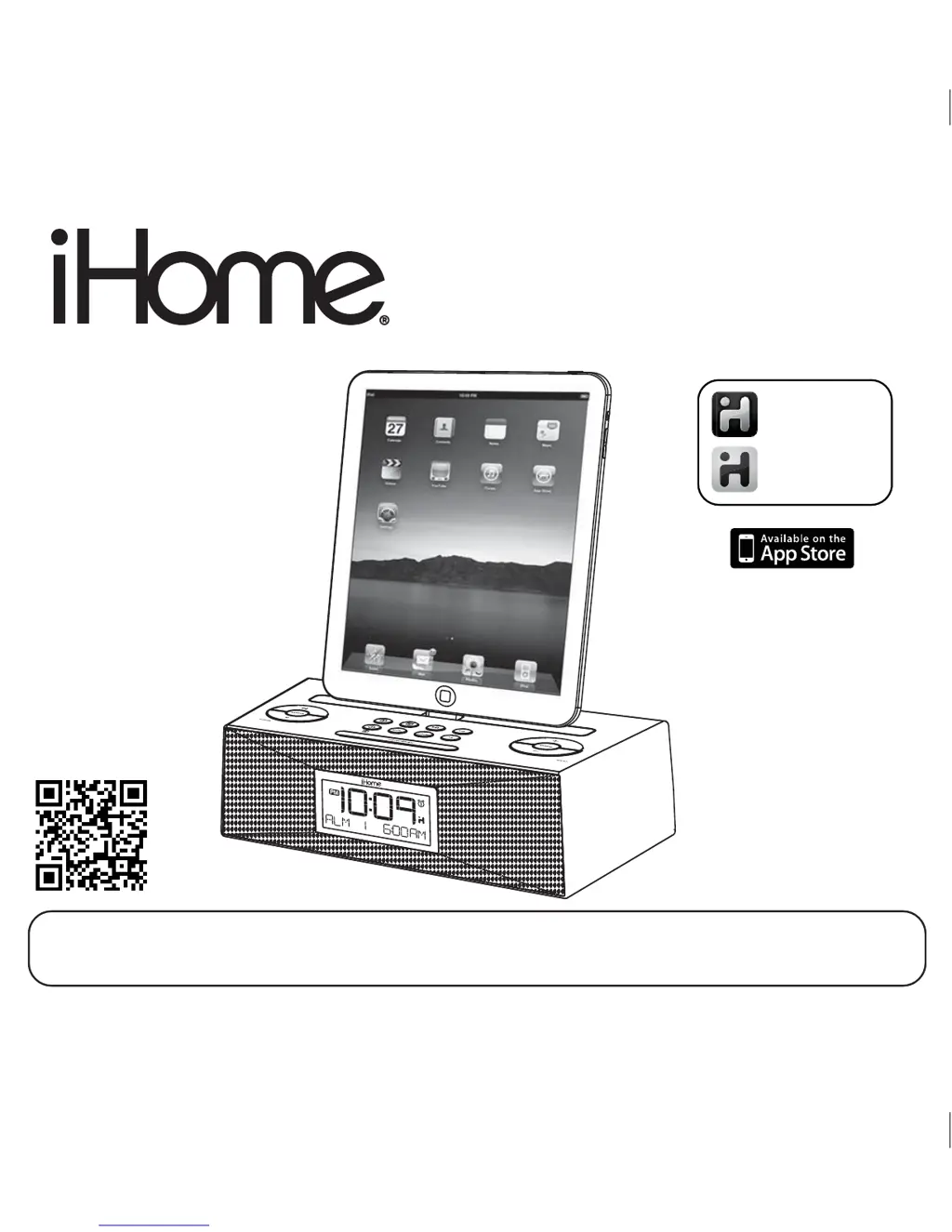
iHome iD83 - User Manual

iHome iD83
14 pages
Print Icon
To Next Page IconTo Next Page
Loading...
Model iD83
The Home System
For Your iPad
®
Questions? For latest instructions, visit www.ihomeaudio.com/support
iD83 IB_US version
Size: 178 x 178 mm (16 pages)
Printing color: Black
Mat’l: 90gsm book paper
Nov. 14, 11.
P1
iHome Sleep
works with
iHome Radio
alarm clock app
internet radio app
Note: iHome Sleep and iHome Radio apps are not covered in detail in this booklet. To learn more about how
these apps can enhance your experience, please download the free iHome Sleep app from the App Store and
review the Start Guide.

Questions and Answers

  • P
    padillamatthewAug 6, 2025
    What to do if my iHome iD83 Clock Radio doesn’t respond?
    • J
      jharrisAug 6, 2025
      If your iHome Clock Radio is plugged in but not responding, try resetting it: 1. Remove your iPad/iPhone/iPod from the dock. 2. Unplug the unit from the power source. 3. Remove the backup batteries. 4. Wait a few minutes, then replace the batteries, plug the unit back in, and resume use. Also ensure that your iPad/iPhone/iPod is properly docked by removing it and checking for obstructions on the connectors, then reseating it in the dock.
  • E
    Elizabeth PopeAug 11, 2025
    How to turn on iHome iD83?
    • D
      Dominic WarrenAug 11, 2025
      Ensure the AC adapter is plugged into a working wall socket and that the connector is securely plugged into the supply jack on the unit.
  • S
    Samuel VegaAug 15, 2025
    Why didn't the time sync work on my iHome Clock Radio?
    • T
      taylor41Aug 15, 2025
      If the time sync feature didn't work on your iHome Clock Radio, ensure you are using a properly docked iPad, iPhone, or newer iPod such as touch, nano, or classic. Older iPod models like the iPod mini do not support the time sync function. If a compatible device is not available, set the time manually.
  • K
    Kevin CarrollAug 19, 2025
    What to do if my iHome Clock Radio iPod doesn't respond or has no sound?
    • J
      John GomezAug 19, 2025
      If your iPod/iPhone/iPad is not responding or there is no sound when docked to the iHome Clock Radio, try the following: * Remove your device from the dock and check for any obstructions on the connectors, then reseat it. * Ensure that your device's software is up to date by upgrading via iTunes on your computer. * Verify the volume setting and ensure your device is working properly before docking. You may need to reset your device. Note that the system cannot control 1st or 2nd generation iPod, iPod Shuffle or other devices.
  • J
    John StricklandAug 23, 2025
    Why didn't my iHome iD83 Clock Radio charge my iPad/iPhone/iPod?
    • R
      ricardo85Aug 23, 2025
      If your iPad/iPhone/iPod isn't charging on the iHome Clock Radio, make sure it is properly installed by removing it from the dock, checking for any obstructions on the connectors, and then reseating it. Also, ensure your device is working properly before docking it into the unit. If the problem persists, there may be an issue with the iPad/iPhone/iPod battery.
  • T
    tonyburkeAug 27, 2025
    What to do if the battery low icon is always flashing on my iHome iD83 Clock Radio?
    • G
      Garrett HarmonAug 27, 2025
      If the battery low icon is constantly flashing on your iHome Clock Radio, it means the batteries are weak and need to be replaced with new ones. Also, check that the batteries are installed correctly, ensuring the polarity (+ and – ends) matches the diagram in the battery compartment.
  • T
    talexanderSep 1, 2025
    Why is my iHome iD83 Clock Radio performance erratic?
    • M
      Molly LopezSep 1, 2025
      If the performance of your iHome Clock Radio or connected device is erratic, it might be due to external interference. Try moving the unit away from potential sources of interference such as computers, modems, wireless devices (routers), or fluorescent lights.

Summary

Controls and Indicators

Top Panel Controls

Identifies buttons and the dock connector on the top of the unit.

Rear Panel Connections

Details the ports and switches located on the back of the unit.

Unit Display Indicators

Explains the various indicators shown on the unit's display.

Quick Start Guide

Power Connection

Instructions for connecting the unit to a power source.

Docking your iPad;iPhone;iPod

Steps for connecting and playing audio from your Apple device.

Using the Alarms

Setting Alarms

How to configure alarm times, sources, and frequencies.

Unit Features and Operations

Charging and Listening to iPad;iPhone;iPod

Connecting and using your Apple device for charging and audio playback.

Troubleshooting

Unit Not Turning On or Responding

Solutions for power issues and unresponsiveness.

iPad;iPhone;iPod Issues

Resolving problems with device connection, sound, and charging.

iHome iD83 Specifications

General IconGeneral
TypeClock Radio
BrandiHome
ModeliD83
Display TypeLCD
Alarm FunctionYes
Snooze FunctionYes
iPod CompatibilityYes
iPhone CompatibilityYes
iPad CompatibilityYes
Power SourceAC Adapter
RadioAM/FM
SpeakerYes
USB Charging PortYes
BluetoothNo
Auxiliary InputYes
Connector Type30-Pin Dock
Weight1.5 pounds

Related product manuals