Need help?
Do you have a question about the iHome POWERCLOCK iBT235 and is the answer not in the manual?
Expresses gratitude for choosing the iBT235 and directs users to ihome.com for more information.
Lists the items included with the iBT235 and guides on connecting the AC adapter.
Details the buttons and functions located on the top panel of the device.
Explains the indicators and symbols visible on the clock display.
Describes the connectivity options and controls found on the back panel.
Step-by-step instructions for setting the current time, year, and date on the device.
Explains how to use the DST switch for daylight saving time adjustments.
Guides users on setting dual alarms, including time, schedule, and wake sources.
Details selecting alarm wake sources (Bluetooth/Tone) and adjusting alarm volume.
Instructions on how to turn alarms on and off and how to silence them when sounding.
Explains how to use the snooze function and adjust display brightness.
Guides on setting the duration for the programmable snooze timer.
Step-by-step guide to pairing a Bluetooth device with the iBT235.
Instructions on how to play and control audio from a linked Bluetooth device.
Explains how to use the USB ports to charge other devices.
Details on the CR-2450 backup battery for maintaining clock settings.
Provides essential tips and cautions for handling and using batteries safely.
Offers advice on cleaning and protecting the unit and surrounding furniture.
Covers safety aspects related to water, ventilation, heat, and power sources.
Details safety measures for cleaning, attachments, lightning, and magnetic interference.
Outlines the warranty period, terms, and procedures for service or replacement.
Specifies conditions not covered by the warranty and legal rights of the owner.
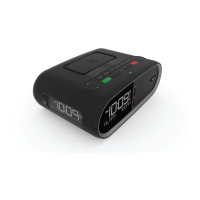
The iHome iBT235 POWERCLOCK is a versatile Bluetooth speaker and alarm clock designed to enhance your daily routine with its multi-functional capabilities. This device combines the convenience of a digital alarm clock with the entertainment of a Bluetooth speaker, all while offering two USB charging ports for your mobile devices. Its sleek design and intuitive controls make it a practical addition to any nightstand or desk.
At its core, the iBT235 serves as a digital alarm clock, featuring a clear LED display that shows the time. It boasts dual alarms, allowing users to set two separate wake-up times, each with customizable schedules (every day, weekdays only, or weekends only). For alarm sources, you can choose to wake up to a linked Bluetooth device, playing your preferred audio, or select from four built-in tones. The alarm volume is also adjustable to suit your preference. A snooze function is integrated, offering a standard 9-minute delay, which can also be programmed for a duration between 1 and 29 minutes, allowing for repeated snoozes for up to one hour.
Beyond its alarm clock functionality, the iBT235 is a Bluetooth speaker, enabling wireless audio streaming from your compatible devices. The unit automatically enters pairing mode when first powered on, simplifying the initial setup. Manual pairing is also straightforward, requiring a simple press and hold of the Bluetooth button. Once paired, you can play or pause audio directly from the unit and adjust the volume. For added convenience, the device includes two USB charging ports (one 1A and one 2.4A) on the back, allowing you to charge your smartphones, tablets, or other USB-powered devices directly from the clock. This eliminates the need for extra wall adapters, keeping your charging area tidy.
A nightlight feature is also incorporated into the design, providing a soft glow that can be turned on or off with a press of a button. The brightness of the nightlight can be adjusted to high or low settings by pressing and holding the nightlight button and using the volume controls. The clock display itself has a dimmer function, allowing you to adjust its brightness to prevent it from being too distracting in a dark room.
For timekeeping accuracy, the iBT235 includes a DST (Daylight Saving Time) switch. By default, it's set to "Auto," which automatically adjusts the time at the start and end of daylight saving time. Users also have the option to manually adjust the time by adding or subtracting an hour. A CR-2450 backup battery is pre-installed to maintain clock settings during temporary power outages, ensuring that your alarms and time settings are preserved.
Setting the time on the iBT235 is an intuitive process. You press and hold the Time Set button until the display flashes, then use the +/- buttons to adjust the hour, minute, year, month, and day. The PM indicator on the display helps distinguish between AM and PM times, as there is no separate AM indicator. The clock display can also be toggled between standard 12-hour and 24-hour ("military") time formats.
Setting the dual alarms follows a similar pattern. Press and hold the Alarm button (Alarm 1 or Alarm 2) until the alarm time flashes. Use the +/- buttons to set the desired wake-up time, ensuring the correct AM/PM is selected. After confirming the time, you can choose the alarm schedule (7 days, 5 days, or 2 days) and the alarm source (Bluetooth or one of four built-in tones). The alarm volume is also adjustable at this stage. Once set, the corresponding alarm indicator (1 or 2) will appear on the display, confirming that the alarm is armed. Alarms can be easily turned on or off by pressing the respective Alarm button. When an alarm sounds, pressing the Alarm button or Alarm Reset button will disable it and reset it for the next day.
For Bluetooth pairing, simply ensure your device's Bluetooth mode is on and discoverable. The iBT235 will automatically enter pairing mode when first powered on. To manually pair, press and hold the Bluetooth button on the back of the unit for 2 seconds. Select "iHome iBT235" from your device's Bluetooth menu to connect. A successful pairing is indicated by the Bluetooth icon appearing on the iBT235 display. If you need to reset Bluetooth settings, press and hold the Bluetooth button for 10 seconds.
The USB charging ports are straightforward to use: connect a USB cable (not included) from your device to one of the two ports on the back of the unit. It's important to note that some devices may use proprietary charging methods and might not charge via the USB ports on the iBT235; in such cases, you should use the device's original charger.
Maintaining the iBT235 is simple and ensures its longevity. The unit should be placed on a level surface, away from direct sunlight or excessive heat sources, to prevent damage. It's recommended to remove any plastic protective film from the clock display upon first use. When placing the unit on natural wood or lacquered furniture, a cloth or protective material should be placed underneath to prevent damage to the furniture surface.
For cleaning, use a soft cloth moistened with mild soap and water. Avoid stronger cleaning agents like thinner or similar materials, as they can damage the unit's surface.
The backup battery, a CR-2450, is pre-installed, but you must remove the battery pull tab before use. When the battery icon on the display flashes, it indicates that the backup battery needs replacement. To replace it, ensure the AC adapter is connected to avoid losing clock settings. Use a Phillips screwdriver to unscrew the battery compartment door, remove the old battery, insert a new CR2450 battery, and then replace the compartment door, being careful not to overtighten the screw.
The iBT235 is designed for use in tropical and/or moderate climates. It is important to note that no naked flame sources, such as lighted candles, should be placed on the apparatus. To reduce the risk of fire or electric shock, the product should not be exposed to rain or moisture. Batteries should not be disposed of in household trash or fire. The mains plug of the power adapter serves as the disconnect device and should remain readily operable.
 General
| Category | Alarm Clock |
|---|---|
| Brand | iHome |
| Model | iBT235 |
| Product Name | POWERCLOCK iBT235 |
| Bluetooth | Yes |
| USB Charging Port | Yes |
| FM Radio | Yes |
| Battery Backup | Yes |
| Display Type | LED |
| Alarm Settings | Dual Alarm |
| Power Source | AC Adapter |

 To Next Page