10 OPERATING THE MONITOR
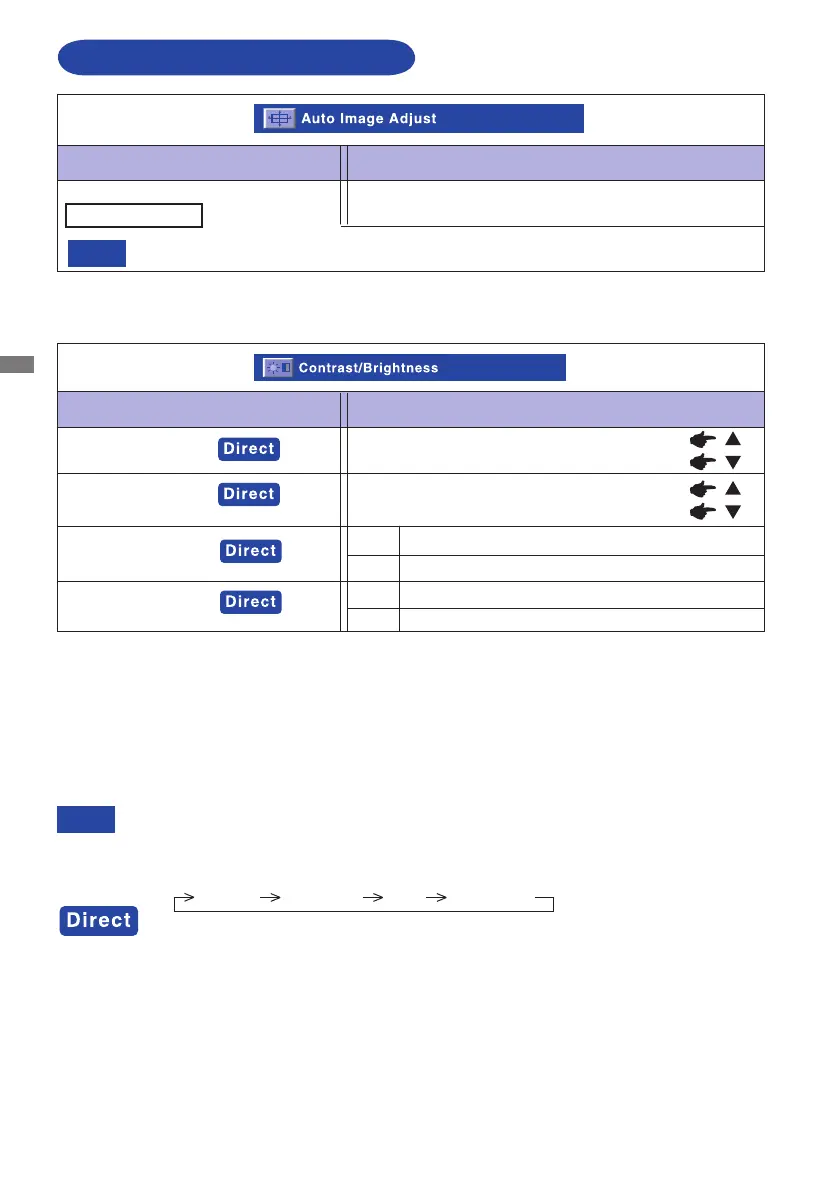
ADJUSTMENT MENU CONTENTS
Adjustment Item Problem / Option Button to Press
Adjust H. / V. Position, H.Size and Fine Tune
automatically.
* For best results, use the Auto Adjust in conjunction with the adjustment pattern. See page 14 for
SCREEN ADJUSTMENTS.
NOTE
Thescreenbecomesdarkforapproximatelyvesecondsduringtheadjustment.
Adjustment Item Problem / Option Button to Press
Contrast/Brightness
Too dark
Too bright
Too dull
Too intense
You can skip the Menu items and display an adjustment scale directly by using the following button
operations.
Contrast/Brightness/ ACR/ ECO Mode :Press the
Button when the Menu is not displayed.
Contrast, Brightness,ACR and ECO Mode are switched as follows by pressing the
/Button
successively.
Contrast Brightness ACR ECO Mode
NOTE
ECO Mode
On Brightness of back light is reduced.
Off Normal
Auto Image Adjust
Brightness *1,2,3
Contrast*2
Off Normal
On Brightness of back-light is reduced.
ACR
*1 Adjust the Brightness when you are using the monitor in a dark room and feel the screen is too
bright.
*2 Contrast and Brightness adjustment disabled when ECO Mode is active or when Opticolor Mode
is set to Text or Cinema or Game or Scenery.
*3 Brightness adjustment disabled when ACR is active.ACR and ECO Mode can not enable at the
same time.
Auto Image Adjust *
Only Analog input






 To Next Page