OPERATING THE MONITOR 11
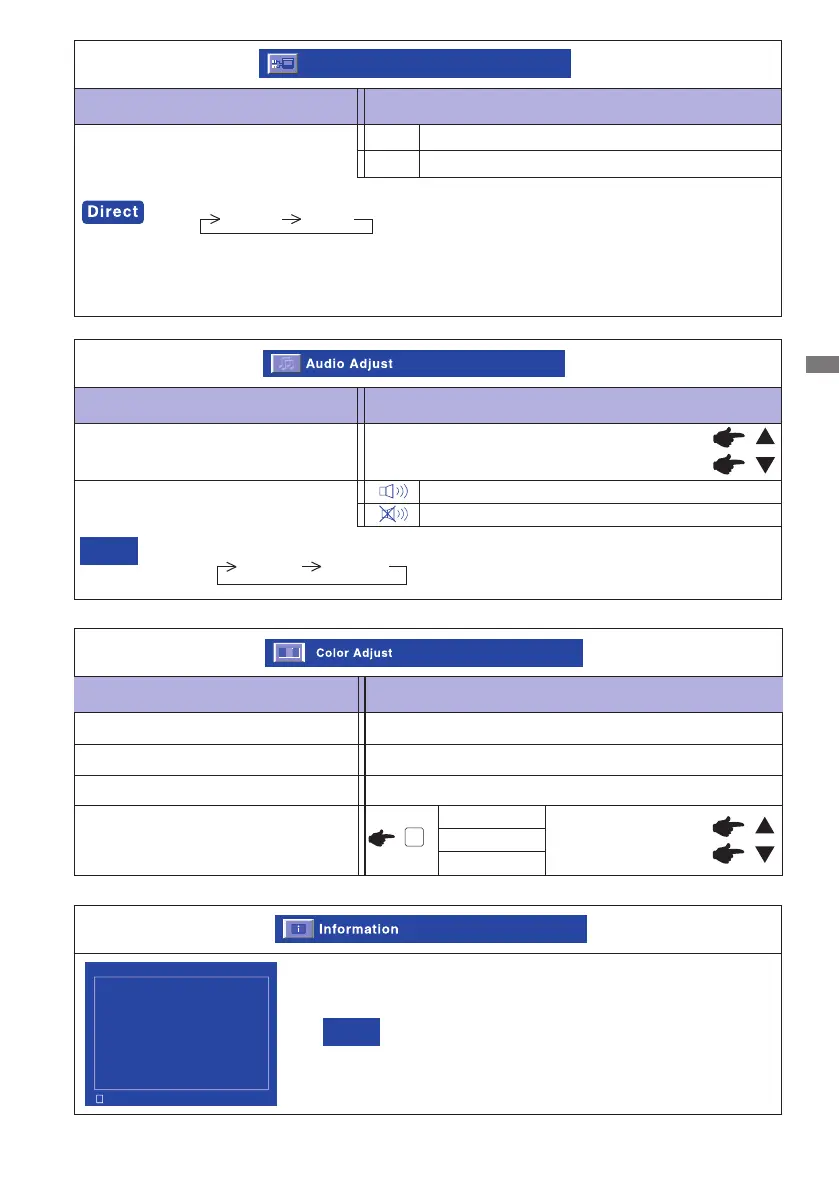
Adjustment Item Problem / Option Button to Press
Audio Adjust
Volume
Too soft
Too loud
Mute
Mute off and on are switched as follows by pressing the Select Button successively.
Mute off Mute on
NOTE
Return the sound volume to the previous level.
Turn off the sound temporarily.
Adjustment Item Problem / Option Button to Press
Input Select
Input Select
VGA and DVI are switched as follows by pressing the / Button successively.
Select the Analog input
Input Select
VGA
DVI
Select the Digital input
VGA DVI
When only one of the two signal inputs is connected to the signal source, the one
connectedis automatically selected. Input Select function is not available if there is no
signal input from theselected connector or during the power management mode.
See your graphic card user guide for more information about
changing the resolution and refresh
NOTE
Information
Displays information regarding the current input signal coming
from the graphic card in your computer.
Information VGA
1 : Exit
H. Frequency: 80.0 KHz
V. Frequency: 75.0 Hz
Resolution: 1680 x 1050
Pixel Clock: 146 MHz
Serial Number: 0598381300001
Model Number: PLE2207WS
Adjustment Item Problem / Option Button to Press
Color Adjust
9300K
6500K
Reddish white
Bluish white
5400K
Greenish white
Green
Red
Blue
Too weak
Too strong
User Color
2






 To Next Page