ENGLISH
14 BEFORE YOU OPERATE THE MONITOR
For optimal viewing it is recommended to
position yourself directly opposite to the full face
of the monitor, then adjust the monitor’s height
and angle to your own preference.
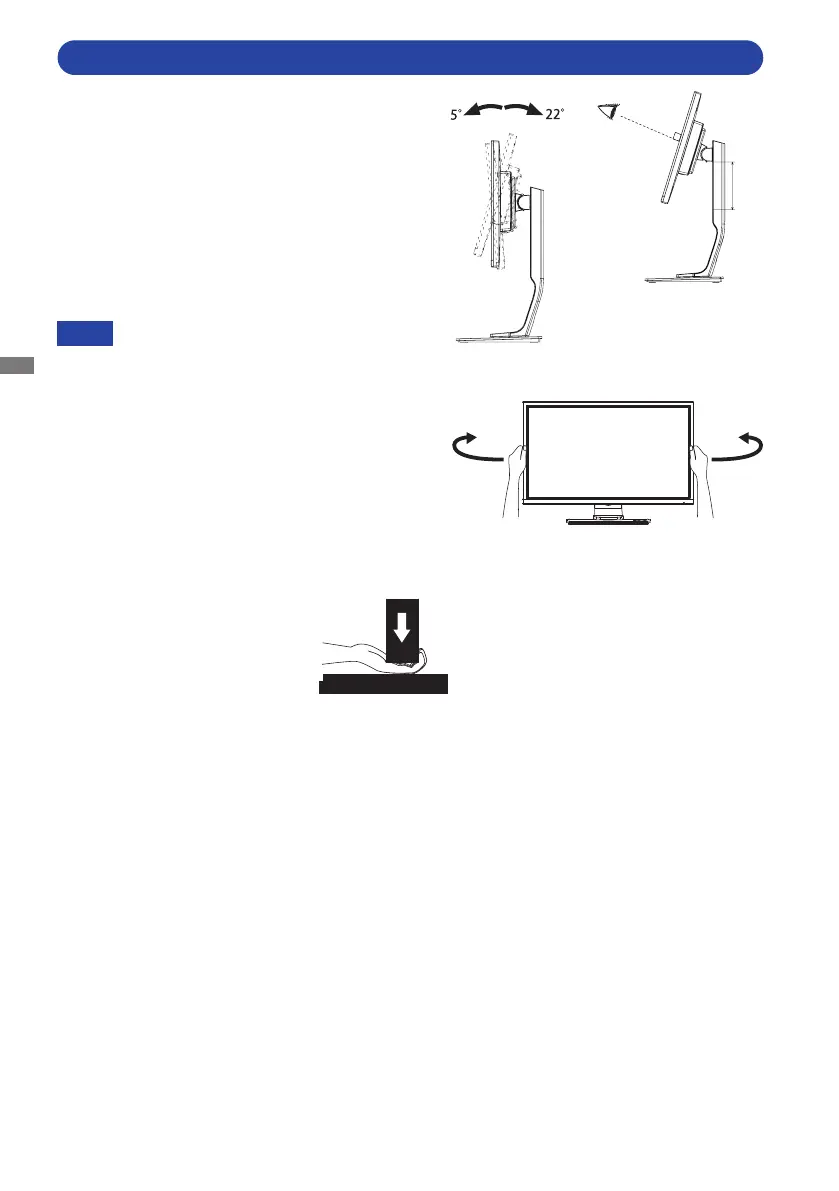
Hold the panel so that the monitor does not topple
when you change the monitor’s height or angle.
You are able to adjust the monitor's height up
to 130mm, angle up to 45° right and left, 22°
upward and 5° downward.
Do not touch the LCD screen when you
change the height or the angle. It
may cause damage or break the LCD
screen.
Careful attention is required not to pinch
your fingers or hands into the moving
part of the stand when you change the
height or the angle.
Injury can occur if care is not taken to
avoidngercontactwiththedisplays
base when adjusting the height.
NOTE
Stand
130m
ADJUSTING THE HEIGHT AND THE VIEWING ANGLE : ProLite B2482HS
45° 45°








 To Next Page