ENGLISH
24 OPERATING THE MONITOR
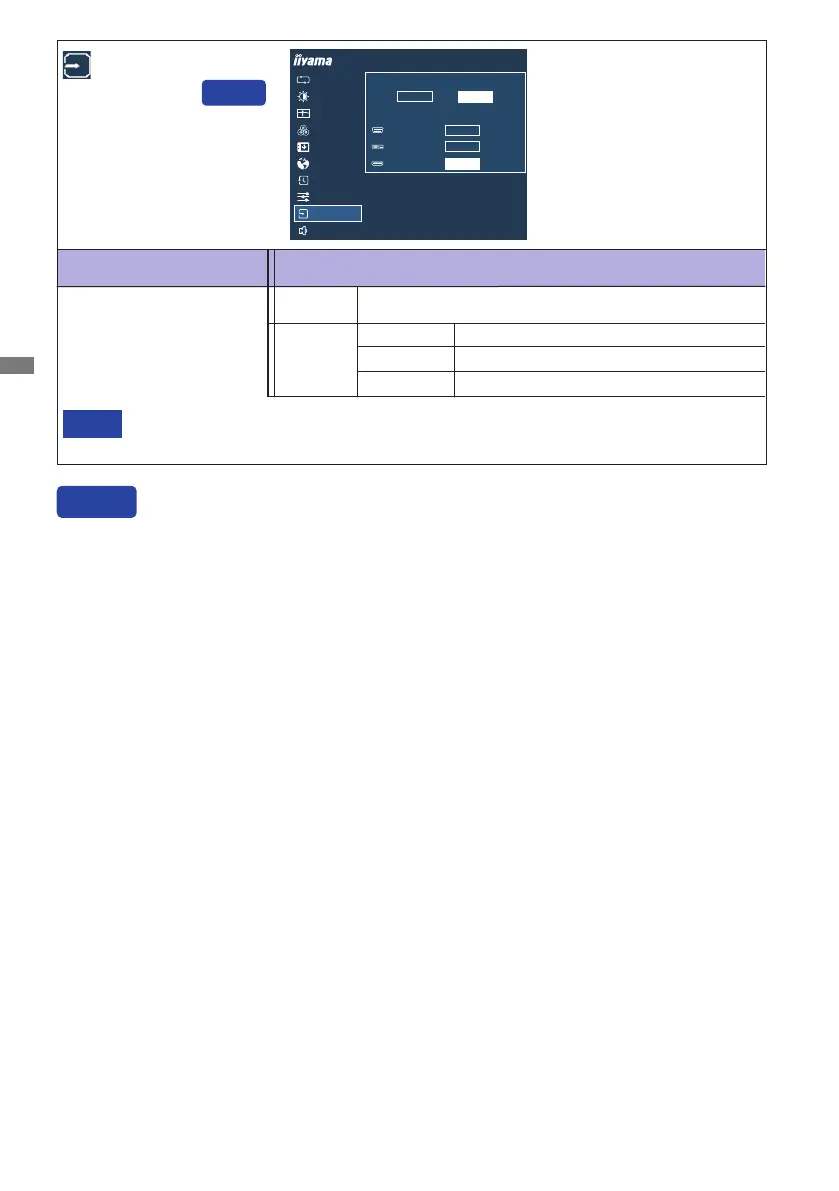
Input Source
InputsourceisxedanditwillnotbedetectedautomaticallywhenyouselectVGA,DVI
or HDMI.
NOTE
Adjustment Item
Problem / Option Button to Press
Input Select
You can skip the Menu items and directly display an option setting screen by using the following
button operations.
Input Select : Press the INPUT Button when the Menu is not displayed.
Search for an available input source and select
automatically.
Auto
SelecttheAnalog(VGA)input.
SelecttheDigital(DVI)input.
VGA
DVI
SelecttheDigital(HDMI)input.
HDMI
VGA
DVI
HDMI
AUTO ADJUST
PICTURE ADJUST
GEOMETRY
COLOR SETTINGS
LANGUAGE
RECALL
MISCELLANEOUS
INPUT SELECT
AUDIO SETTINGS
OSD
ProLite B2482HS
INPUT SOURCE
AUTO
MANUAL
MANUAL
SELECT
SELECT
SELECT
Manual








 To Next Page