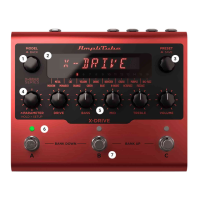
AmpliTube X-DRIVE
22
YELLOW
Based on BOSS® SD-1
One of the earliest and most collectible Japanese pedals, it’s one of the most iconic overdrive pedals ever made.
From subtle to over-the-top, it pushes amps harder without sacrificing attack clarity.
Parameters
• DRIVE: increases the amount of clipping in the distortion circuit.
From 0 to 10.
• BASS: boosts and cuts the low frequencies.
From -6 dB to +6 dB.
• MID: boosts and cuts the mid frequencies.
From -6 dB to +6 dB.
• TREBLE: boosts and cuts the high frequencies.
From -6 dB to +6 dB.
• VOLUME: sets the output level.
From 0 to 10.
• COLOR: controls the tone of the distortion.
From 0 to 10.
• MID Q: sets the bandwidth of the mid parameter EQ from narrow to wide.
From 0.2 to 3.
• MID FREQ: changes the center frequency of the mid parametric EQ.
From 80 Hz to 5000 Hz.
• EQ POSITION: sets the tone EQ pre or post clipping.
PRE or POST.
• NOISE GATE: turns the noise gate ON or OFF.
ON or OFF.
• NG THRESHOLD: adjusts the sensitivity of the gate’s threshold.
From -100 dB to 0 dB.
• NG RELEASE: adjusts the time of the gate’s release.
From 20 ms to 1500 ms.
• NG DEPTH: adjusts the gate’s deepness.
From -20 dB to -100 dB.
• COMPRESSOR: turns the compressor ON or OFF.
ON or OFF.
• COMP SENSITIVITY: sets the sensitivity of the compressor.
From 0 to 10.
• COMP OUT: sets the output level of the compressor.
From 0 to 10.
• CAB SIM: selects the cabinet simulator.
CAB 1, CAB 2, CAB 3, CAB 4, BASS, OFF.
• MIX: regulates the amount of the dry and wet distorted signal. By default the mix is set to 100% WET.
From 0% to 100%.


 To Next Page
 Loading...