20
032007
Please follow the following procedure should a fault occur during operation:
+
Switch off device using the main switch (6)
+
Carry out corrective measures
+
Restart the device
If the actions described fail to resolve the fault or another error code is displayed then take one of the following steps:
- Contact the service department
- Send the device for repair, including a short description of the fault.
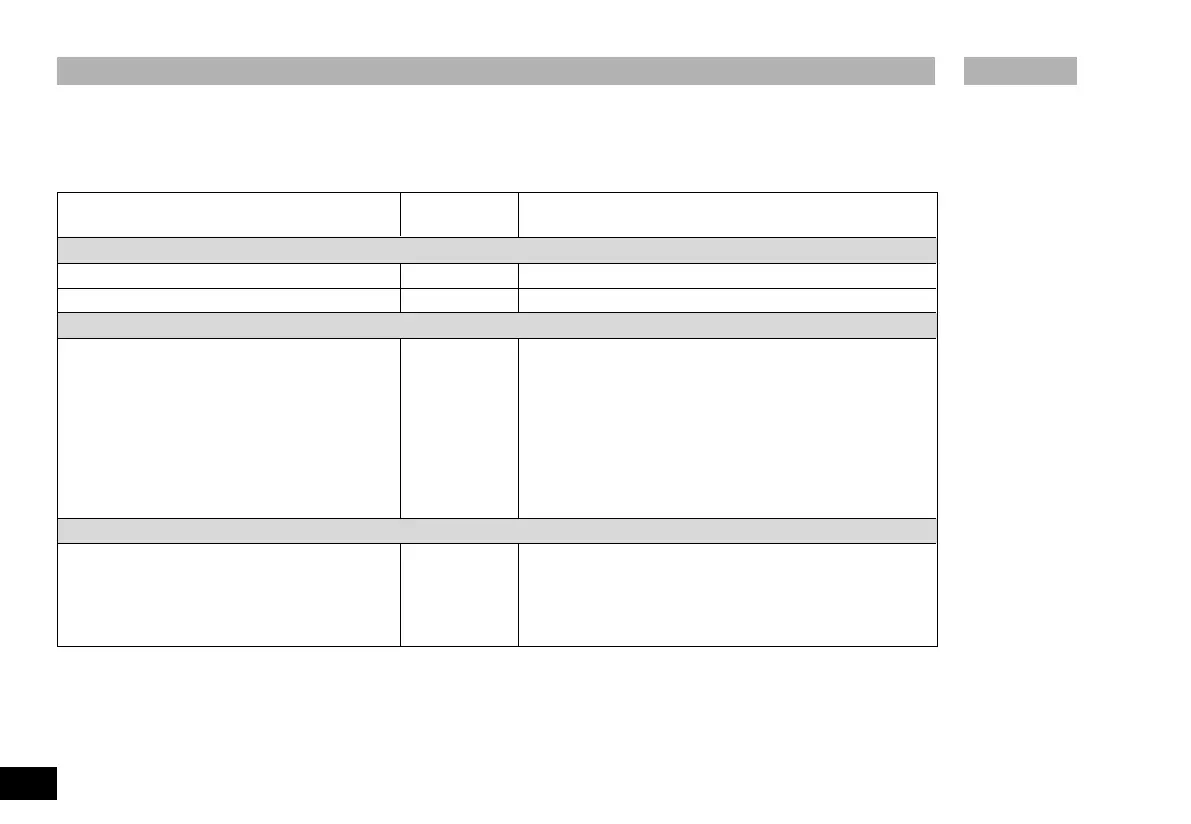
Faults and Troubleshooting
Fault Effect Solution
Undervoltage
Mains voltage failed during operation Device off - Switch device off and on
Mains plug connected with switch set to “On” Device off - Switch device off and on
Overtemperature
Device will switch automatically to cooling mode if Motor speed set - Allow device to cool down:
operated with excess load automatically - Allow to continue running in cooling mode
(not adjustable) - Switch device off. Switch on again after some time.
(Duration depends on the magnitude of the overtemperature)
A standard power meter is used between the mains socket
and the mains plug to prevent the device failing as a result
of excess load.
Power consumption < 500 W : continuous operation
Power consumption > 500 W : device may switch to cooling mode
Electronic fault
Device switches to cooling mode Motor speed set - Switch off device and allow to cool in order to exclude
automatically the possibility of overtemperature.
(not adjustable) If the device continues to switch to the cooling mode after
it has cooled down then please send it to the Servicing
department for repair, enclosing a short description of the fault.
Artisan Technology Group - Quality Instrumentation ... Guaranteed | (888) 88-SOURCE | www.artisantg.com





 To Next Page