For the cooking instructions refer to "Hints
and tips" chapter, Moist Fan Baking.
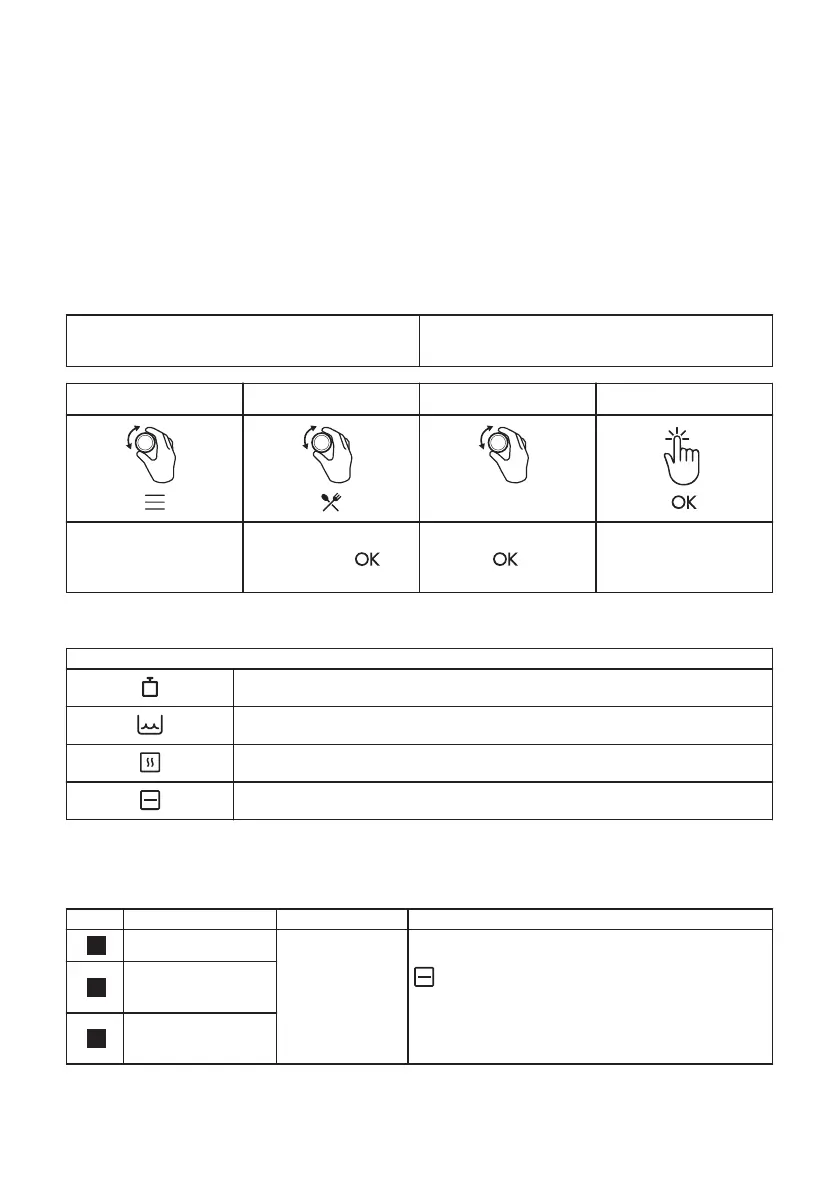
How to set: Assisted Cooking
Every dish in this submenu has a recommended heating function and temperature. Use the
function to prepare a dish quickly with default settings. You can also adjust the time and the
temperature during cooking.
For some of the dishes you can also cook
with:
• Weight Automatic
Step 1 Step 2 Step 3 Step 4
P1 - P45
Enter the menu. Select Assisted Cook‐
ing. Press .
Select the dish. Press
.
Insert the dish to the
oven. Conrm set‐
ting.
Assisted Cooking
Legend
Weight Automatic available.
The amount of water for the steam function.
Preheat the appliance before you start cooking.
Shelf level.
The display shows P and a number of the
dish that you can check in the table.
When the function ends check if the food is
ready.
Dish Weight Shelf level / Accessory
1
Roast Beef, rare
1 - 1.5 kg; 4 - 5
cm thick pieces
2; baking tray
Fry the meat for a few minutes on a hot pan.
Insert to the appliance.
2
Roast Beef, medi‐
um
3
Roast Beef, well
done
ENGLISH 14



 To Next Page