IKE 4 User Manual 23
Anchor Type List
List of Values
Select List
Select this icon to create a single level list in IKE Ofce to ensure only one
radio button may be selected in the eld. This allows output of coded
values (output string) for integration mapping.
Select List Example:
Anchor Type
1” Triple Eye - Anchor Rod and Plate
10-Inch Double Helix 1 Pin - 3/8” or 1/2” Anchor Hub
10-Inch Double Helix 2 Pin- 3/8” or 1/2” Anchor Hub
10-Inch Double Helix 3 Pin- 3/8” or 1/2” Anchor Hub
3/4” Double Eye - Anchor Rod and Plate
4-Inch Double Helix 10 Pin - Granite Anchor
5/8” Single Eye - Anchor Rod and Plate
8-Inch Double Helix 3 Pin- 3/8” or 1/2” Anchor Hub
etc...
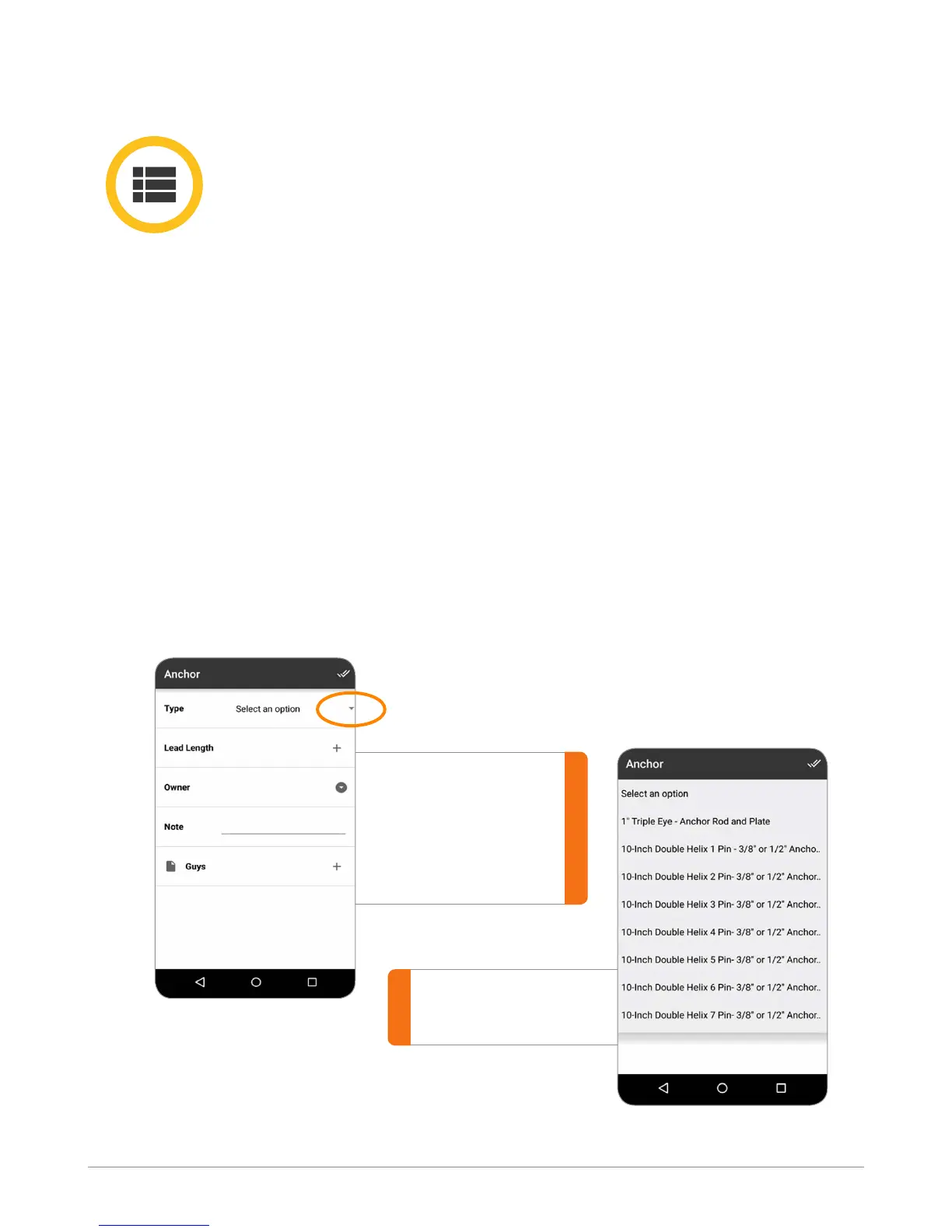
Once a Select List is dened, below is an example of how the list will
appear on the mobile screen within IKE Field.
Clicking on the
down arrow
brings up the list
for user to select.
IKE Field screen
Ike Field screen depicting a
select list.



 To Next Page