PAIRING MODE
From OFF, Push and hold the centre button for 8 seconds. After 5 seconds the
speaker will indicate that it is ON. Keep holding without releasing for another 3
seconds, and the speaker will enter Pairing Mode. The LED light will flash Blue
rapidly.
See your phone/music device manual for pairing instructions.
Then you will hear a voice prompt while the Pairing successful.
LOCATION OF CONTROLS
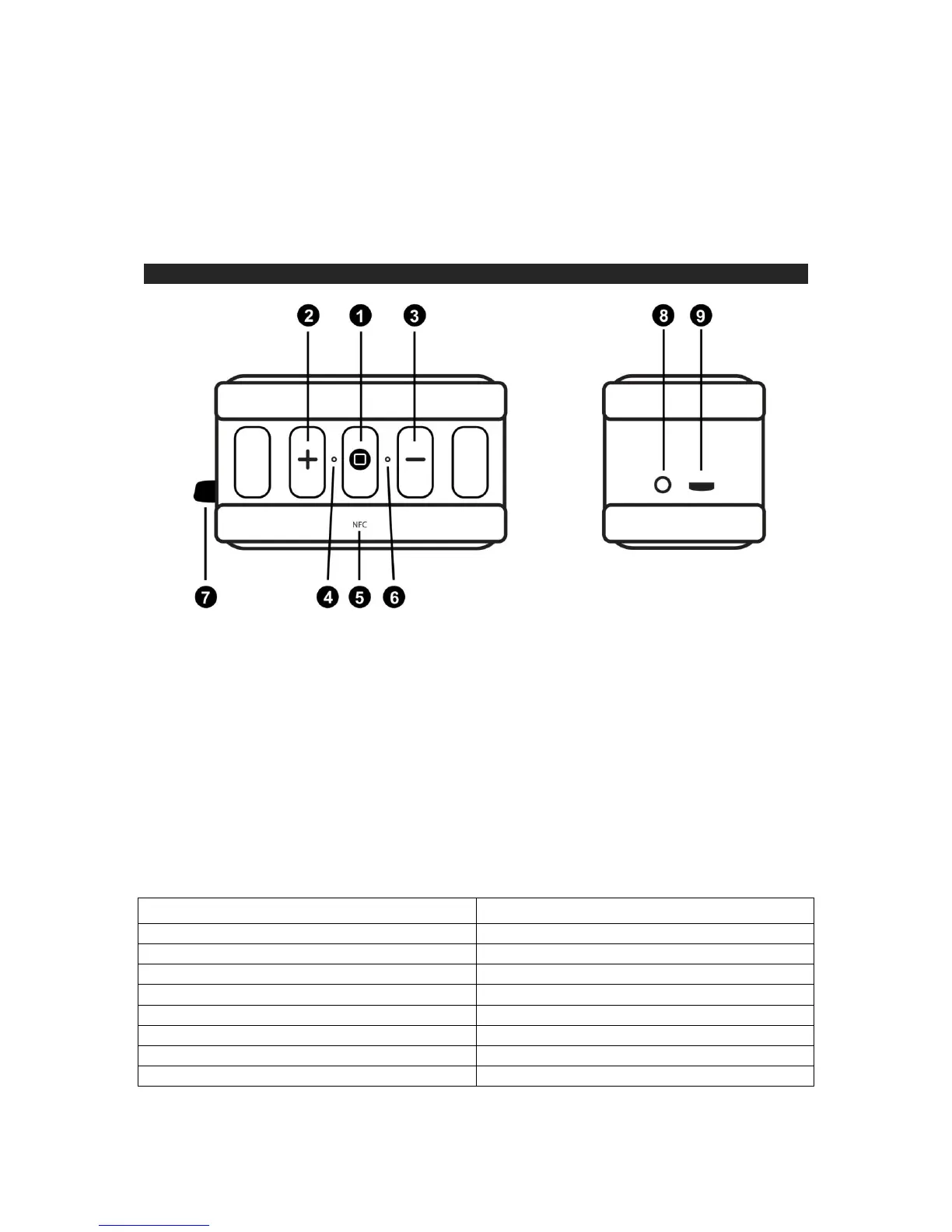
TOP SIDE
1. FUNCTION BUTTON (ON/ OFF, PLAY/ STOP, PAIR OR PICK UP/ HANG UP)
2. VOLUME UP OR NEXT SONG
3. VOLUME DOWN OR PREVIOUS SONG
4. LED – POWER / CHARGING / PAIRING STATUS INDICATOR
5. NFC PAIRING AREA
6. MICROPHONE
7. HOOK FOR WRIST STRAP
8. 3.5MM AUX IN JACK
9. CHARGING JACK(MICRO USB)
LED INDICATOR


 To Next Page