PAGE 9PAGE 8
A.
B.
C.
D.
3.Product Operating3.Product Operating
3.Product Operating
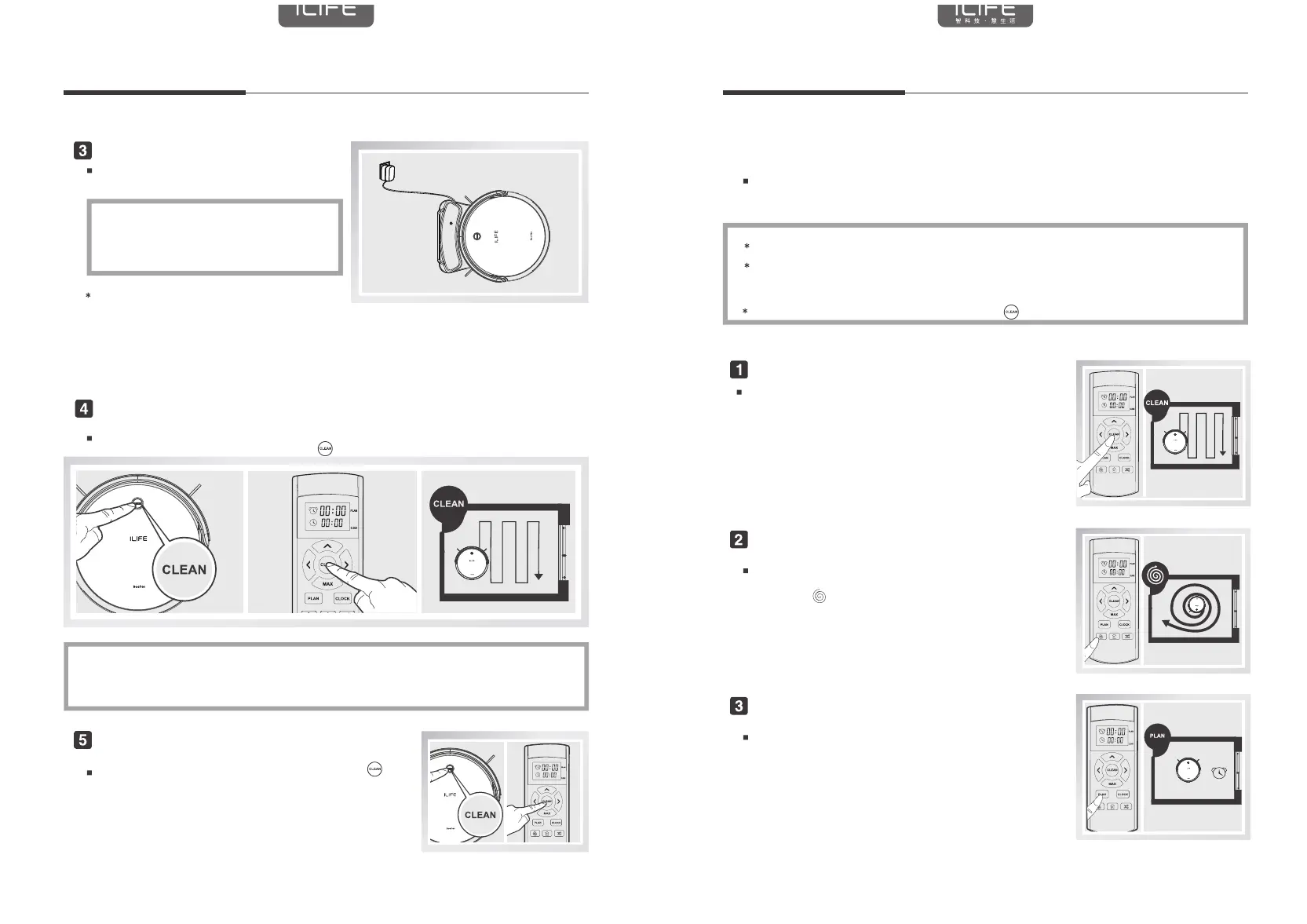
Charging robot
Cleaning start
Stop working
3.3 Work mode
Auto cleaning
Spot cleaning
Time programmed cleaning
Put the host into the charging stand,
pay attention to align the charging pole piece
CLEAN button orange light flashing or 3-line lights
gradually superimposed, charging; CLEAN key long green
light or 3 lines long bright, the charge is complete.
Tips:
When charging for the first time, please charge continuously for 12 hours;
For daily use, store the machine in a cradle and ensure that the cradle is plugged in
If you do not use the machine for a long time, please fully charged the machine,
turn off the power switch, stored in dry and ventilated place;
Do not use the manual charging mode when setting the reserved operating mode.
It is recommended to use the auto charging mode.
The Auto Sweep mode can be activated by either the CLEAN button on the main unit
or by the remote controller Sweep key
Before starting this mode, make sure that the host CLEAN key is lit and the host is woken up.
If the host is not woken up, briefly press the CLEAN button or the remote control button (clean)
to wake it up. If you need to select another mode, refer to the [Mode Selection] section.
Press the CLEAN key or the remote control key
on the panel to stop the work.
In order to adapt to different ground conditions, to achieve the depth of cleaning,
this product has a variety of cleaning mode, according to the need to choose through
the remote control.
Use the remote control to switch directly to any mode.
Before starting the following modes, make sure that the host CLEAN key is on and
the host is woken up. If the host is not woken up, briefly press the CLEAN button
on the main unit or the CLEAN key on the remote control to wake it up.
After starting the following modes, press the
button to terminate the mode.
In the automatic cleaning mode, the machine will
automatically clean the room, and according to different
ground conditions to adjust. Press the CLEAN button on
the main unit or remote control to enter the Auto Sweep mode.
For more concentrated ground garbage environment,
the host in the designated area for centralized cleaning.
Press the
key on the remote control or the
SPOT key on the display to begin the key sweep.
You can reserve machine cleaning time on demand.
Once set, the machine will leave the charging station
at the set time to start the cleaning work,
the cleaning machine will automatically return to the
charging station after charging.
PAGE 9PAGE 8
A.
B.
C.
D.
3.Product Operating3.Product Operating
3.Product Operating
Charging robot
Cleaning start
Stop working
3.3 Work mode
Auto cleaning
Spot cleaning
Time programmed cleaning
Put the host into the charging stand,
pay attention to align the charging pole piece
CLEAN button orange light flashing or 3-line lights
gradually superimposed, charging; CLEAN key long green
light or 3 lines long bright, the charge is complete.
Tips:
When charging for the first time, please charge continuously for 12 hours;
For daily use, store the machine in a cradle and ensure that the cradle is plugged in
If you do not use the machine for a long time, please fully charged the machine,
turn off the power switch, stored in dry and ventilated place;
Do not use the manual charging mode when setting the reserved operating mode.
It is recommended to use the auto charging mode.
The Auto Sweep mode can be activated by either the CLEAN button on the main unit
or by the remote controller Sweep key
Before starting this mode, make sure that the host CLEAN key is lit and the host is woken up.
If the host is not woken up, briefly press the CLEAN button or the remote control button (clean)
to wake it up. If you need to select another mode, refer to the [Mode Selection] section.
Press the CLEAN key or the remote control key
on the panel to stop the work.
In order to adapt to different ground conditions, to achieve the depth of cleaning,
this product has a variety of cleaning mode, according to the need to choose through
the remote control.
Use the remote control to switch directly to any mode.
Before starting the following modes, make sure that the host CLEAN key is on and
the host is woken up. If the host is not woken up, briefly press the CLEAN button
on the main unit or the CLEAN key on the remote control to wake it up.
After starting the following modes, press the
button to terminate the mode.
In the automatic cleaning mode, the machine will
automatically clean the room, and according to different
ground conditions to adjust. Press the CLEAN button on
the main unit or remote control to enter the Auto Sweep mode.
For more concentrated ground garbage environment,
the host in the designated area for centralized cleaning.
Press the
key on the remote control or the
SPOT key on the display to begin the key sweep.
You can reserve machine cleaning time on demand.
Once set, the machine will leave the charging station
at the set time to start the cleaning work,
the cleaning machine will automatically return to the
charging station after charging.


 To Previous Page
 Loading...