17
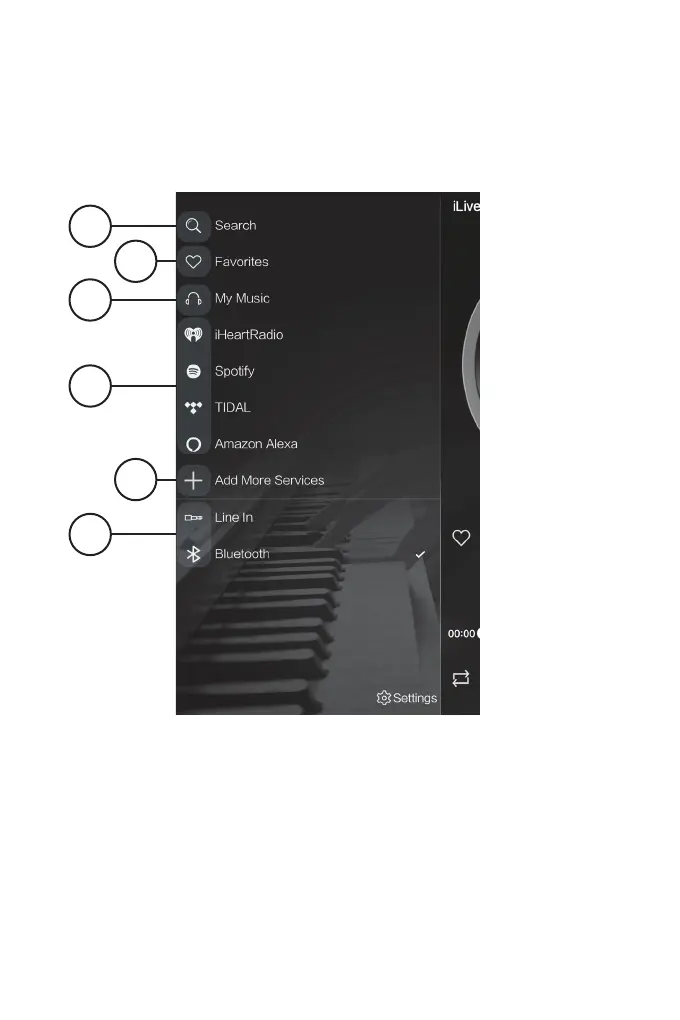
Main Menu Screen
1. Search
Search for songs, albums and artists.
2. Favorites
Open songs, artists, albums, or
stations that you have saved.
3. My Music
Open music that is stored on your
mobile device.
4. Internet Music Services
Available third-party music apps.
5. Add more Services
Press to add more third-party apps.
6. Alternate Play Modes
Select Bluetooth Mode. *Note: Line In
Mode is not available on this particular
model of iLive Wi-Fi speaker.
1
3
6
*
2
4
5


 To Next Page