Illustra Flex 3MP and 8MP Outdoor Bullet Quick Start Guide
8200-1456-03 G0 8
Procedure 2 Connecting the wires
Step Action
1 Attach the camera to the fixed surface.
2 Pass all the signal cables through the mounting bracket.
3 Connect the power cable to the power plugs with one of the following options:
a AC 24V: Connect 24V (~) cables to terminals ~AC 24V.
b PoE: Connect the RJ-45 jack to a PoE compatible network device that supplies power
through the Ethernet cable.
4 Insert audio cable and alarm cable to the unit. Connect the network cable to the RJ-45
terminal of a switch. Refer to Input/Output connector descriptions on page 4 for further
information regarding wiring.
Note:The power source needs to be NEC Class 2 or LPS. The PoE connection should be provided
by a UL Listed product and the connections shall be made in accordance with Article 800 of the NEC
or local regulations.
- End -
Procedure 3 Adjusting the camera position
Step Action
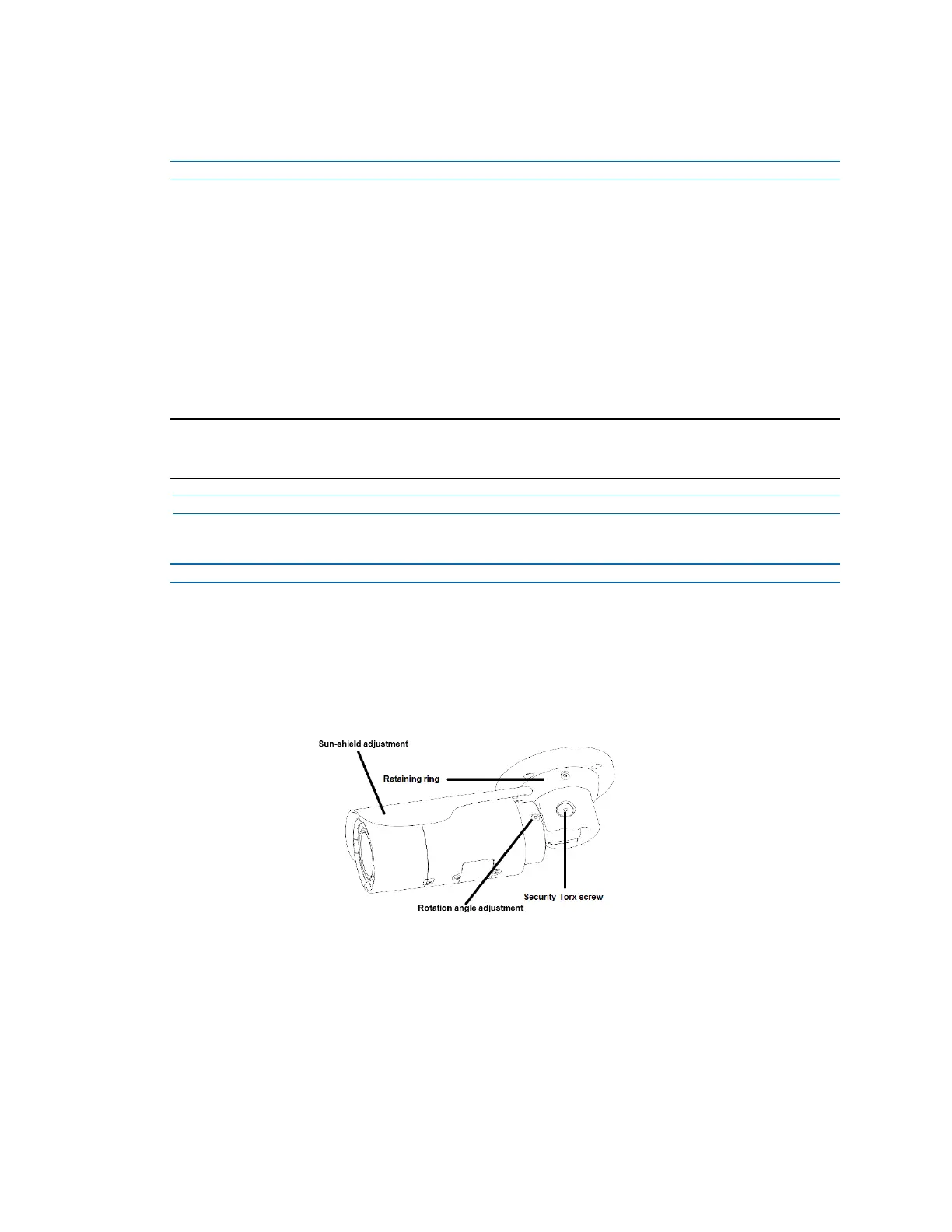
1 Use the security key to loosen the security torx screw on both sides of the mount bracket so
that you can tilt the camera.
2 Loosen the screw on the retaining ring to adjust the camera angle.
3 After adjustments, fasten the screws and retaining ring back to the camera.
Figure 13 Adjusting the 3MP (IFS03B1BNWIT) camera position


 To Next Page