Illustra Flex 3MP Indoor and Outdoor Dome Cameras Quick Start Guide
8200-1456-02 E0 14
Checking appearance
When first unboxing, check whether if there is any visible damage to the appearance of the unit and
its accessories. The protective materials used for the packaging should be able to protect the unit
from most types of accidents during transportation.
Remove the protective part of the unit when every item is checked in accordance with the list in In
the box on page 13.
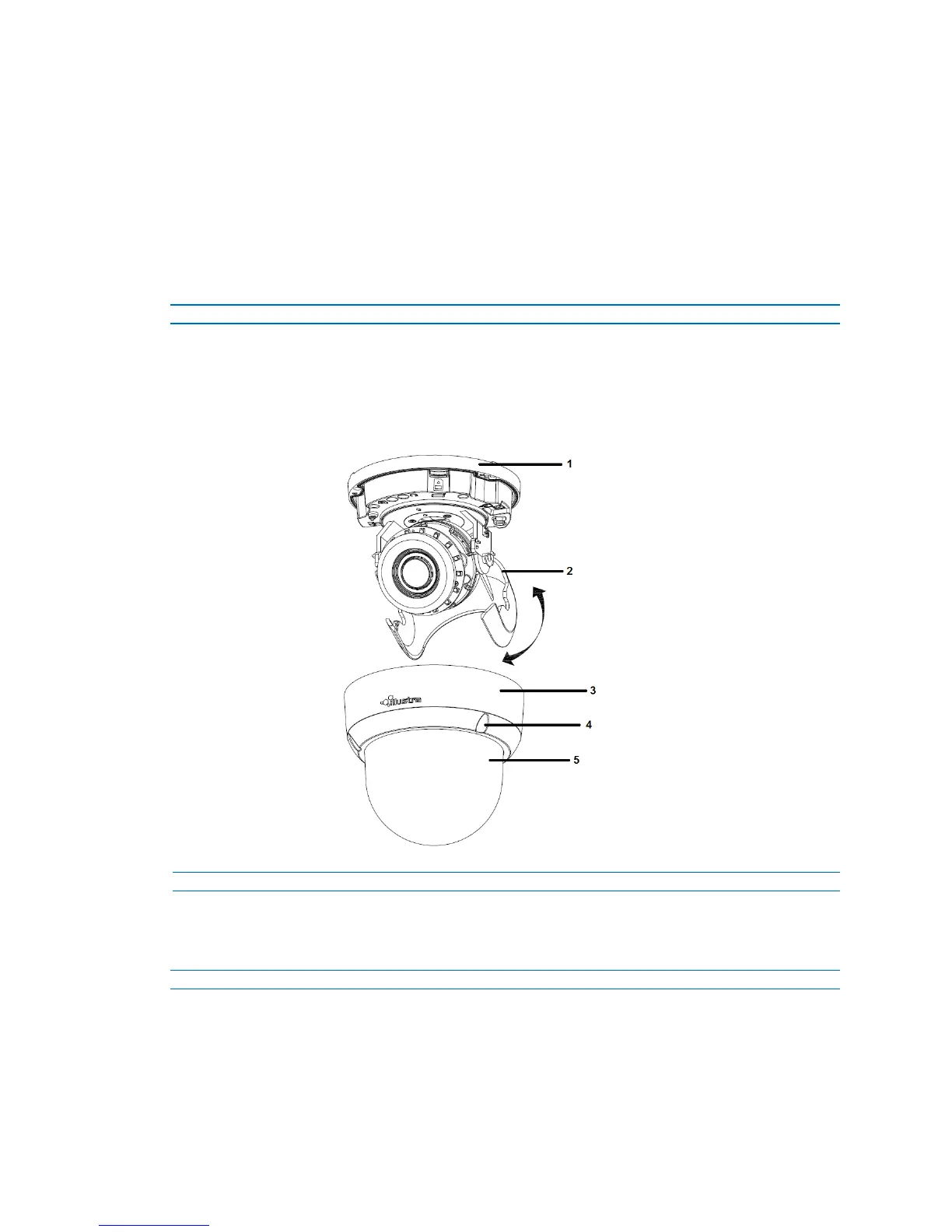
Procedure 6 Disassembling the Camera
Step Action
1 Remove the screws (4).
2 Gently remove the camera housing (3) and dome cover (5).
3 Set the camera housing aside.
Figure 21 Disassembling the outdoor camera
- End -
Procedure 7 Connecting the wires
Connect the power cable to the power plugs with one of the following options:
Step Action
1 AC 24V:
a Insert the power cable for AC 24V.
b Connect 24 V (~) cables to terminals ~AC 24V.
2 PoE:


 To Next Page