Illustra Pro PTZ Outdoor Housing
8 Quick Reference Guide
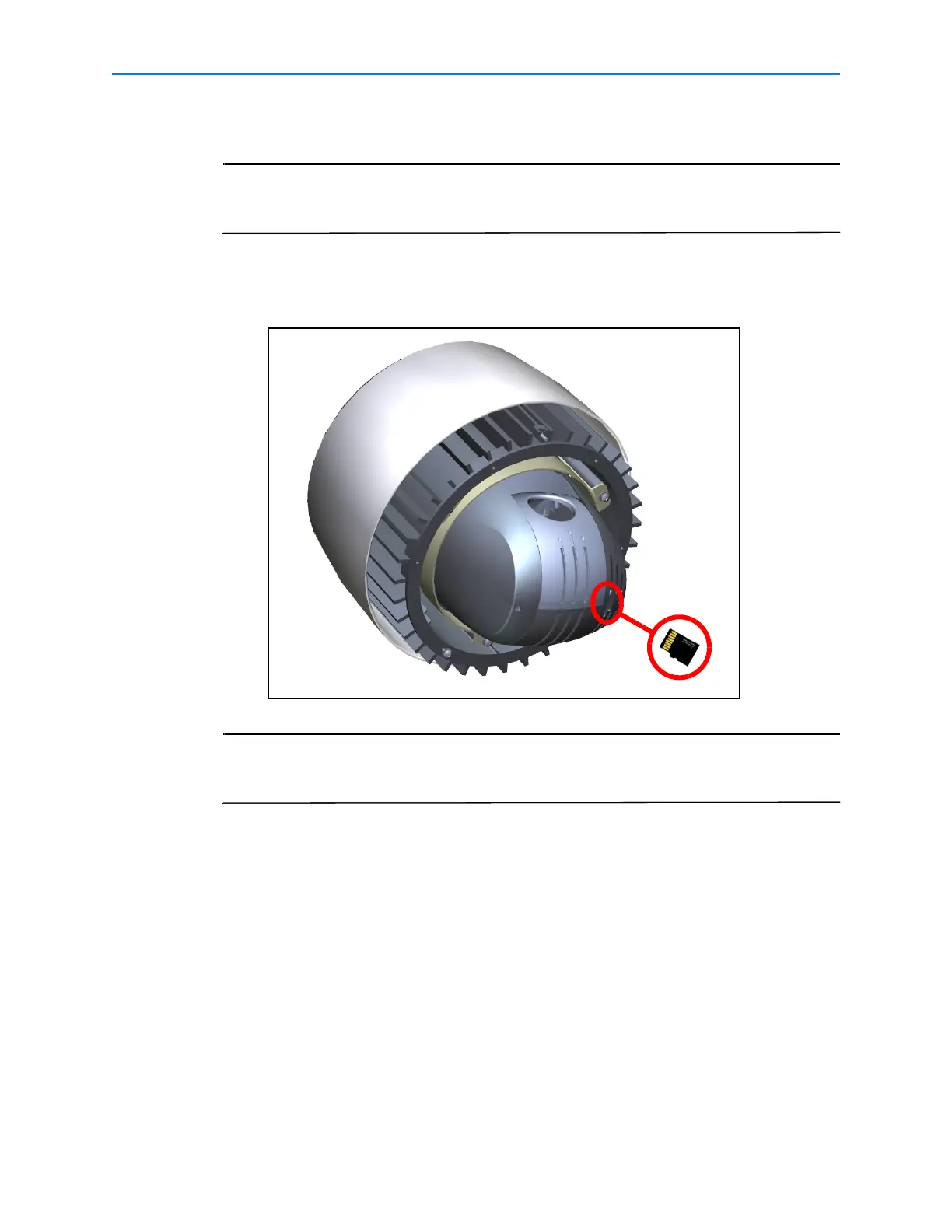
11 If required, a microSD memory card can be installed in the dome:
The microSD card is an optional accessory and is not supplied with the dome. The
maximum size of microSD card that can be used with the dome is 32GB. Contact
your Tyco Security Products representative for further information.
a Align the microSD card with the memory card slot in the dome as shown, the gold-
colored contacts should face towards the camera lens as seen in
Figure 11.
Figure 11
Push the microSD card into the memory card slot until it locks into position.To
remove the microSD card push the card gently until it disengages from the dome.
Remove the microSD card.
12 Attach the bubble assembly:
a Remove the bubble assembly from the packaging.
b Attach the plastic lanyard on the housing to the screw on the inside of the trim ring of
the bubble assembly.
c It may be necessary to orientate the plastic lanyard to the position shown in Figure
12. This will ensure that the plastic lanyard does not become trapped between the
bubble assembly and the camera housing and will aid with alignment.


 To Next Page