1
2
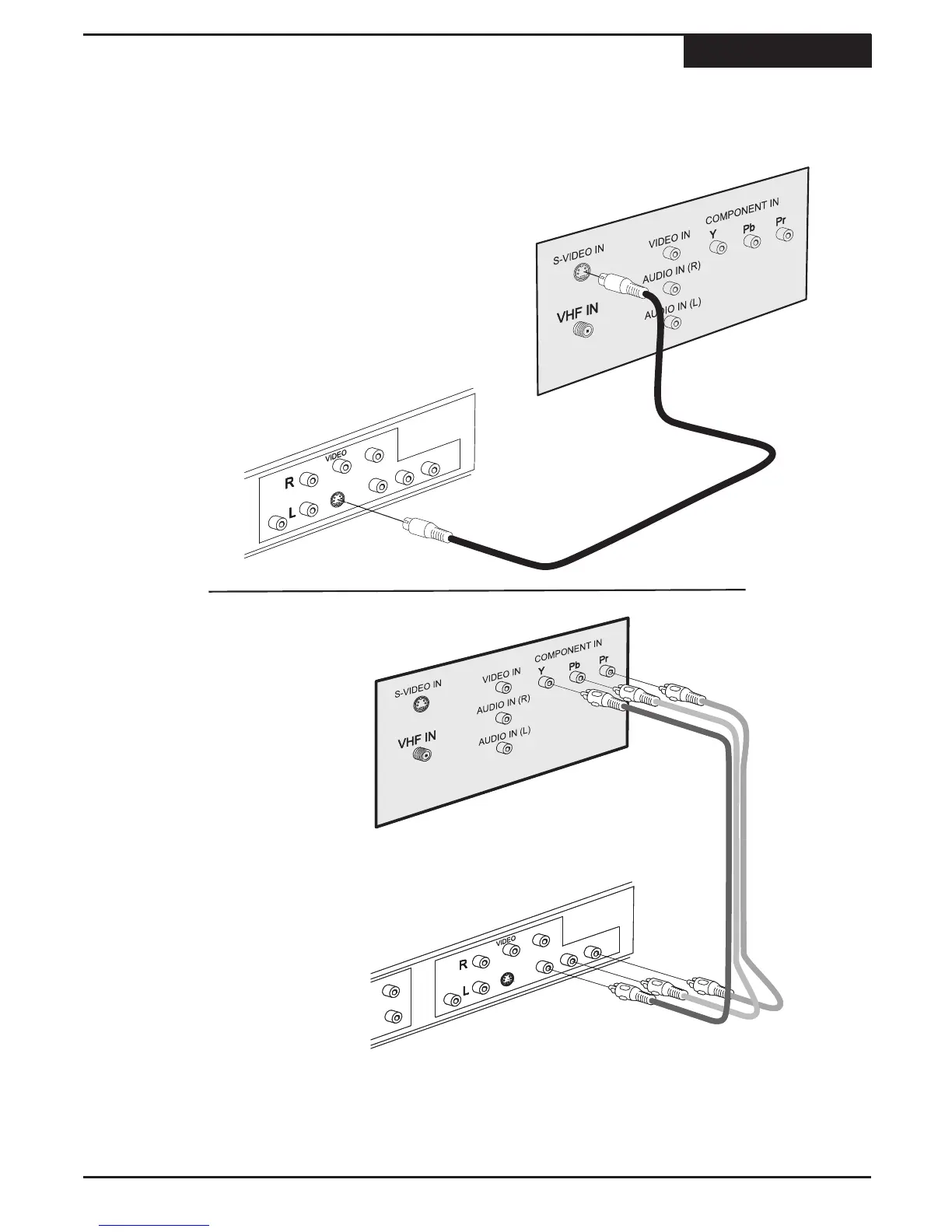
You can enjoy high quality picture reproduction by
using the component video output instead of S-Video
or Composite video output. Connect the cables per
the illustration.
Change the Setup Menu/A/V
Output/Scan Mode to Progressive if
your TV supports P-SCAN or
Interlace if it supports component.
S-VIDEO is a higher quality connection than standard composite video, and requires a special S-Video cable (not
included). The S-Video connector is distinguishable by its 4 pins, as shown below. If your TV has an S-Video input,
it's recommended that you use this type of connection for better picture quality.
First, obtain a special S-Video cable. Connect the
S-Video output from the unit to the corresponding
input on your TV.
1
On your TV, select the S-Video input. This is
normally done by selecting "Video 2" or "AV2" with
the remote control. On some TVs, this is done by
selecting a particular channel.
On your TV, select the component or
progressive scan input. This is
normally done by selecting "Video 2"
or "AV2" with the remote control. On
some TVs, this is done by selecting a
particular channel.
2
S-Video & Component Video Connections
Connections
10



 To Next Page