33
TROUBLESHOOTING
No flashes are coming
out of the applicator.
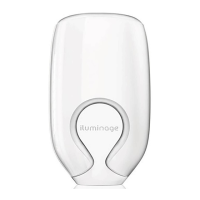
elōs energy button on
base is flashing.
Accessory activation
button on base is
flashing.
"Empty" indicator is
blinking.
"Empty" indicator is
constantly on.
Silver RF contact bars
not in contact with
the skin in treatment
area.
elōs activation
button was not
pressed.
elōs energy level was
not selected.
If you still have questions about your iluminageTOUCH system, contact Customer Care at
www.iluminagebeauty.com or call us toll free at 1-877-651-1177
Cartridge slot is empty.
Accessory slot is empty.
5% left on the elōs cartridge.
No more pulses remaining in
elōs cartridge.
In order for the system to
flash pulses, make sure that
the following 3 conditions
are met: elōs level is
selected, elōs activation
button is pressed, silver RF
contact bars are in contact
with skin.
1. Insert cartridge or a
protective cap.
1. Insert protective cap or
attach desired accessory.
1. Order a new cartridge
if you plan to continue
treatments.
1. Insert a new elōs cartridge.
1.1.
2.
3.
1.
1.
1.
1.
PROBLEM POSSIBLE CAUSE SOLUTION


 To Next Page