Energy Report
The mode "logger" is used to generate the energy report (without the aid
of any third-party software) also viewable by the individual user.
The system administrator is also allowed to send the energy report by
mail, provided that the interface has the chance to reach the Internet. This
report can be either Daily, Weekly or Monthly and sent at decided date
and time.
This option is not available to standard users that are permitted only to
view their own consumption in a selected time period and export it.
Setup and logger management
First of all you must access in with mode "Administrator" or "Service". In
the "System Mode", select the "Logger" and save the new operating
condition.
After this operation, the interface is ready to be configured and to operate
self standing.
As first step, go to the tab selection "Admin" and enter the daylight saving
time typical of the country, enable it, if desired, using the appropriate
check box, and synchronize the time and date by the button "Sync with
OS"
How to add device to Logger
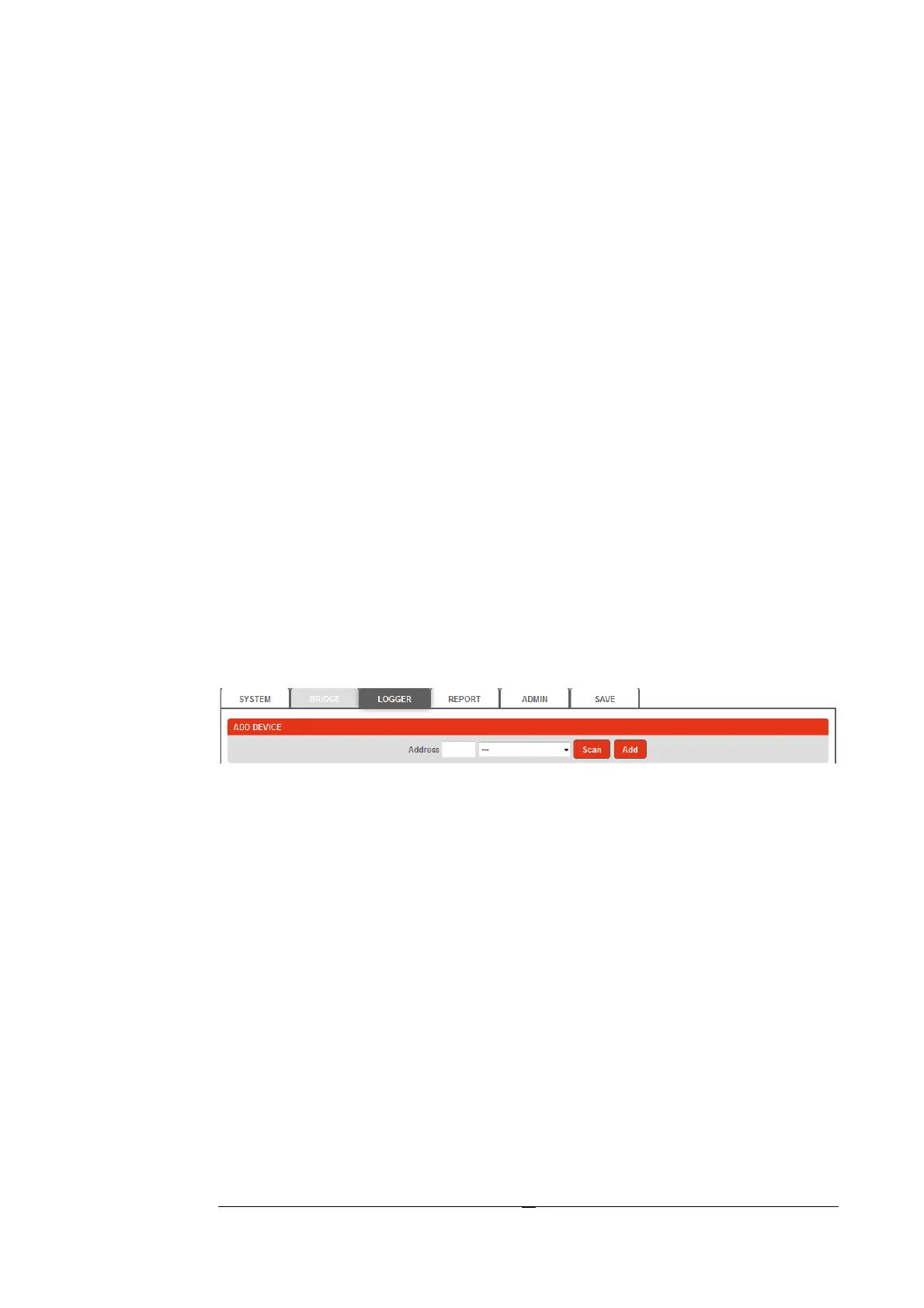
In the "Logger" menu the first section is a special feature dedicated and
enabled only for users Admin and Service.
There are only two possible choices :
1. Add device manually (Add)
2. Allow the interface to discover all devices on the network and, at the
end, add only the interested (Scan).
In the first case, manually enter the address of node ModBus
corresponding to the instrument you want and click on the add button
"Add".
In the second case, start the automatic scanning through the "Scan"
button and wait for the conclusion. When the automatic scanning ends, the
drop-down selector will show the list of found instruments. Select the
device you want and click on the "Add" button. Repeat for all the
concerned instruments.
In both cases, at the end, the interface shows the default name eg.
"User1" that can be maintained or changed.
Warning! This name is also the “Login” name of the user.


 To Next Page