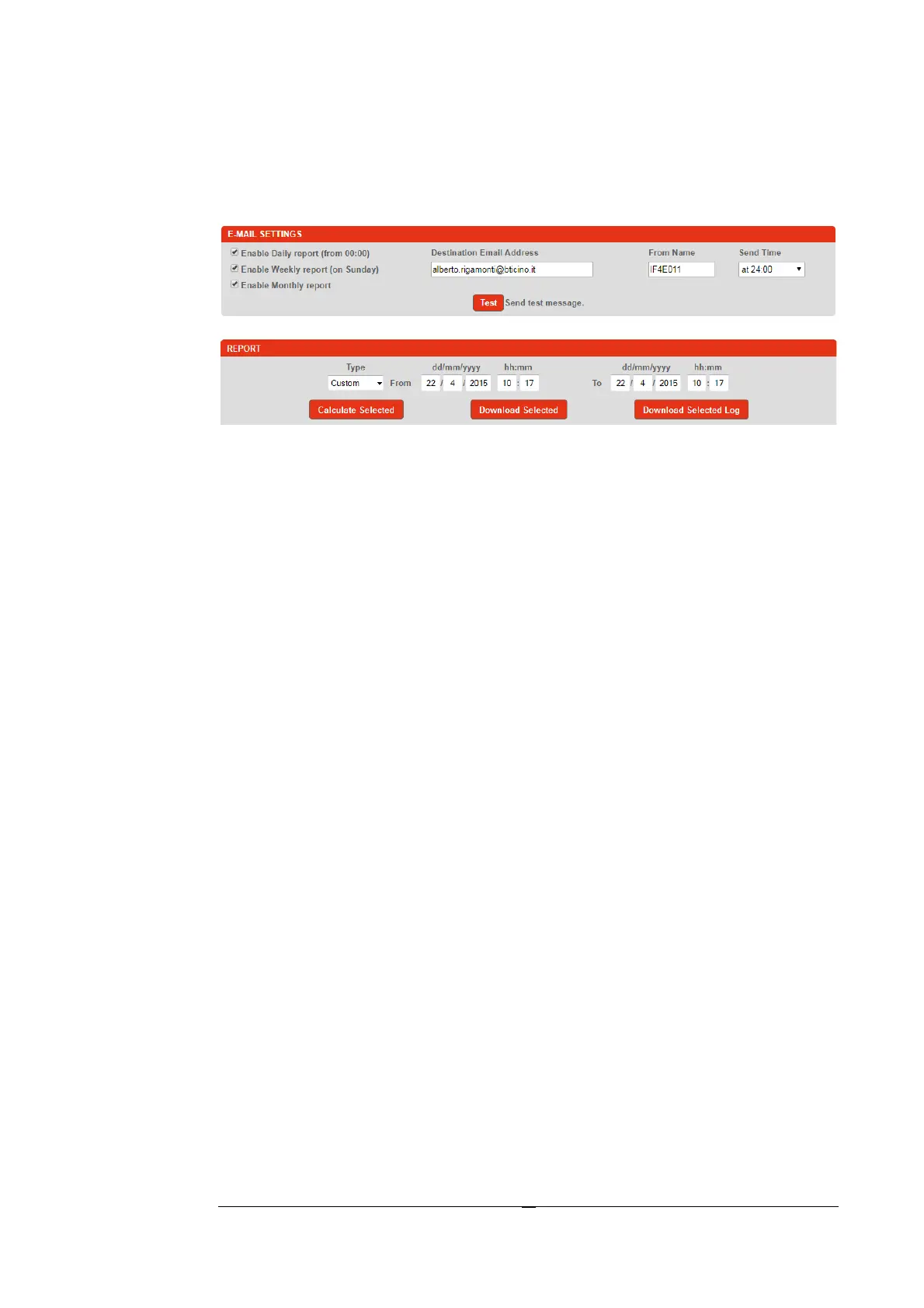
The Report
Through the appropriate section "Report" the user can see the energy
consumption in relation to a period. This section contains the options that
must be set to have the delivery of the report by e-mail.
The "Report" section, contains the main controls of the reporting function.
As a first step, set the time period, typically "from"... "to", of which
retrieving the consumption data.
Type : in the search box are proposed some types of research :
1. Custom – Free search, set using the appropriate input box.
2. Last hour – Last hour Energy report.
3. Today – Energy report of the current day
4. Last week – Energy report of the current week.
5. Last month – Energy report of the current month.
Calculate Selected : this function calculates the power consumption for
the selected instruments showing it directly to screen.
Download Selected : this feature is similar to the previous one except that
the output is generated in a file format "csv".
Download Selected Log : this function will return a .csv file of all
individual readings taken every 15 minutes for all selected devices.


 To Next Page