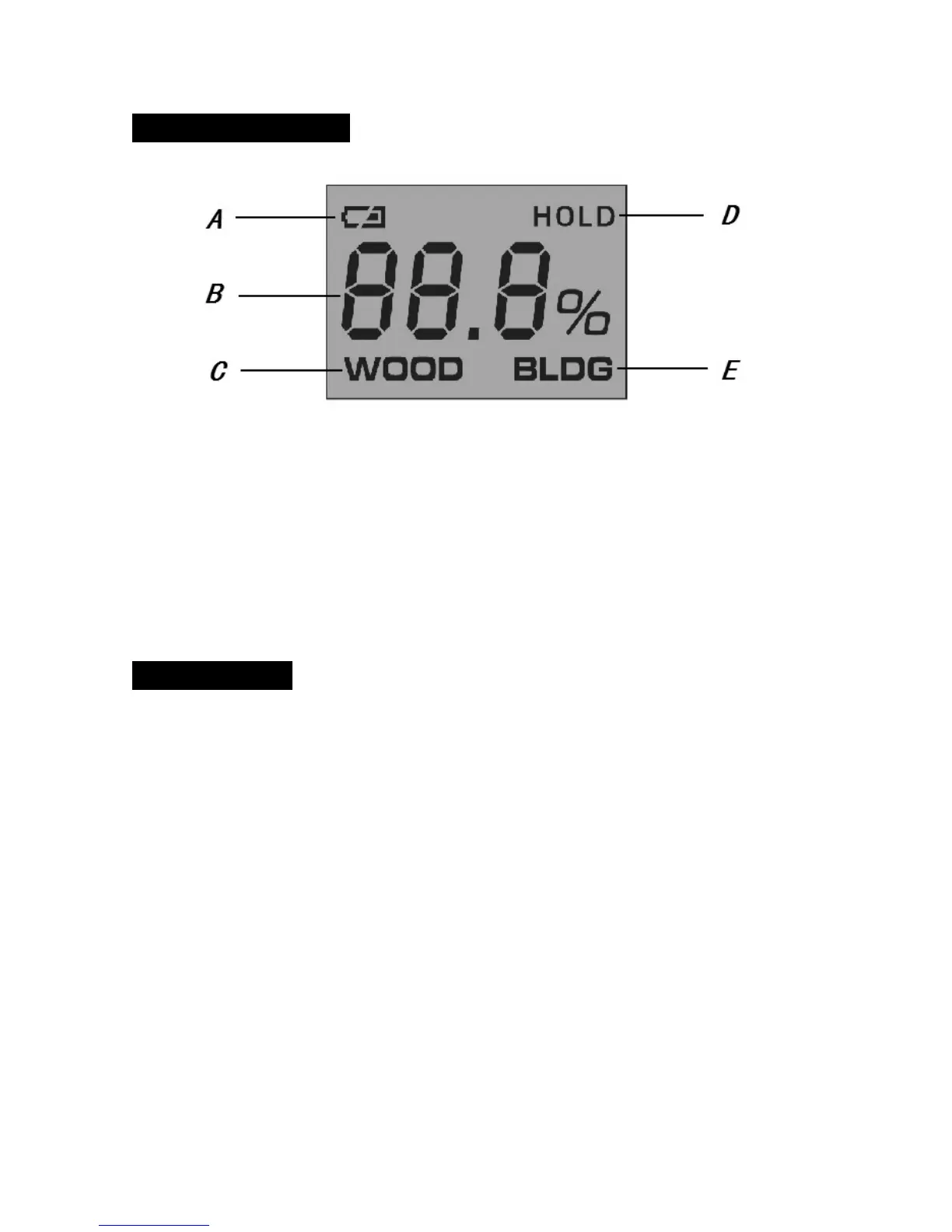
LCD Screen Illustration
A:Low battery indication
B:Measuring result
C:Wood mode indication
D:Data hold indication
E:Building material mode indication
Operation Notes
● Install battery
Remove the battery lid on the back of the unit, place one 9V block battery(6F22 or 6LR61)
according to the correct sign marked in the compartment, then put back the lid.
●Measure moisture
1、Pull out the protection cover A, remove the protection K from the pins;
2、Press the power button G to power on the unit, LOW LED turns on, LCD display ”__ __ __”;
The default measuring mode is for wood, use the button F to select the measuring mode.
3、Insert the two detection pins into target material;
4、Under wood mode, reading of the target wood is displayed on LCD screen, available range
is 5%~50%. When it is lower than 5%, the screen shows” __ __ __”, when it is higher than
50%, the screen shows “ ̄  ̄  ̄”.


 To Next Page
 Loading...