EasyManua.ls Logo

imex Moisture Pro MP100 - User Manual

imex Moisture Pro MP100
6 pages
Print Icon
To Next Page IconTo Next Page
Loading...
Moisture Pro
Moisture Meter MP100
User Manual
Question and Answer IconNeed help?

Do you have a question about the imex Moisture Pro MP100 and is the answer not in the manual?

Summary

Product Introduction and Safety

Introduction

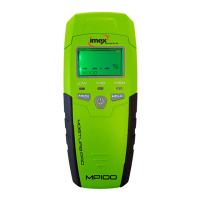
MP100 moisture meter measures moisture content via electrical resistivity using two pins.

General Safety Instructions

Guidelines to prevent personal injury during operation, including reading the manual and pin care.

Battery Safety Instructions

Proper handling, installation, and disposal of batteries to prevent hazards like explosions.

Device Components and Display

Tools Components Overview

Identifies key external parts of the Moisture Pro MP100, including pins, buttons, and screens.

LCD Screen Elements

Details the various indicators and readings displayed on the MP100's LCD screen.

Operation and Features

Battery Installation

Instructions for correctly installing a 9V battery into the unit's compartment.

Measuring Moisture Content

Step-by-step guide for inserting pins and reading moisture levels in wood and building materials.

Data Hold and Buzzer Function

How to use the HOLD button to freeze readings and manage buzzer sound during measurement.

LED Indicators

Explanation of LED color codes for dry, mild moisture, and excessive moisture levels.

Accuracy Checking

Procedure to verify the product's measurement accuracy using internal test points.

Operation Notes

Recommendations for battery replacement and interpreting wood moisture values.

Technical Specifications and Warranty

Technical Specifications

Detailed technical data including measuring range, accuracy, power supply, and dimensions.

Warranty Information

Details on the warranty period and conditions that may void the warranty.

Summary

Product Introduction and Safety

Introduction

MP100 moisture meter measures moisture content via electrical resistivity using two pins.

General Safety Instructions

Guidelines to prevent personal injury during operation, including reading the manual and pin care.

Battery Safety Instructions

Proper handling, installation, and disposal of batteries to prevent hazards like explosions.

Device Components and Display

Tools Components Overview

Identifies key external parts of the Moisture Pro MP100, including pins, buttons, and screens.

LCD Screen Elements

Details the various indicators and readings displayed on the MP100's LCD screen.

Operation and Features

Battery Installation

Instructions for correctly installing a 9V battery into the unit's compartment.

Measuring Moisture Content

Step-by-step guide for inserting pins and reading moisture levels in wood and building materials.

Data Hold and Buzzer Function

How to use the HOLD button to freeze readings and manage buzzer sound during measurement.

LED Indicators

Explanation of LED color codes for dry, mild moisture, and excessive moisture levels.

Accuracy Checking

Procedure to verify the product's measurement accuracy using internal test points.

Operation Notes

Recommendations for battery replacement and interpreting wood moisture values.

Technical Specifications and Warranty

Technical Specifications

Detailed technical data including measuring range, accuracy, power supply, and dimensions.

Warranty Information

Details on the warranty period and conditions that may void the warranty.

imex Moisture Pro MP100 Specifications

General IconGeneral
AccuracyWood: ±0.5%, Materials: ±0.1%
Resolution0.1% RH
Operating Temperature32 to 122°F (0 to 50°C)
Power Supply9V battery
DisplayLCD
Measuring Range0 to 100% RH
Measurement Range0 to 100% RH
Weight200g

Related product manuals