Installing Camera
Note: Make sure the mounting surface is strong enough to hold at least three times of the device weight.
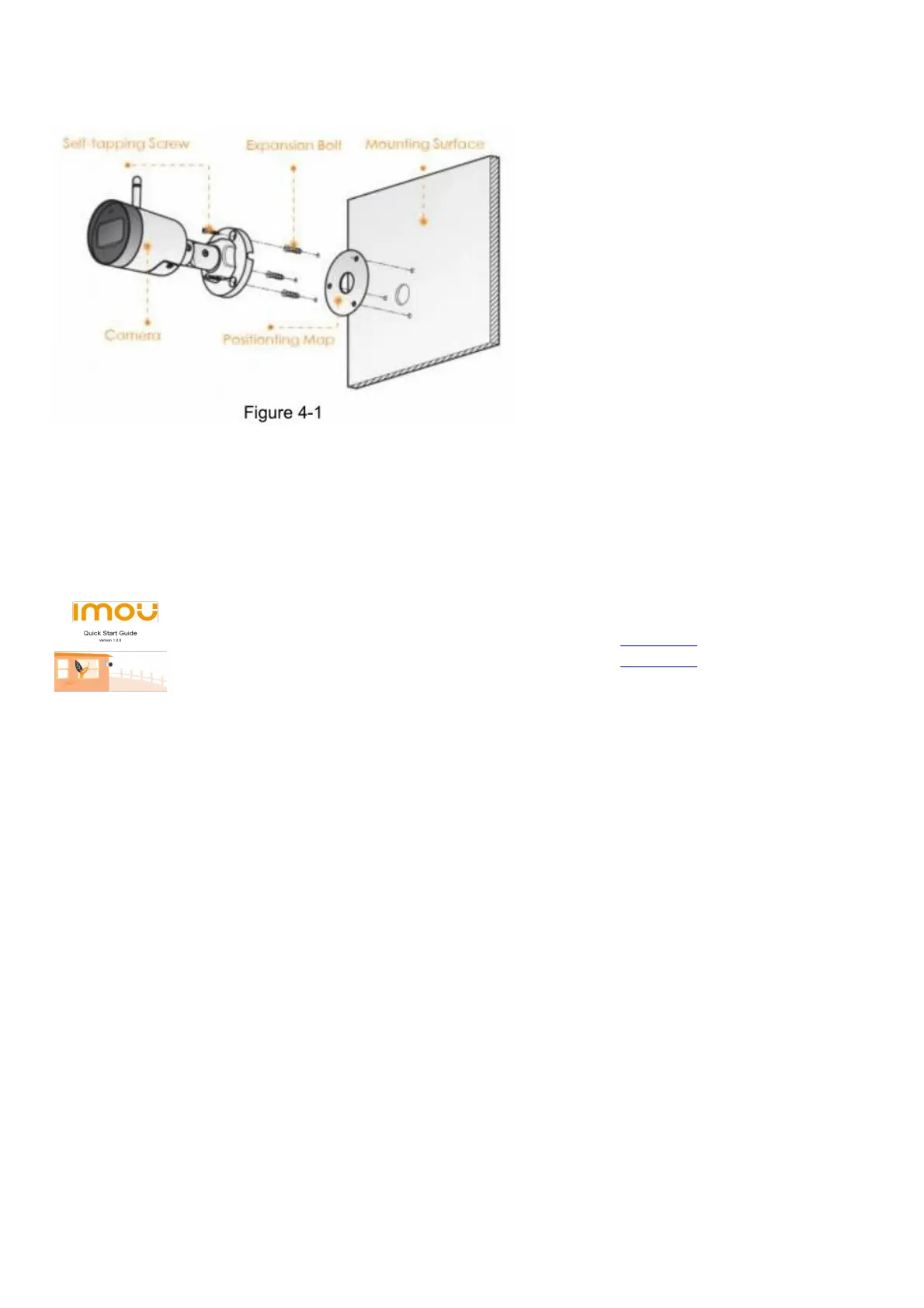
Step 1 Drill screw holes on the mounting surface as the positioning map shows, and then put in the expansion bolts.
Step 2 Attach the camera pedestal to the mounting surface with the self-tapping screws.
Step 3 Power up the camera, and then adjust the lens to the ideal angle.
File Downloads
User Guide
Bullet 2C Outdoor WiFi Security Camera, Outdoor WiFi Camera
Download [optimized]
Download
Related Manuals
1. zmodo HD WIFi Indoor/ Outdoor Camera Kit User Guide zmodo HD WIFi Indoor/ Outdoor Camera Kit User Guide
Mobile...
2. Swann Spotlight Outdoor Security Camera SWIFI-SPOTCAM User Manual Swann Spotlight Outdoor Security
Camera SWIFI-SPOTCAM User Manual – Optimized...
3. Lorex W281AA Series Smart Outdoor Wi-Fi Security Camera User Manual Quick Setup Guide W281AA Series
Package Contents HD Wi-Fi Camera...
4. Geeni Smart WiFi Outdoor Camera User Manual SMART WI-FI OUTDOOR CAMERA START GUIDE Thank you for
purchasing...
5. Eufy EufyCam 2C Wireless Camera Set User Manual USER MANUAL WIRE-FREE HD SECURITY CAMERA SET
Anker Innovations Limited....
6. Bullet Network Camera DS-2CD2T65G1-I5 User Manual Bullet Network Camera DS-2CD2T65G1-I5 User Manual –
Optimized PDF Bullet...



 To Previous Page