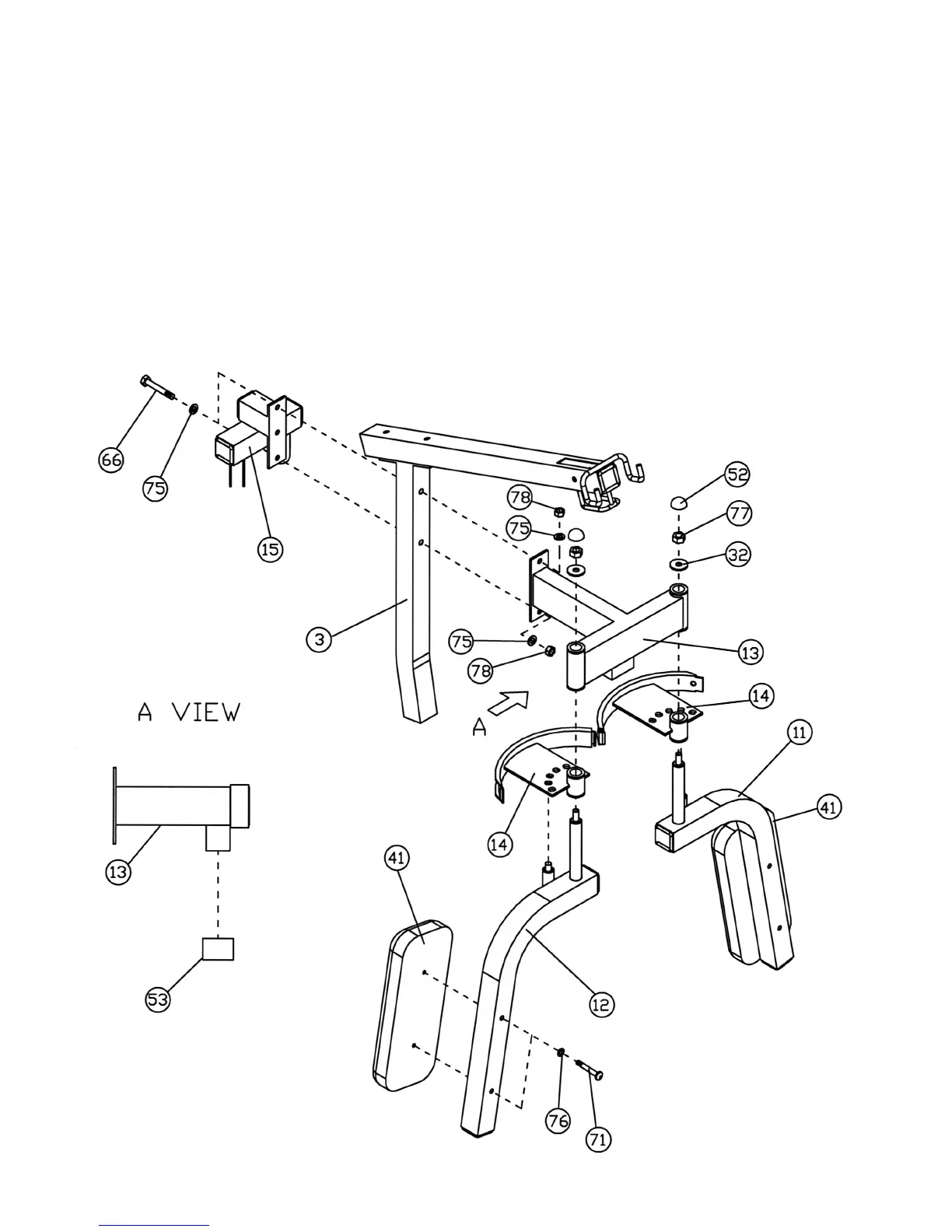
STEP 3 (See Diagram 3)
A.) Attach the Butterfly Support (#13) and the Butterfly Pulley Frame (#15) to the Front Vertical
Frame (#3). Secure them with two M10 x 3” Hex Bolts (#66), four ∅ 13/16” Flat Washers
(#75), and two M10 Aircraft Nuts (#78).
B.) Attach a 2” Square Rubber Cap (#53) to the opening underneath the Butterfly Support (#13).
See A View.
C.) Place a Butterfly Cable Guide (#14) onto the axle on the Right Butterfly (#12). Insert the
Right Butterfly through the hole on the Butterfly Support (#13). Secure it with a ∅ 1 ½”
Washer (#32), M12 Aircraft Nut (#77), and M12 Cone Shape Cap (#52).
D.) Attach a Butterfly Pad (#41) to the Right Butterfly (#12) and secure it with two M8 x 2 9/16”
Allen Bolts (#71) and two ∅ 11/16” Flat Washers (#76).
E.) Repeat the above procedure C and D to install the other side.
DIAGRAM 3
6





 To Next Page