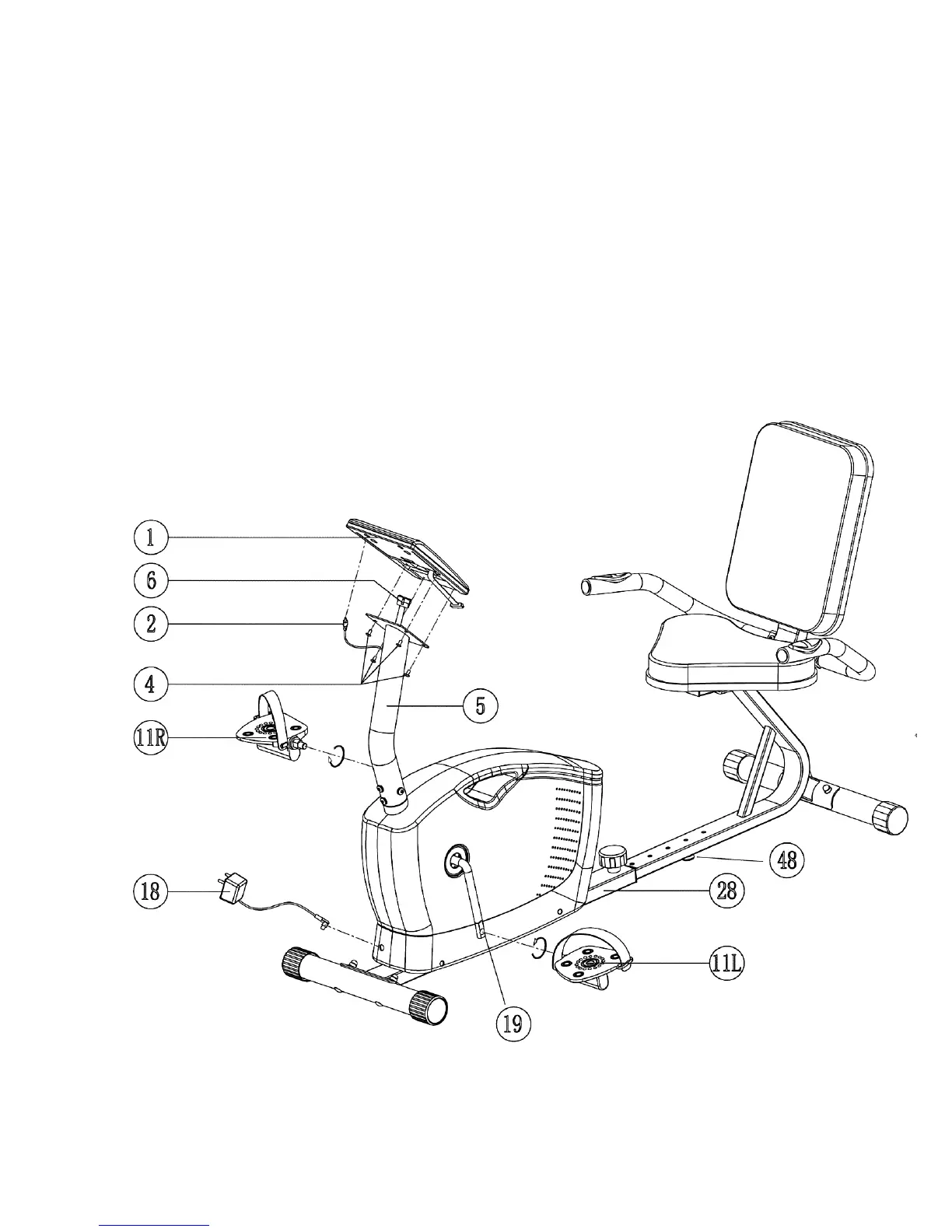
STEP 8 (See Diagram 8)
A.) Remove four M5 x 3/8” Philips Screws (#4) from the Computer (#1).
B.) Connect the Upper Computer Wire (#6) to the Computer.
C.) Plug the Upper Pulse Sensor Wire (#2) into the computer.
D.) Attach the Computer to the Front Post (#5). Secure it with the four M5 x 3/8” Philips Screws
(#4).
E.) Thread the Left Pedal (#11L) counterclockwise into the Crank (#19).
F.) Thread the Right Pedal (#11R) clockwise into the Crank.
G.) Adjust the Floor Level Adjustment (#48) to stabilize the Bike on floor.
H.) Plug the AC Adapter (#18) to110v outlet, and plug the power cord into the Main Frame
(#28). Note: Only use the original AC Adapter from manufacturer. Do not use any
Adapter which is not from manufacturer.
DIAGRAM 8
12




 To Next Page