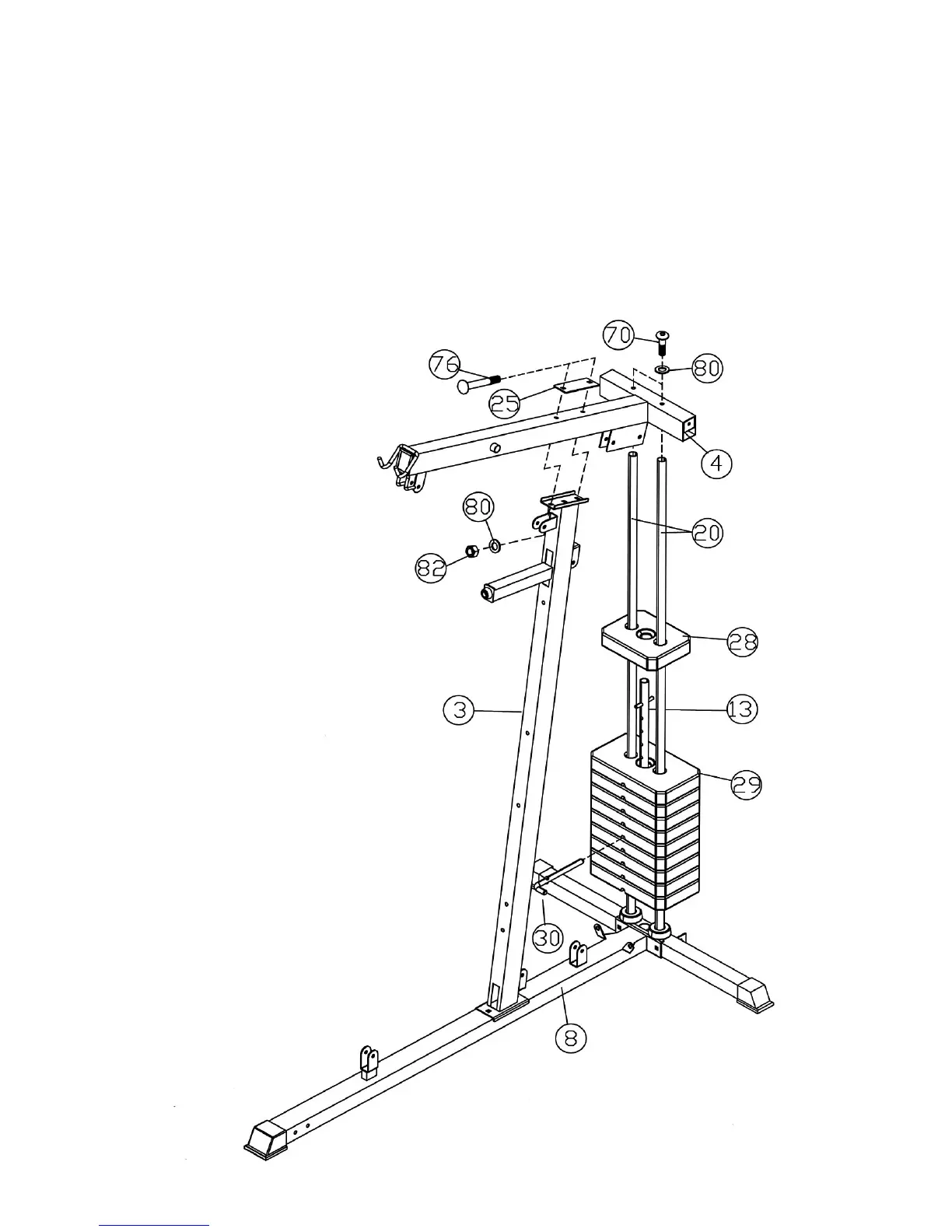
STEP 2 (See Diagram 2)
A.) Slide the 9 Weight Plates (#29) onto the Guide Rods (#20). Align the holes of the Weight
Plates. Insert the Selector Rod (#13) through the center hole. Use a L-shaped Pin (#30) to
select the number of plates.
B.) Slide the Selector Stem (#28) onto the Guide Rods.
C.) Attach the Upper Frame (#4) to the two Guide Rods. Place the Upper Frame onto the Front
Vertical Frame (#3).
D.) Secure the Upper Frame to the Guide Rods with two M10 x 1” Allen Bolts (#70) and Ø ¾”
Washers (#80).
E.) Secure the Upper Frame to the Front Vertical Frame with two M10 x 3 ½” Carriage Bolts
(#76), one 5 ½” x 2” Bracket (#25), two Ø ¾” Washers (#80), and two M10 Aircraft Nuts
(#82). Tighten all bolts and nuts previously installed.
8



 To Next Page