Set Top Box USER MANUAL
3
1
2
3
4
5
6
7
7
8
10
11
12
13
14 15
16
17
18
19
19
20
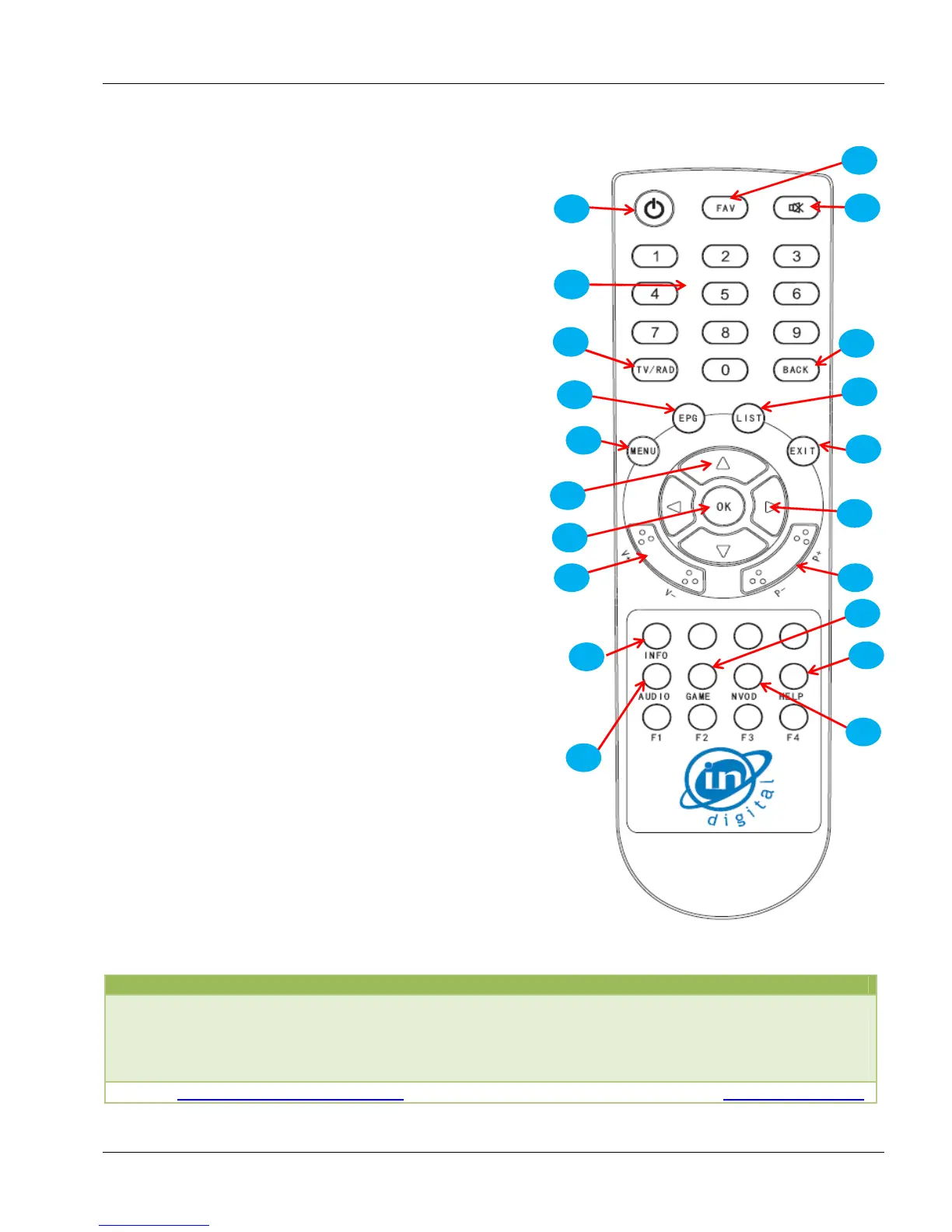
Remote Control
Customer Care
Mumbai 022 2821 8993 Delhi 011 2592 2799 Bangalore 080 4011 4100
Ahmedabad 079 6661 4165 Vadodra 0265 6690 666 Nagpur 071 2661 3200
Belgaum 0831 2405 118 Kolhapur 231 2655 677 Nashik 0253 6627 711
Goa-Madgaon 0832 6484 247 Mapuca 0832 2253 198
E-Mail : customer.care@incablenet.net Website : www.indigital.co.in
1
Power Button
2
FAV Button
3
Mute Button
4
Number Buttons :Enter channel directly
5
TV / RAD Buttons: To select Radio / TV
6
Back Buttons: To move to earlier option
7
EPG Buttons: To know Program Guide
8
List Buttons: All channel List
9
Exit Buttons: To remove information from
Screen
10
Menu Buttons: To get Main menu on TV
11
Up / Down Buttons: Channel Up / Sown
Change setting
12
Left / Right Buttons: Volume UP / Down
Change setting
13
OK Buttons: Select setting
14
Volume Buttons
15
Channel Buttons
16
INFO [Red] Buttons: Information of channel.
To Jump to
FAV list when we are in All channels list if FAV
list is already created
17
Audio Buttons: To change Audio in dual
language option MUL / AUD mode
18
Game Buttons
19
Help Buttons: System Info
20
NVOD Buttons


 To Next Page