Set Top Box USER MANUAL
4
7
6
1
3
2
5
4
Getting Started
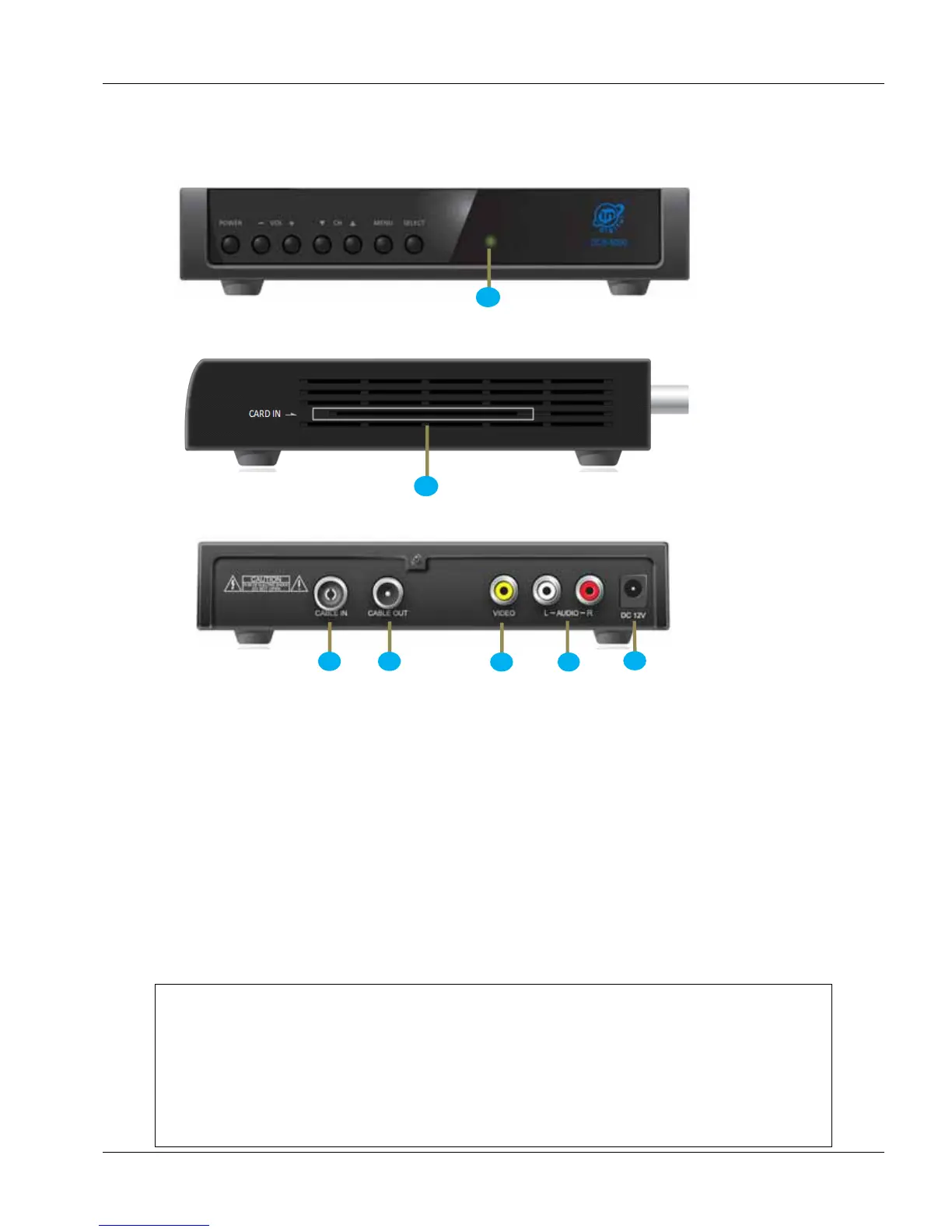
Front view
Side view
Back view
Step 1: Connect output of 12V DC Adaptor to and connect other end to AC Mains.
Step 2: connect Female Connector of RF Cable to Place the other end of cable(Male connector) to
your Television Set.(The Female connector is present at the rear side of the TV).
Step 3: Connect Cable from your cable operator to of your Digital Set Top Box.
Step 4: Connect A/V Cable provided to your Digital Set Top Box. The White and Red colour
connectors are for Audio and the Yellow Connector is for Video. Same types of Connectors are
available on your TV set. Ensure that the connectors are inserted as specified. To use the audio-video
output select AV Option of your TV.
ATTENTION!!
Whenever the Set Top Box is turned ON by switching on the AC mains or by
using the "POWER" key in the remote, the Set Top Box will take
a few seconds for internal initialization.
Please wait for about 10-15 seconds before pressing any other key.


 To Next Page