13
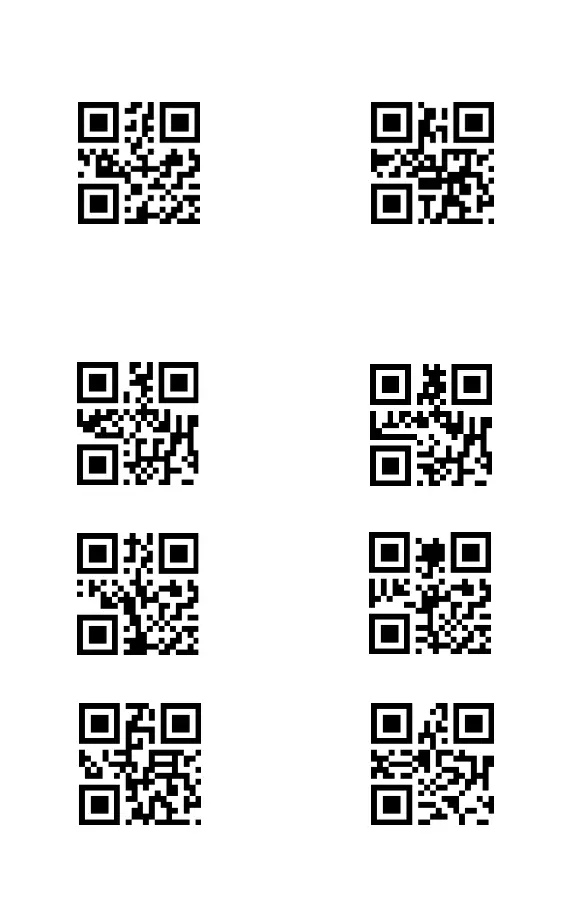
7.11 Industrial 2 of 5
7.11.1 Scan the two-dimensional codes below to read/not to read Industrial 2 of 5
7.11.2 Only decode Industrial 2 of 5 of a certain length range
Users can set to decode Industrial 2 of 5 of a certain length range.
For example, to decode Industrial 2 of 5 of the range of 4 - 20 digits:
Scan the barcode below, and then scan “0”, "4", "2", "0" in Appendix 1.
If the barcode of a certain length range cannot be read, please read the barcode
" Industrial 2 of 5 of any length". Please contact us if the problem still occurs.
7.11.3 Verify Industrial 2 of 5 Check Digit
7.11.4 Output Industrial 2 of 5 Check Digit
Enable
Industrial 2 of 5 of a certain length range
Enable
Enable
(*)Disable
Industrial 2 of 5 of any length
(*)Disable
(*)Digit



 To Next Page