MICROCOM
®
TEMPERATURE CONTROLLER
INSTRUCTION MANUAL
©INCOE
®
CORPORATION 4/2010
Pg.
www.incoe.com
2.6.1 CONFIGURATION 1 MENU:
The conguration 1 menu is as follows :
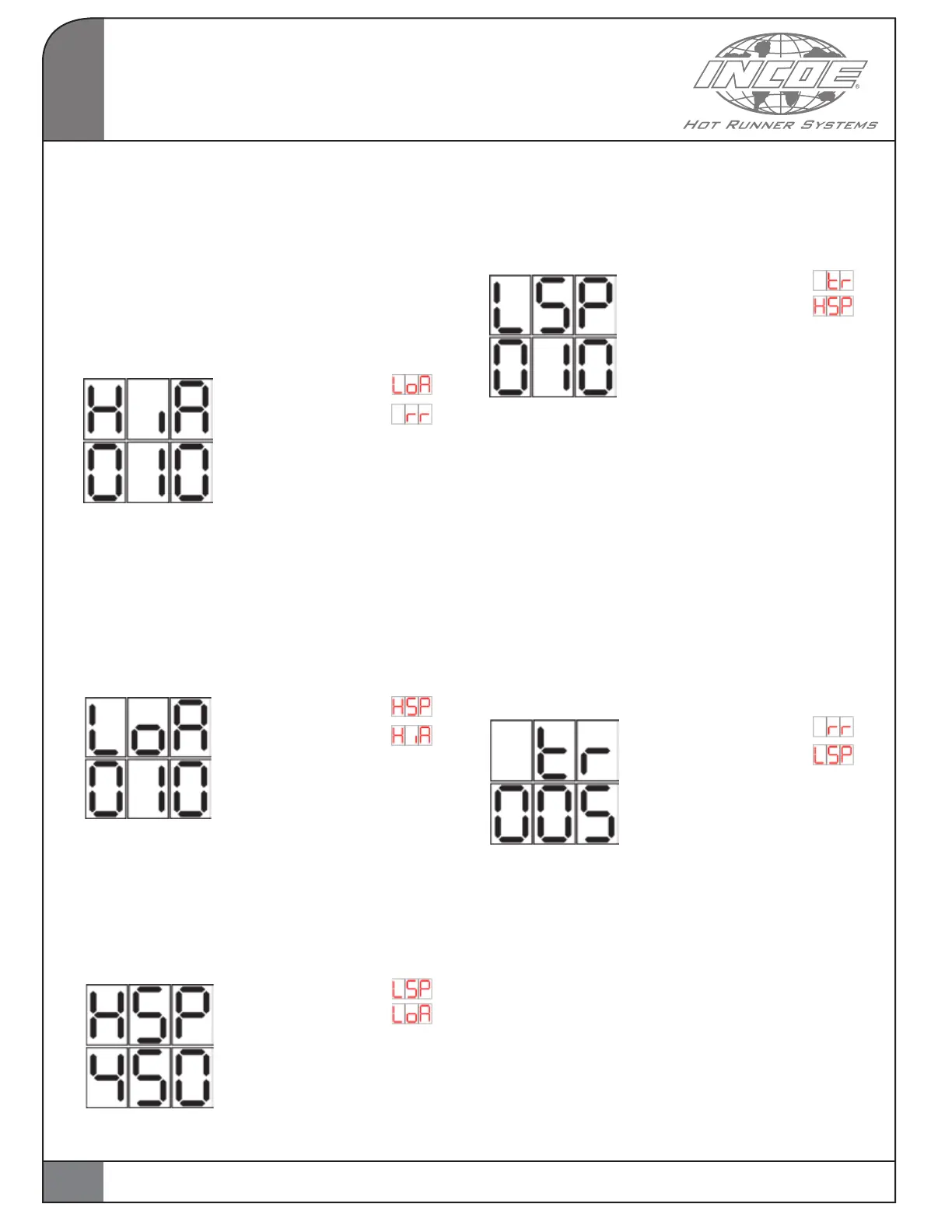
High Alarm User Select :
Adjustable parameter setting allows for the
number of degrees above the setpoint to be set
(Default value: 5°F).
Navigation via “Click & Rotate” switch:
If “Increase” display
If “Decrease” display
If “Selected” (Push 2
seconds): It is possible to
modify the parameter value.
Value in °F / °C.
Low alarm:
Adjustable parameter setting allows for the
number of degrees below the setpoint to be set
( Default value: 5°F/C° ).
Navigation via “Click & Rotate” switch:
If “Increase” display
If “Decrease: display
If “Selected” (Push 2 seconds):
It is possible to modify the
parameter value. Value in °F /° C.
Maximum setpoint User Select :
Adjustable parameter to limit the setpoint value to
a maximum value (by default 500°C).
Navigation via “Click & Rotate” switch:
If “Increase”display
If “Decrease”display
If “Selected” (Push 2
seconds): It is possible to
modify the parameter value.
Value in °F or in °C.
Minimum setpoint :
Adjustable parameter to limit the setpoint to a
minimum value (by default 0°C).
Navigation via “Click & Rotate” switch:
If “Increase”display
If “Decrease”display
If “Selected” (Push 2 seconds):
It is possible to modify the
parameter value. Value shown
in °F or in °C.
Time Ramp:
Adjustable parameter, which allows the user to
define the Time Ramp for the SoftStart function.
This ramp is active if the temperature,
when starting up is less than 212°F (100°C).
Controller will heat at 15 percent for duration
adjustable by the operator (from 0 to 99 min)
(Default setting: 5 min).
This duration is stored in memory and will be
used for every new ramp. NOTE: The Time Ramp
cannot be modified nor cancelled while operating.
Navigation via “Click & Rotate” switch:
If “Increase” display
If “Decrease” display
If “Selected” (Push 2
seconds): It is possible to
modify the parameter value.
Value shown in minutes.
Ramp Rate :
Adjustable parameter defining the second mode
of the SoftStart function.
This mode is active if the parameter value differs
from 0. This parameter is the Ramp Rate ( Default
setting: 0°F or °C /min).
Every minute, temperature is increased by a
certain amount of degrees (0 to 99 °F/min or
°C/min), and the percentage of nominal power
is not limited.
2
OPERATION
8


 To Next Page