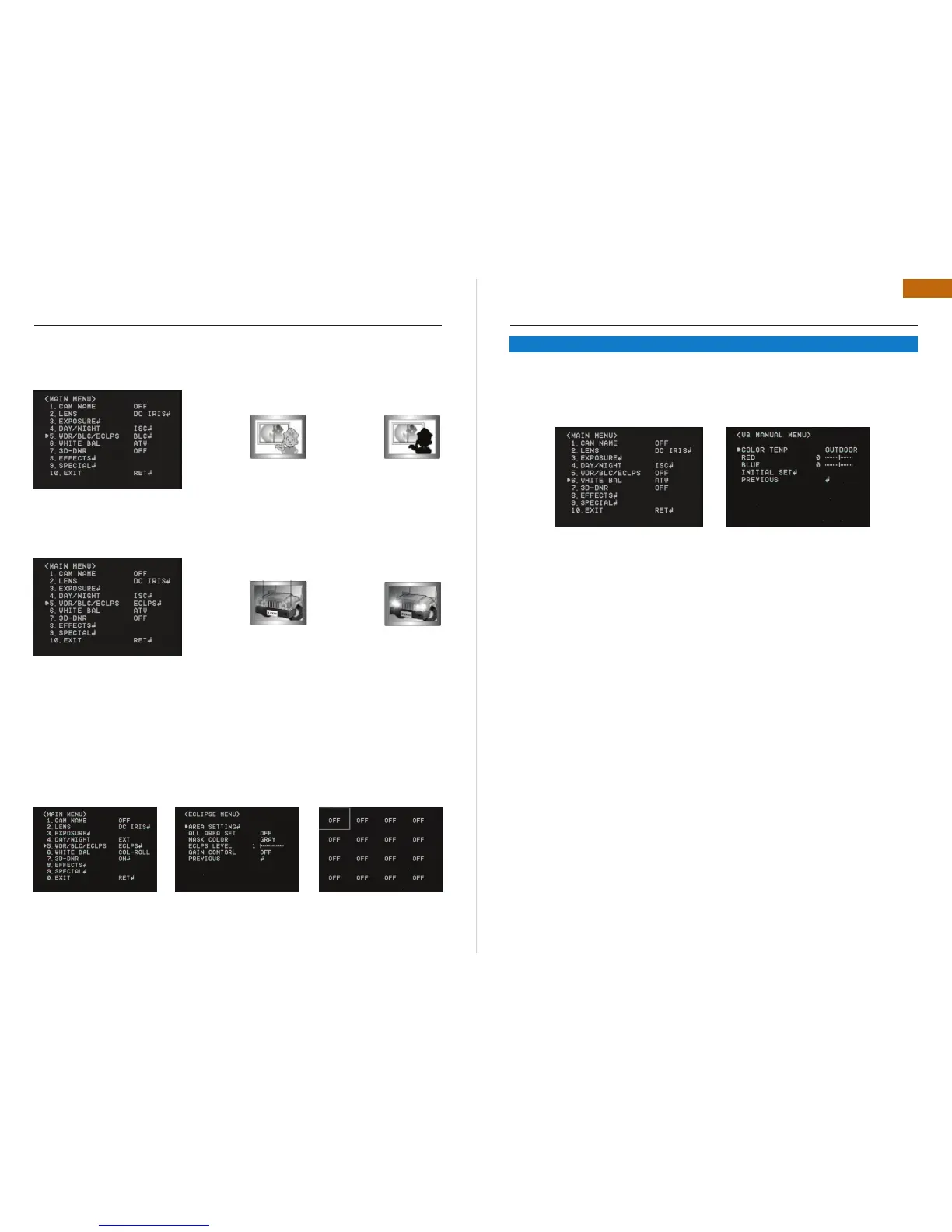
BLC (BACK LIGHT COMPENSATION)
It delivers a distinctive subject and background at the same time, even when the subject is in •
backlight, unlike conventional cameras, by adopting a proprietary DSP chip.
Low / Middle / High : Select your desired mode•
ECLPS (ECLIPSE : HIGH LIGHT COMPENSATION)
If the scene contains extremely bright light areas such as ; from car headlight, the light can mask
out much of the on-screen detail. Press “Joystick S/W” in ECLPS mode to enter the sub menu.
Area setting : select the desired area where you want to activate this feature•
All area set : enable to set all areas as on or off .•
Mask color/tone : Change the color / brightness of the masking area. (Black,, grey, dark •
grey)
Eclps level : adjust the level of eclipse.•
Gain control : on / off. Select the desired mode.•
Remark : when gain control is “on”, eclipse function will be only activated in Low light condition.
Previous : go back to main menu.•
OSD INSTRUCTION
BLC OFF
ECLPS OFFECLPS ON
BLC ON
Adjust the picture color with this feature.•
Select “White Bal.” by using Joystick S/W with Up / Down Direction.•
Press “ Set Button” to enter “White Bal. ” Select one of the following 4 modes for your pur-•
pose
ATW : Select this when the color temperature is between 1700 K and 11000°K.•
COL-ROLL : Select this when the color rolling is occurred.•
AWC SET: To find the optimal setting for the current luminance environment in this mode. Set •
the point the camera towards a sheet of white paper and press the SET Button. If the environ-
ment changes, readjust it.
Manual : Select this to fine-tune white balance manually. Set White Balance first by using •
ATW or AWC mode. After that switch to Manual mode, fine-tune the White Balance and the
press “Set Button”. Also you can set the color temp. between Indoor and Outdoor mode
Remark: White Balance may not work properly under the following conditions. In this
case, select AWC mode.
When the color temperature of environment surrounding the subject is out of the control range •
(e.g. Clear Sky or Sunset)
When the ambient illumination of the subject is dim.•
If the camera is directed towards a fluorescent light or is installed in a place where illumination •
changes dramatically, the White Balance operation may become unstable.
OSD INSTRUCTION
5.6 WHITE BALANCE


 To Next Page
 Loading...