22
Using the audio
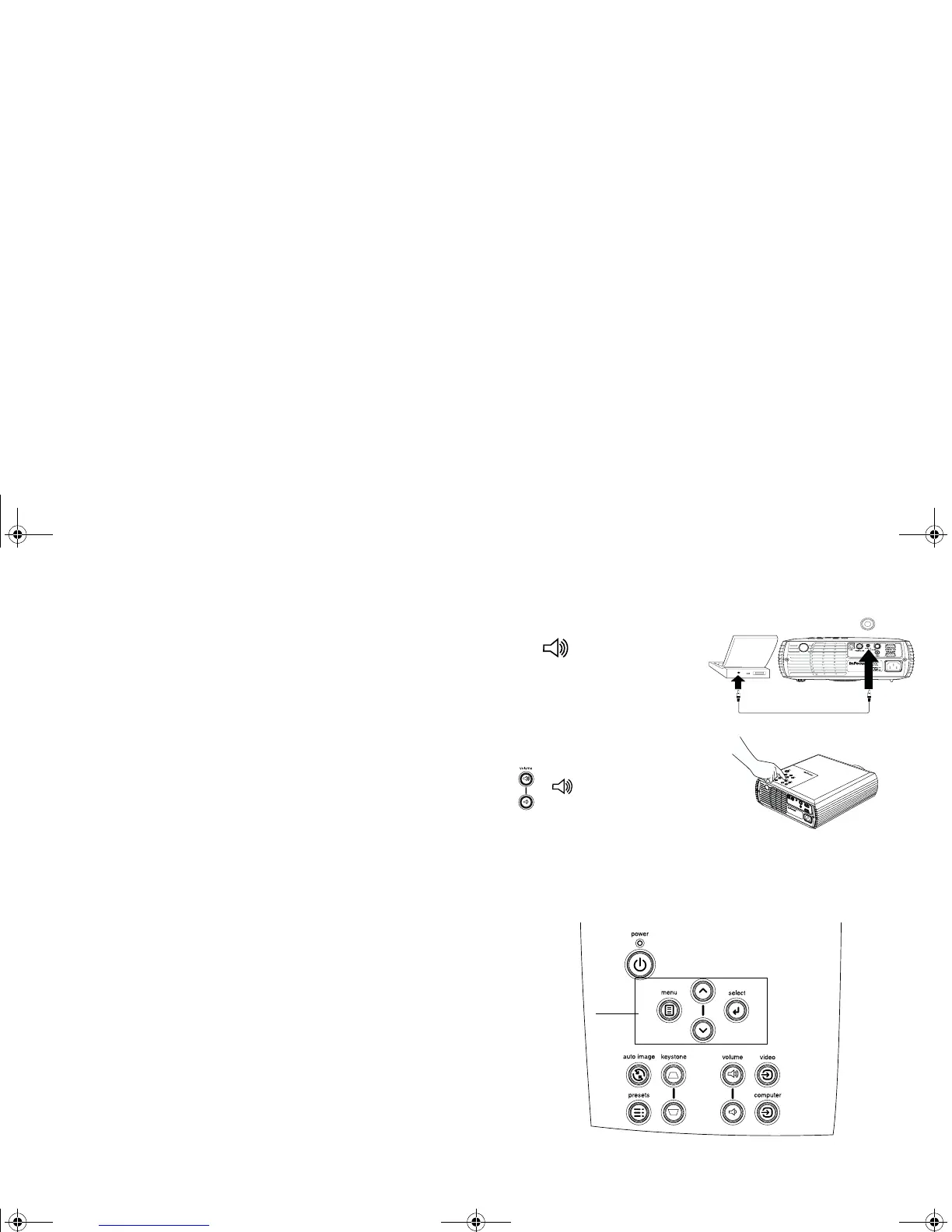
To use the projector’s speaker, connect your source to the Audio In connec-
tor on the projector.
To adjust the volume, use the Volum e buttons on the keypad or remote.
To mute the sound, press the Mute button on the remote.
Troubleshooting Audio
• If you aren’t hearing the audio, check the following:
• Make sure the audio cable is connected.
• Make sure mute is not active (press the Mute button on the remote).
• Make sure the volume is turned up enough. Press the Vo lum e button
on the keypad or remote.
• Make sure the correct source is active.
• Adjust the audio source. If playing a video, make sure the playback has
not been paused.
Using the keypad buttons
Most buttons are described in detail in other sections, but here is an over-
view of their functions:
Power: turns the projector on (page 7) and off (page 13).
Menu: opens the on-screen menus (page 25).
Select: confirms choices made in the menus (page 25).
Up/Down arrows: navigates to and adjusts settings in the menus (page 25).
Auto Image: resets the projector to the connected source.
Presets: cycles through the available preset settings (page 27).
Keystone: adjusts squareness of the image (page 9).
Volu me : adjusts sound (page 22).
Video and Computer: changes the active source.
connect audio cable
adjust volume
menu navigation
buttons
p5p7 manual.fm Page 22 Thursday, January 9, 2003 9:46 AM



 To Next Page