7
Connecting a Computer
The projector ships with an M1-DA analog computer cable. If
your computer has a digital output, you can order the optional
M1-DA digital computer cable. See “Optional Accessories” on
page 39.
1
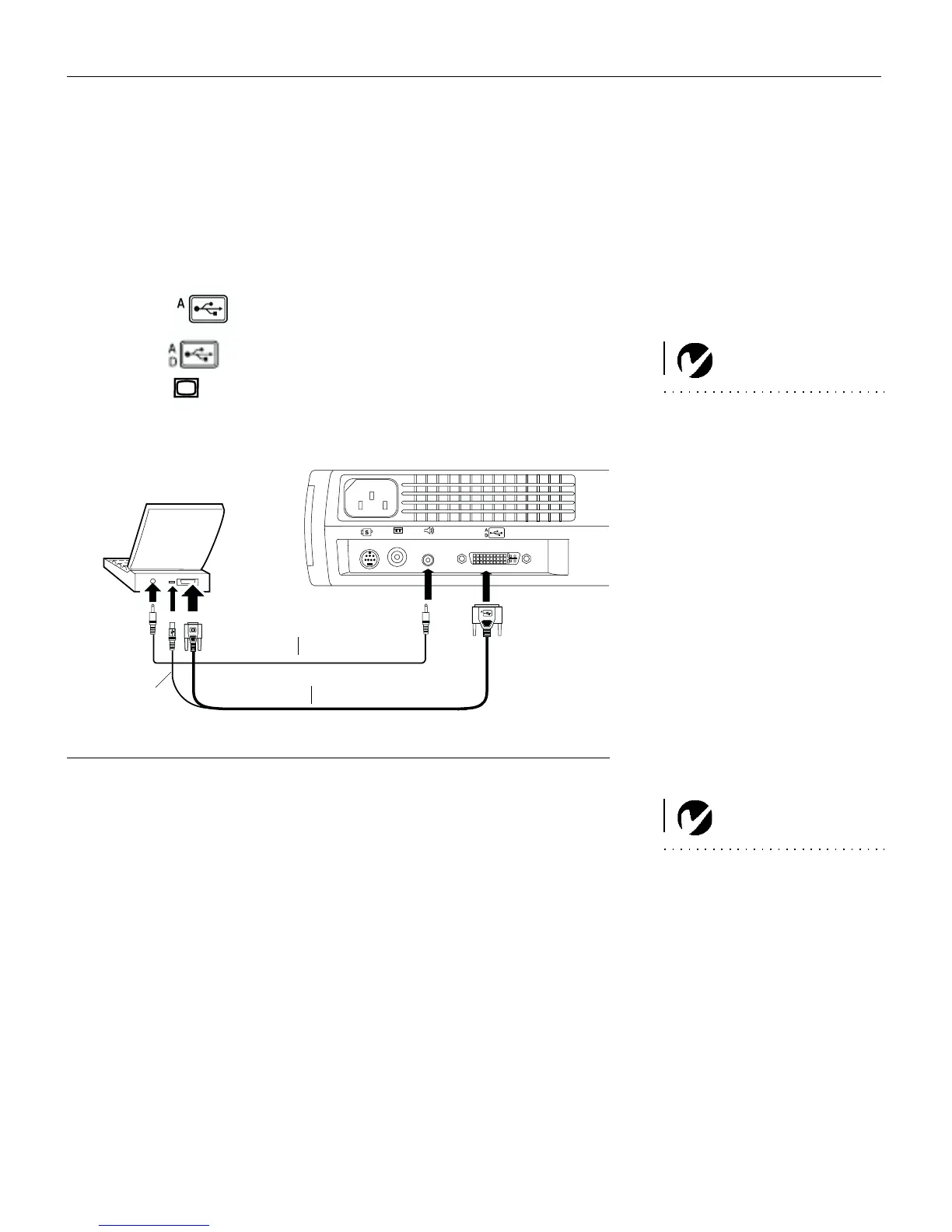
Plug the end of the M1-DA analog computer cable
into the connector on the projector.
NOTE: Many laptop computers
do not automatically turn on their
external video port when a sec-
ondary display device such as a
projector is connected. Refer to
your computer manual for the
command that activates the exter-
nal video port. Activation com-
mands for some laptop computers
are listed in the Appendix of this
manual on page 40 and in the
Service section of our website.
2
Plug the end of the M1-DA analog computer cable into
the video connector on your computer.
FIGURE 6
Connecting the projector to a computer
NOTE: If you are connecting an
older Macintosh computer that
does not have a 15-pin connector,
you must use a Mac adaptor
between the computer and the
projector. See “Optional Accesso-
ries” on page 39.
in
in
audio cable
M1-DA analog computer cable
USB mouse



 To Next Page