Need help?
Do you have a question about the Infomir MAG324 and is the answer not in the manual?
Confirms compliance with EU directives regarding essential requirements and waste management.
Details compliance with FCC rules for digital devices, including interference limits and user precautions.
Specifies RF exposure compliance for MAG324w2, including installation distance requirements.
Details indoor deployment restrictions for MAG324w2 in the 5150-5250 MHz band.
Defines warranty periods for different regions (Europe, USA, etc.) based on sale or manufacture date.
Lists contact details for warranty processing centers in Europe, USA, Russia, MEASA, and Ukraine.
Outlines conditions for warranty validity, exclusions, and limitations, including product misuse and unauthorized repairs.
States copyright ownership, trademarks, and disclaims proprietary interest in third-party marks.
Users agree to terms and conditions for software use, including limitations and prohibitions.
Grants limited license for software; manufacturer retains ownership and intellectual property rights.
Disclaims warranties for software, including merchantability and fitness for a particular purpose.
Device contains no hazardous substances and should be used safely and efficiently.
Recommends using only supplied or manufacturer-approved accessories to avoid danger or warranty voiding.
Warns against exposing the product to liquids, rain, or high moisture to prevent damage or electric shock.
Explains ESD impact causing reboots and temporary black screen, with automatic restoration described.
Advises against disassembly, emphasizes qualified specialist maintenance, and warns about voiding warranty.
Instructs to use dry cloth or slightly damp cloth for cleaning, avoiding harsh chemicals or abrasives.
Details physical attributes like model, weight, dimensions, and operating temperature/humidity range.
Describes Ethernet, Wi-Fi standards, frequency bands, output power, and USB interface types.
Lists supported codecs, AV interfaces, connector types, and power supply unit specifications.
Details the package type and approximate dimensions, as well as the shipping weight of the product.
Provides guidance on careful handling, placement, and installation to ensure proper ventilation and avoid damage.
Details the use of the provided power supply unit, including country-specific socket compatibility.
Advises on power supply unit warmth during operation and recommends contacting supplier if it overheats.
Recommends disconnecting power and cables during thunderstorms or extended periods of non-use for protection.
Warns against pausing images on plasma screens for over 5 minutes to prevent pixel burn-out.
Defines the product's intended use for digital audio/video channels and prohibits other uses, including unauthorized copying.
Explains automatic software updates for functional improvements and advises on the procedure during updates.
Illustrates and labels the components on the front panel of the MAG324/MAG324w2 device.
Illustrates and labels the connectors and ports on the back panel of the MAG324/MAG324w2 device.
Provides a diagram for connecting the device to a TV using an HDMI cable for optimal audio/video quality.
Shows how to connect the device using AUDIO/VIDEO RCA cables for standard quality audio/video output.
Emphasizes powering off devices and disconnecting power before any cable connections or disconnections.
The MAG324 and MAG324w2 are set-top boxes designed to select, decode, and display digital audio and video channels from transport streams on a TV. These devices are intended for indoor use only and are not to be used outdoors in certain frequency bands (5150-5350 MHz in the European Union, 5150-5250 MHz in the United States). Any other use is prohibited. The manufacturer, Telecommunication Technologies LLC, emphasizes that the product's usage must be in full compliance with copyright law. Unauthorized copying or distribution of protected materials may violate copyright law and requires prior adoption by the rights holder for commercial use.
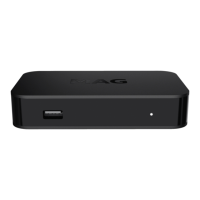
The set-top box features a front panel with an Fn button for resetting to factory settings or selecting the boot mode, two USB 2.0 ports, an LED indicator, and a Power On/Off button. The back panel includes a Power Supply input, an RCA 3.5 mm jack, an HDMI port, and an Ethernet port.
For optimal video quality, the device should be connected to a TV using an HDMI cable. For good quality, an AUDIO/VIDEO input connection can be used with an adapter cable, typically featuring red, white, and yellow connectors for audio and video signals. Before connecting or disconnecting any cables, it is crucial to switch off all devices (TV, amplifier, etc.) and unplug the power supply unit from the socket to prevent damage. If an amplifier is not connected, digital audio outputs should be left disconnected.
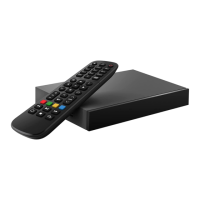
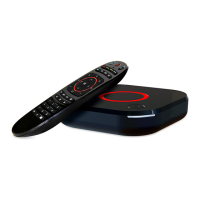
The MAG324 and MAG324w2 come with a remote control unit (RCU) that requires two AAA batteries. It is important not to mix different types of batteries or old and new ones, and rechargeable batteries should not be used. If the remote control will not be used for several weeks, the batteries should be removed to prevent leakage. Leaking batteries should be immediately removed, as they can cause burns to the skin or eyes. The remote control may also include a block of five programmable buttons (marked with blue print color) that can be configured to control other devices like a TV or amplifier. To program these buttons, the infrared LEDs of both the STB RC and the TV RC should be placed opposite each other at a maximum distance of 5 cm. Then, specific button combinations on the STB RC and TV RC are used to enter setup mode, copy functions, and finalize the programming. A reset function is also available for the remote control.
The device is equipped with an automatic software updating capability. The manufacturer and service provider reserve the right to update the software to improve functional capabilities. During software updates, the product should not be used for watching and must remain switched on until the update is complete. Switching off the product during an update is inadmissible. The updating process typically takes several minutes, after which the user can resume enjoying digital television services.
Care should be taken during unpacking and installation. The product should be handled with care, avoiding drops, shakes, or other impacts. It is designed for horizontal placement on a flat surface. Placing the product on slippery surfaces, in areas prone to vibration, or where it might fall can damage the device and void the warranty. The device should not be placed on soft surfaces like carpets or beds, as this can block ventilation openings, impede airflow, and lead to overheating. Adequate clearance around the product is necessary for proper ventilation, especially when placed within furniture. The device should be kept away from direct sunlight, open flames, and convectors. It should not be placed on surfaces that generate heat during operation, such as video recorders or amplifiers, and nothing should be placed on top of the unit. Objects containing liquids, such as vases or plant pots, should not be placed near or on the product. The device should not be touched or moved during operation; if relocation is necessary, it should be switched off first.
The power supply cord should be positioned to prevent deformation, jamming, or damage. It should not be laid under carpets or blocked by other objects where damage might go unnoticed. For AC/DC adapters, the socket outlet must be easily accessible and located near the equipment. Only the power supply unit provided by the manufacturer should be used. If the product needs to be connected in a different country or region with different electrical circuit data, a power supply unit adapted for that specific area should be obtained from the manufacturer. The outer power supply unit may get warm during operation. If it becomes hot, it should be promptly switched off, and the equipment supplier should be contacted for a replacement.
To protect the device from atmospheric electricity or during prolonged periods of non-use, the power supply cord should be disconnected from the socket, and Ethernet, video, and audio cables should be switched off. This protects the product from thunder discharges and power surges. When using the product with plasma screens, avoid pausing the picture for more than 5 minutes, as this can cause "burn-out" pixels on the screen. This is considered a characteristic of plasma screens, not a product defect, and the manufacturer is not responsible for damages caused in this manner.
Maintenance of the product should only be performed by qualified specialists at warranty processing centers. The product should not be disassembled, as this can be dangerous and void the product guarantee. The product has protective sealing, and breaking or changing this sealing invalidates the guarantee. For cleaning, the product and accessories should be wiped with a dry cloth or tissue. Before cleaning the shell, the power supply should be disconnected from the AC socket. Persistent spots on the shell can be cleaned with a slightly wet cloth or cleaning tissue. Harsh cleaners, polishes, benzyl, solvents, abrasive items, or liquid/aerosol detergents should not be used for cleaning the product or its accessories.
The device is susceptible to electrostatic discharges (ESD), which can cause the IPTV set-top box to reboot, resulting in a temporary black screen. After a reboot, the operating mode of the IPTV set-top box is automatically restored. The reboot duration depends on local network parameters and typically ranges from 30 to 40 seconds or more. Users should wait for the device to restart automatically in such situations.
 General
| Model | MAG324 |
|---|---|
| Operating System | Linux |
| Connectivity | Wi-Fi, Ethernet |
| USB Ports | 2 x USB 2.0 |
| Audio Output | HDMI, Optical |
| Power Supply | 5V/2A |
| Video Output | HDMI |
| Resolution | 1080p |
| Video Codecs | H.264, H.265 |
| Audio Codecs | AAC, MP3, AC3 |
| Ethernet | 10/100 Mbps |
| Supported Video Formats | AVI, MKV, MP4, TS |
| Supported Audio Formats | MP3, AAC |

 To Next Page