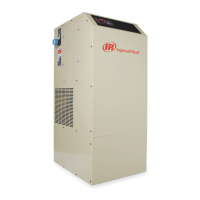
The Ingersoll Rand Nirvana Cycling Refrigerated Dryer Models 1000-1600 are designed to remove moisture from compressed air by cooling the air temperature to between 36° and 40°F (2 and 4°C). This process causes water vapors to condense into liquid droplets, which can then be easily removed from the air. The dryer utilizes an Air System, a Moisture Removal System, a Refrigeration System, a Thermal Mass Circulating System, and a Control System to achieve this.
Function Description
The dryer operates by directing hot, saturated air from the compressor into a precooler/reheater. Here, the air temperature is reduced by the cool, dry air exiting the air/moisture separator. This precooling allows for the use of a smaller refrigeration system. The air then moves into the chiller section, where it is further cooled to the desired dew point by a thermal mass fluid. The temperature of this thermal mass fluid is maintained by the refrigeration circuit and its controls. The air continues to the separator, where moisture is removed. The cool, dry air then returns to the precooler/reheater to be heated by the incoming moist hot air. The air exiting the reheater portion of the dryer should be approximately 15°-20°F lower than the inlet air temperature under standard conditions at full rated flow.
The Moisture Removal System employs zero-air-loss condensate drains to discharge condensed moisture and lubricants from the compressed air. This drain system uses a unique sensing method to determine the condensate level in the drain bowl. A transducer continuously sends a signal 50 times per second. Once the condensate level reaches a predetermined point, a signal is sent to the no-loss drain valve, which opens to remove condensate at a rate of up to 80 gallons per hour. The drain also features a test button for manual operation, which illuminates an LED to indicate "POWER ON" and goes off when the drain valve is operated by the transducer or manual test.
The Refrigeration System uses a compressor to circulate refrigerant. The compressor status (ON/OFF) is displayed on the Microprocessor Control. The system also monitors discharge and suction pressures, as well as suction temperature, to ensure optimal performance and to determine the superheat of the refrigerant. The condenser, which can be air-cooled or water-cooled, helps to dissipate heat from the refrigerant. Fan motors are used in air-cooled condensers to facilitate heat exchange.
The Thermal Mass Circulating System uses a circulating pump to move the thermal mass fluid through the chiller. The pump operates continuously in Nirvana Cycling™ dryers, and the compressor cycles on and off based on the chiller temperature.
Usage Features
The dryer is equipped with a Microprocessor Control that provides a user-friendly interface. When power is supplied, the control illuminates and defaults to "Standby" mode, displaying "Press ON." The keypad functions include:
- ON: Places the dryer "On Line" and energizes the glycol pump. The compressor operates based on temperature.
- OFF: Places the dryer "Off Line," stopping all automatic functions, including circulating pump operation.
- SELECT DISPLAY: Allows the user to cycle through available displays. The last selected display remains as the default.
- +/-: Used to increase or decrease set point values. Values cycle through a fixed range and allow entering negative numbers in FACTORY MODE.
- TEST: Manually activates the no-loss drain valve.
- RESET: Clears local alarm indications and de-energizes the remote alarm contact. If the alarm condition persists, it returns after the alarm inhibit time expires.
- SET: Permits adjustment of parameters in TECHNICIAN and FACTORY MODES. In CUSTOMER MODE, it allows users to back through displays.
- ENTER: Used to accept changed parameters and set point values.
The Microprocessor Control displays various system parameters, including:
- Chiller Temperature (CHLLR TEMP): The temperature of the thermal mass fluid in degrees Fahrenheit.
- Compressor Status (CMPRSSR): Indicates if the refrigeration compressor is "ON" or "OFF."
- Discharge Pressure (P disch): The discharge pressure of the refrigeration system in psig.
- Suction Temperature (T suction): The suction temperature of the refrigeration system in degrees Fahrenheit, useful for determining refrigerant superheat.
- Suction Pressure (P suction): The suction pressure of the refrigeration system in psig.
- Percent Savings (% SVGS): Displays the compressor operating time versus the dryer's total operational time.
- Cumulative Dryer Hours (CUM DRYER HR): The total operational time of the dryer in hours.
- Cumulative Compressor Operating Hours (CUM CMP HR): The total energized time of the refrigeration compressor in hours.
The dryer supports three start modes:
- Manual Mode: The dryer ships in this mode. After power is supplied and the anti-short cycle (ASC) delay times out, the dryer starts only when the ON button is pressed. To restart, the ON button must be manually depressed.
- Auto Restart Mode: After power is applied and the ASC delay times out, the dryer starts automatically. Manual control via ON & OFF pushbuttons is still possible. This mode is useful for automatic restarting after power failures.
- Remote Automatic Mode: Allows remote control of the dryer via a customer-supplied contact. The dryer starts automatically once the switch is closed and the ASC delay times out. Manual control via ON & OFF pushbuttons is still possible. The remote alarm contact signal must be 24V.
Maintenance Features
Regular maintenance is crucial for optimal performance and longevity.
- Condensate Discharge System: The service unit should be replaced annually. Before maintenance, ensure the system is depressurized. The service unit can be removed by pressing a latching hook, detaching the Bekomat from the outlet, removing the design shell, and pulling the service unit from the pipe.
- Refrigerant Condenser: For standard dryers, regular inspection and cleaning of the condenser is recommended. Ingersoll Rand dryers may be equipped with an optional ambient air filter designed to protect the condenser from dirt and debris. If present, this filter should be inspected and cleaned regularly. Annual replacement of the filter is recommended, or more frequent inspection and cleaning may be required depending on the application.
- Prefilters and Afterfilters: Filter elements should be changed every 6 to 12 months. Carbon elements should be changed when hydrocarbons are first detected downstream or every six months, whichever comes first. When replacing filter elements, all elements should be replaced simultaneously to avoid reduced air quality. Before disassembling filters, depressurize the system to prevent injury or death.
- Automatic Drains: Isolate the air (gas) supply and depressurize the drain by opening the vent valve before removal. The drain can then be dismantled by removing the clamp ring. When replacing the drain, do not pressurize the unit until the drain bowl is in position and the clamp ring is locked.
- Technician Mode: This protected mode allows qualified service personnel to manipulate several parameters not accessible to the typical operator and to view factory settings for troubleshooting. To enter, press the "2" and "3" buttons simultaneously. Parameters like "NO-LOSS DRAIN VALVE ENABLE" and "CRANKCASE HEATER DELAY" can be adjusted. Altering these settings without proper instruction from Ingersoll Rand Service Personnel can damage the dryer.
Safety Precautions
- Always read all instructions completely before operating the unit.
- Only qualified personnel should adjust, perform maintenance, or repair the dryer.
- Pull the main electrical disconnect switch and any separate control lines before working on the unit.
- Do not service any part while the machine is operational.
- Relieve the entire air system of pressure before removing any parts.
- Remove and contain refrigerant in accordance with EPA and local regulations before working on the refrigeration system.
- Do not operate the dryer at pressures exceeding its rating.
- Do not operate the dryer without guards, shields, and screens in place.
- Inspect the unit daily for unsafe operating conditions.
- Never attempt to lift heavy objects without proper lifting equipment.
- Ensure all customer electrical connections are made at the designated location and follow all NEC, state, local, and other applicable codes.
- Removing fuses does not disconnect power from the dryer; always disconnect power from all sources before performing service.
- The fan may start automatically at any time.
- The unit is charged with refrigerant under high pressure.
- High voltage is present in the electrical connection box. Turn off power and lock out all sources before opening for service.
- The remote alarm contact wiring has control power from a separate source.
- Air under pressure can cause injury, death, or property damage. Do not exceed pressure rating, relieve pressure before servicing, and do not modify/repair/rework ASME coded pressure vessels.
- Condensate drain discharges under pressure and requires periodic cleaning.
- Failure to comply with instructions may void the warranty.
- Always use a backup wrench when making threaded connections to the dryer to prevent damage to tubing and internal components.
- The dryer should not be located in areas where ambient temperatures are likely to exceed 113°F (45°C) or be less than 50°F (10°C).
- Ensure sufficient clearance (minimum 18 inches) from walls and other equipment for servicing and maintenance.
- If installed after reciprocating compressors, add proper vibration isolation and pulsation dampening devices.
- A pre-filter is recommended to protect the dryer from contamination and ensure maximum performance.



 To Next Page
 General